On this page
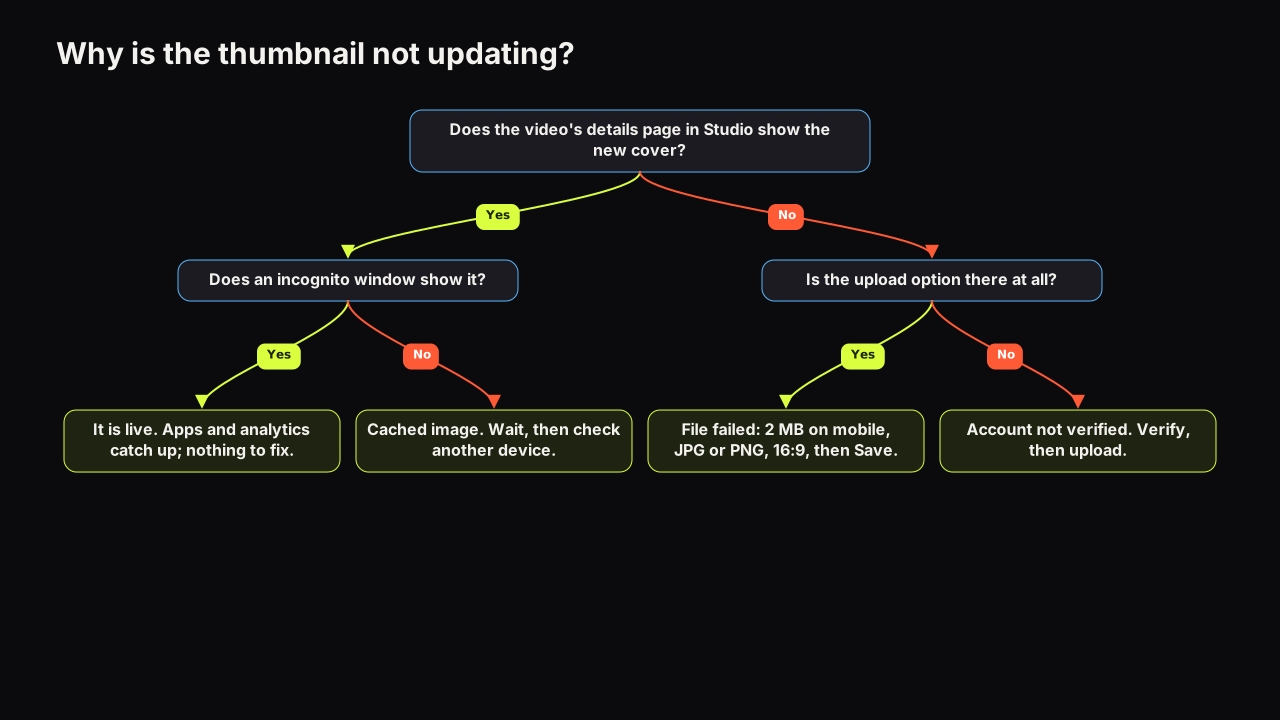
When a YouTube thumbnail is not updating, the most likely cause is that the change is live and you are looking at a cached copy of the old image in the app or browser; the next most likely is that the upload never succeeded because of the account or the file. Confirm which in two checks: open the video's details in YouTube Studio (does it show the new cover?), then open the watch page in an incognito window (does that show it?). Studio yes and incognito yes means it is live and the rest of the world is catching up. Studio no means the file was never saved. The causes below run in order of likelihood, and the end of the piece covers what a change does and does not touch.
The causes, in order of likelihood
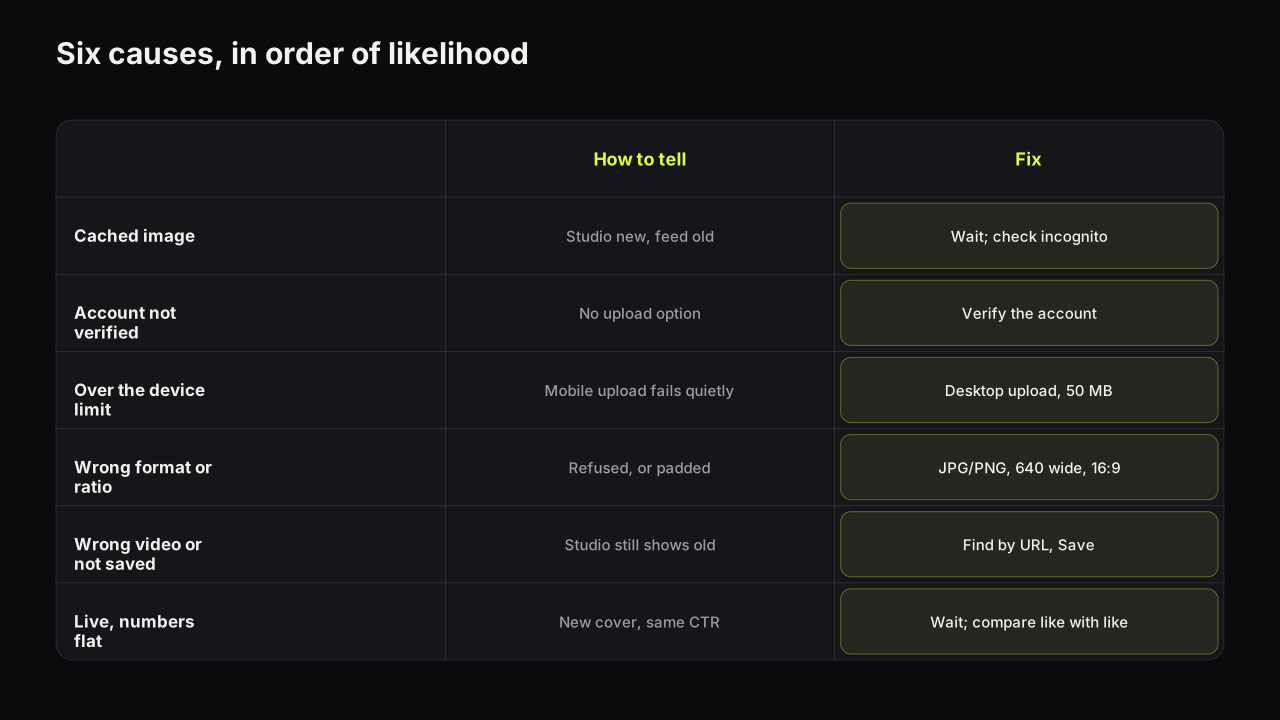
| Cause | How to tell | Fix |
|---|---|---|
| Cached image in the app or browser | Studio shows the new cover; your feed shows the old one | Wait, then check incognito or another device |
| Account not verified | The thumbnail upload option is missing | Verify the account, then upload |
| File rejected by device limit | Mobile upload failed with no clear message; file is over 2 MB | Upload from a desktop browser (50 MB) or export smaller |
| Wrong format, size or ratio | Upload refused, or the cover appears padded or cropped | JPG or PNG, at least 640 wide, 16:9 (9:16 for Shorts) |
| Saved to the wrong video, or not saved | Studio shows the old cover on the video you meant | Find the right video, upload again, press Save |
| It updated; the numbers did not | New cover is live; CTR looks unchanged so far | Give it time; compare like with like |
1. The change is live and you are seeing a cached copy
The YouTube app and web browsers keep a local copy of images they have already shown, and a thumbnail you have looked at recently is exactly such an image. After a change, YouTube Studio shows the new cover at once, while the watch page, your subscriptions feed and the app on your phone can keep showing the old file until the cached copy expires. Third-party sites that embed the video, and chat apps that generated a link preview, keep their own copies for longer still. We do not give a figure for how long any of this takes, because it varies by device, app version and how recently you viewed the video.
The tell is a disagreement between Studio and everything else. If the details page in Studio shows the new cover, the file was accepted and saved, and no amount of re-uploading will make your own phone refresh faster.
The fix is to stop checking on the device that has the old copy. Open the watch page in an incognito or private window, or on a phone that has not seen the video, or over mobile data instead of your home connection. The free thumbnail downloader is another quick check: paste the video's link and it fetches the current full-size thumbnail from YouTube's image server, without your browser's cache in the way. If any of those show the new cover, it is live.
2. The account is not verified
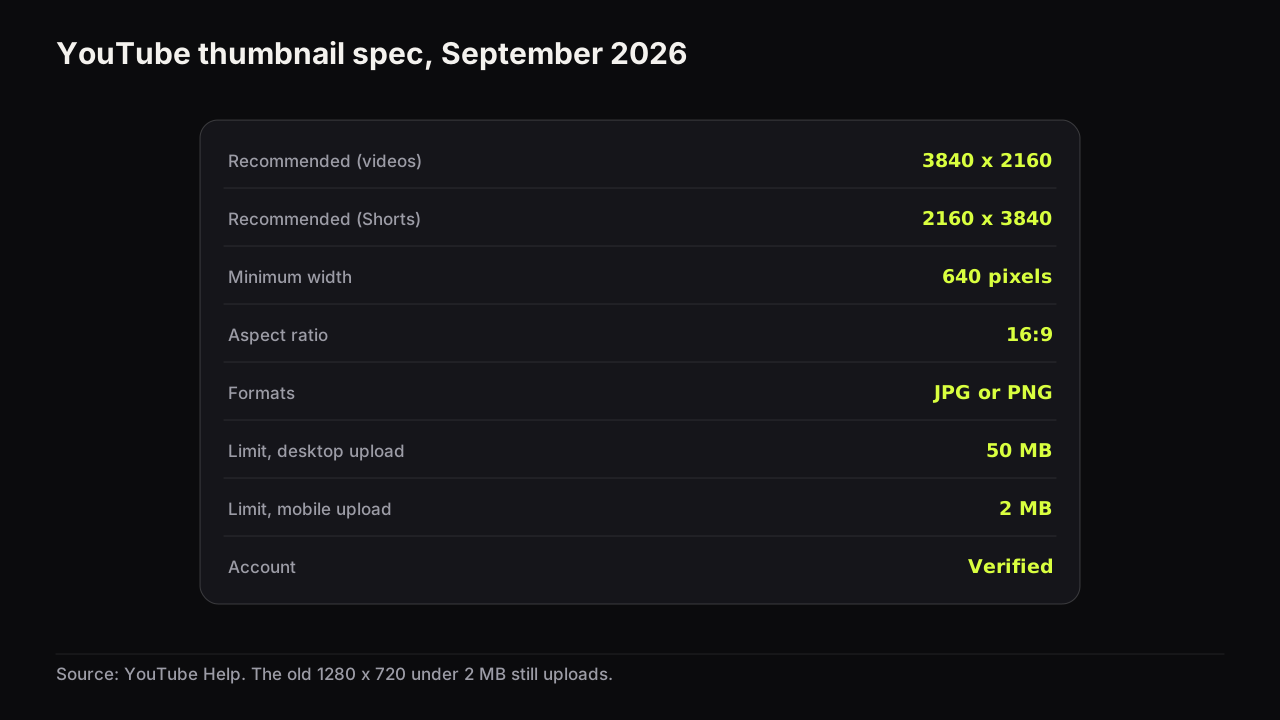
YouTube's help page on adding custom thumbnails says custom thumbnails require a verified account.
On an unverified account the symptom is not a failed upload; it is the absence of the option. New creators who see only auto-generated frames and no way to upload their own have hit this, not a bug. Verify the account in YouTube's settings and the upload control appears on the video's details in Studio.
3. The file is over the limit for the device you uploaded from
The same help page sets the file limit by upload device: 2 MB for video thumbnails uploaded from mobile (10 MB for podcasts), and 50 MB for video, Shorts and podcast thumbnails uploaded from desktop.
This is the cause behind most "I uploaded it and nothing happened" cases. A 3840 x 2160 PNG is nearly always larger than 2 MB, and a mobile upload that exceeds the limit can fail without a message that says why, and the old cover simply stays. If you built the cover at the current recommended size, upload it from a desktop browser, where the 50 MB limit applies, or export a 1280 x 720 version that comes in under 2 MB for the phone. The full spec and an export recipe that clears every limit are in the size reference.
4. Wrong format, too small, or the wrong aspect ratio
The help page accepts JPG or PNG, a minimum width of 640 pixels, and 16:9 for videos (9:16 for Shorts). A WEBP, a HEIC straight from a phone camera, or a screenshot narrower than 640 pixels is refused. A file at the wrong ratio is accepted but displayed inside the 16:9 frame, padded or cropped, which viewers experience as "the thumbnail looks wrong" and creators sometimes read as "it did not update". Re-export from a 16:9 canvas rather than stretching the image to fit.
5. It was saved to the wrong video, or never saved
Two ordinary mistakes account for a large share of the cases we hear about. The first is editing a different video than the one you are checking: a re-upload with the same title, a Short and a long-form video with the same name, or the wrong item in a long Content list. The second is choosing the file and closing the details panel before pressing Save, which discards the change. Both show the same tell: Studio itself shows the old cover on the video you are looking at.
Open Content in Studio, find the video by its URL rather than its title, and check the details page. If the cover there is old, the change was never made; upload it again and confirm the Save button has been pressed and the panel reports the change. Shorts are listed under their own tab, and Shorts covers can only be uploaded from Studio on a computer, which is a separate reason a phone upload seems to do nothing.
6. The cover updated, but the analytics did not move
The change is live and the numbers look the same, so the cover "did not update" in the sense that matters. Two things are going on, and neither is a fault.
YouTube's impressions and click-through rate FAQ says an impression is counted when a thumbnail is shown for more than one second with at least half of it visible, and that a video's rate varies with where its impressions come from and how old it is.
Every impression served before the change showed the old cover, and the click-through rate in Studio is a total over the period you select. A new cover changes only the impressions served from that moment on, so the aggregate number moves slowly, and a video that is no longer receiving many impressions barely moves at all. Compare the days after the change with the same number of days before it, from the same traffic sources, and expect a gap large enough to exceed the ordinary daily wobble before you call it a result. Whether a thumbnail change is worth making, and how to judge it fairly covers that comparison in full.
Analytics in Studio also lag real time; the delay is not documented as a number and we do not give one. A change made this morning has not had a fair day yet.
How to confirm a thumbnail change in five minutes
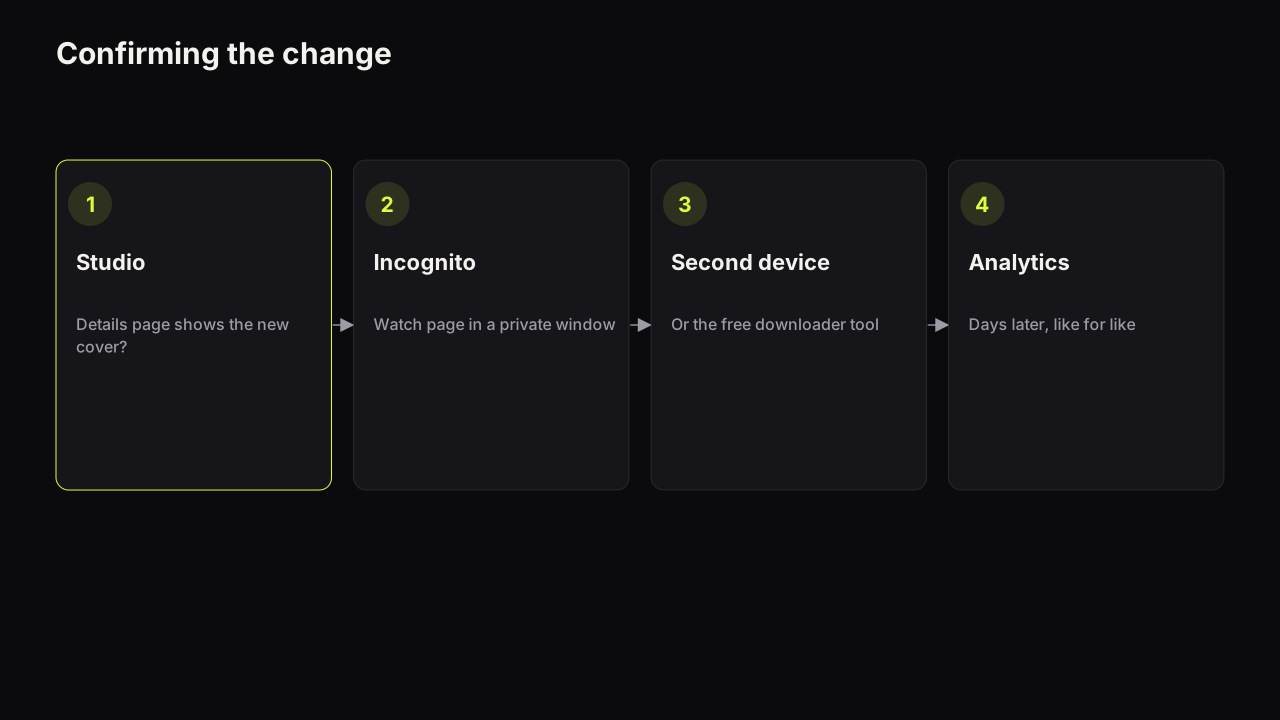
- Open the video's details in YouTube Studio. New cover here means the file was accepted and saved. Old cover here means it was not: go back to causes 2 to 5.
- Open the watch page in an incognito window. New cover here means it is live on YouTube. Old cover means a cached copy; move to step 3 rather than re-uploading.
- Check a device that has not seen the video, or paste the link into the thumbnail downloader. Either one bypasses your own cache. If the new cover appears, you are done with the image.
- Give the analytics a few days, then compare like with like. Same traffic sources, same length of period before and after, title untouched.
We recommend never uploading the same file twice to "force" a refresh. If Studio already shows the new cover, a second upload changes nothing on YouTube's side and resets your sense of when the change happened, which muddies the before-and-after comparison. If Studio shows the old cover, upload once, press Save, and confirm on the details page before checking anywhere else.
What a thumbnail change does not reset
Changing a thumbnail edits the details of an existing video. The views, watch time, likes and comments stay with it, the URL does not change, and analytics continue as one history; the only thing that changes is the cover shown in impressions from that point on. It does not create a new video and it does not restart any counter. The question a creator usually means, whether swapping the cover can hurt the video, has a short answer: the risk is a worse cover, not a penalty for changing it.
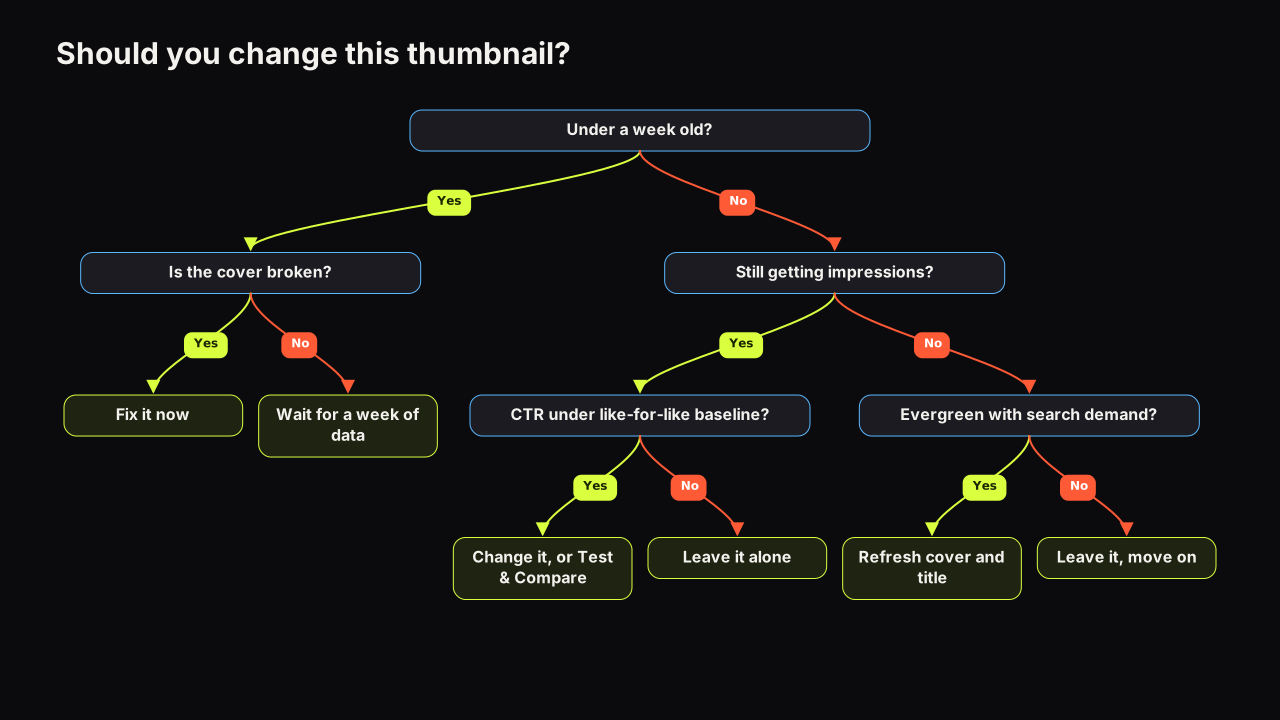
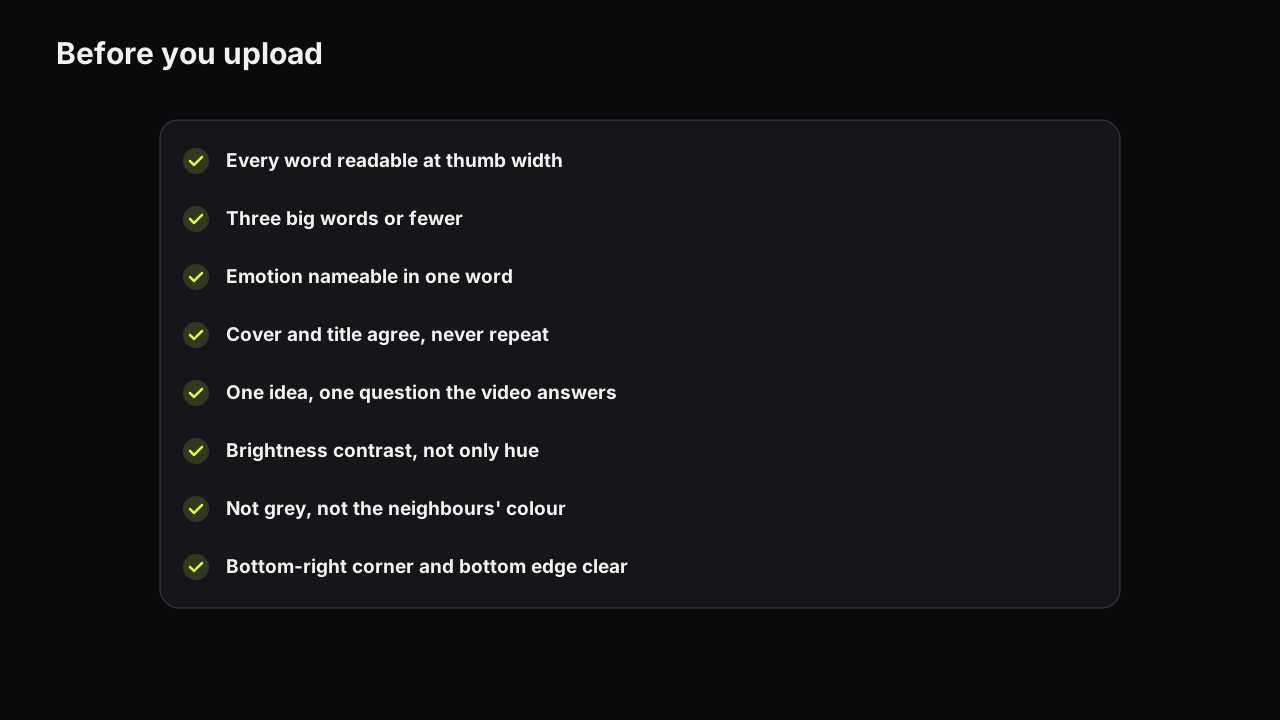
The exception that is worth a separate decision is the first week. In the days after upload the numbers are noisy, and YouTube's CTR FAQ says new videos can see a wider range, so a cover change then is hard to judge. We would fix a broken cover at once even in that first week, even though the swap muddies the before-and-after comparison for good, because a typo or the wrong face costs clicks every hour it stays up and the comparison was never going to be clean on a days-old video anyway. Broken means a typo, the wrong face, or a headline that fails the phone check. For anything else, wait, and run the pre-upload checklist on the replacement before you swap, so the second cover is at least as strong as the first.
Making the replacement before you swap
If the reason you are changing the cover is that the first one did not work, the replacement should differ in one thing you can name: a bigger face, fewer words, a different dominant colour, a headline that opens a question instead of answering it. Say the first cover for a desk-setup video was the whole desk from the doorway, monitor and lamp and plant, with "MY NEW SETUP TOUR" in four white words across the middle. The viewer infers a room and nothing else. A replacement that changes everything (new photo, new words, new colour) teaches you nothing if it works. A replacement that changes one thing keeps the desk, cuts the words to "UNDER £400" in heavy yellow, and leaves the rest alone, so the viewer now infers a budget build and you learn whether a stake beats a description on this channel. On the bench, Tweak takes a finished render as the source for the next one, so you can change that single thing and keep the rest; Export HD then gives a 1280 x 720 file under 2 MB, which clears the mobile limit and removes cause 3 from the list.
Common questions
How long does it take for a new YouTube thumbnail to show?
In YouTube Studio the change appears as soon as it is saved. On the watch page, in feeds and in the app it can lag while cached copies of the old image expire, and YouTube does not publish a figure for that. Check in an incognito window or on a device that has not seen the video; if the new cover shows there, the change is live.
Why does the thumbnail option not appear at all?
YouTube's help page says custom thumbnails require a verified account. On an unverified account the upload option is missing rather than failing. Verify the account in YouTube's settings, then return to the video's details in Studio.
Does changing the thumbnail reset the video's views?
No. Changing the thumbnail edits the details of an existing video. Views, watch time, likes, comments and the URL all stay. What changes is the cover shown in impressions from that point on, so compare click-through rate before and after rather than expecting the counters to restart.
What to do next
Run the two checks now: the details page in Studio, then an incognito window. If both show the new cover, close the tab and give the analytics a few days. If Studio shows the old one, check the account is verified, check the file against the limit for the device you used, and upload once from a desktop browser. For the reasoning behind every cover decision, from the spec to the phone check, start with the full guide to how covers earn the click.