On this page
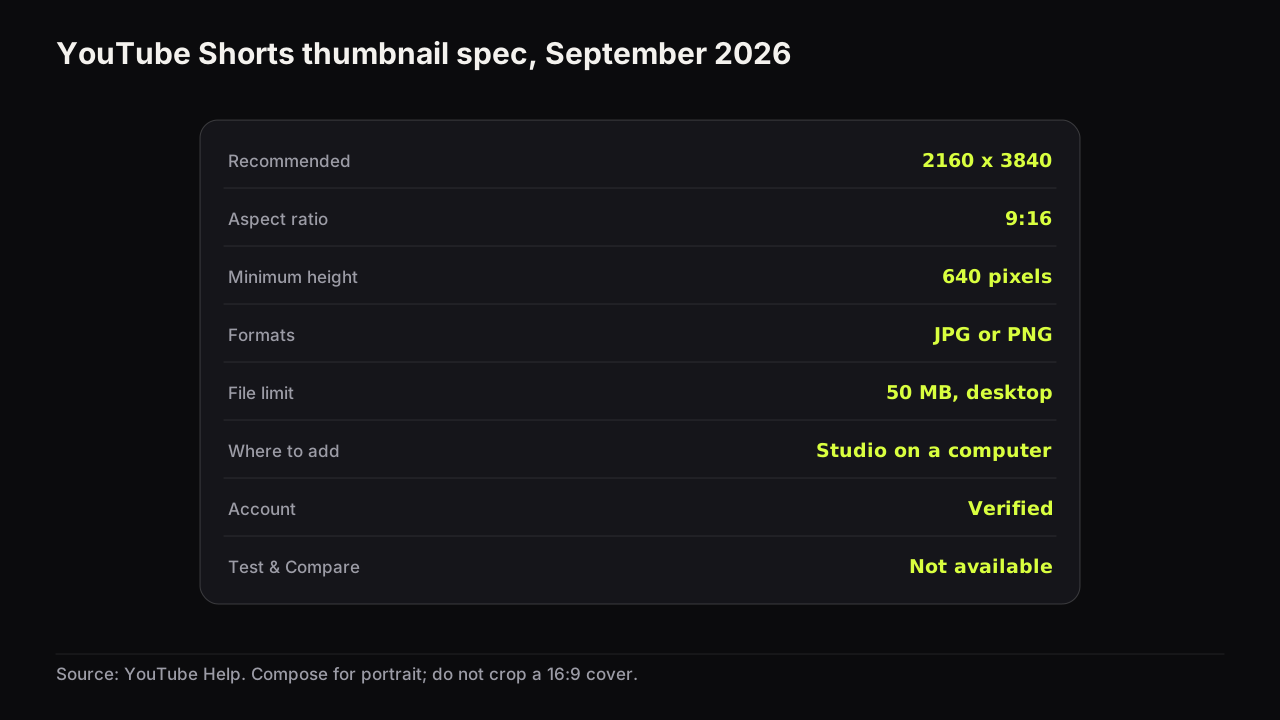
A YouTube Shorts thumbnail is a 9:16 portrait image, recommended at 2160 x 3840 pixels as JPG or PNG, uploaded from YouTube Studio on a computer to a verified account, and it cannot be A/B tested with Test & Compare. That is the whole documented picture as of September 2026. What the documentation does not tell you is where the cover is actually seen, which is the question that decides how much effort it deserves. Most creators who do make one get it wrong the same way, by cropping a landscape cover.
The Shorts thumbnail spec
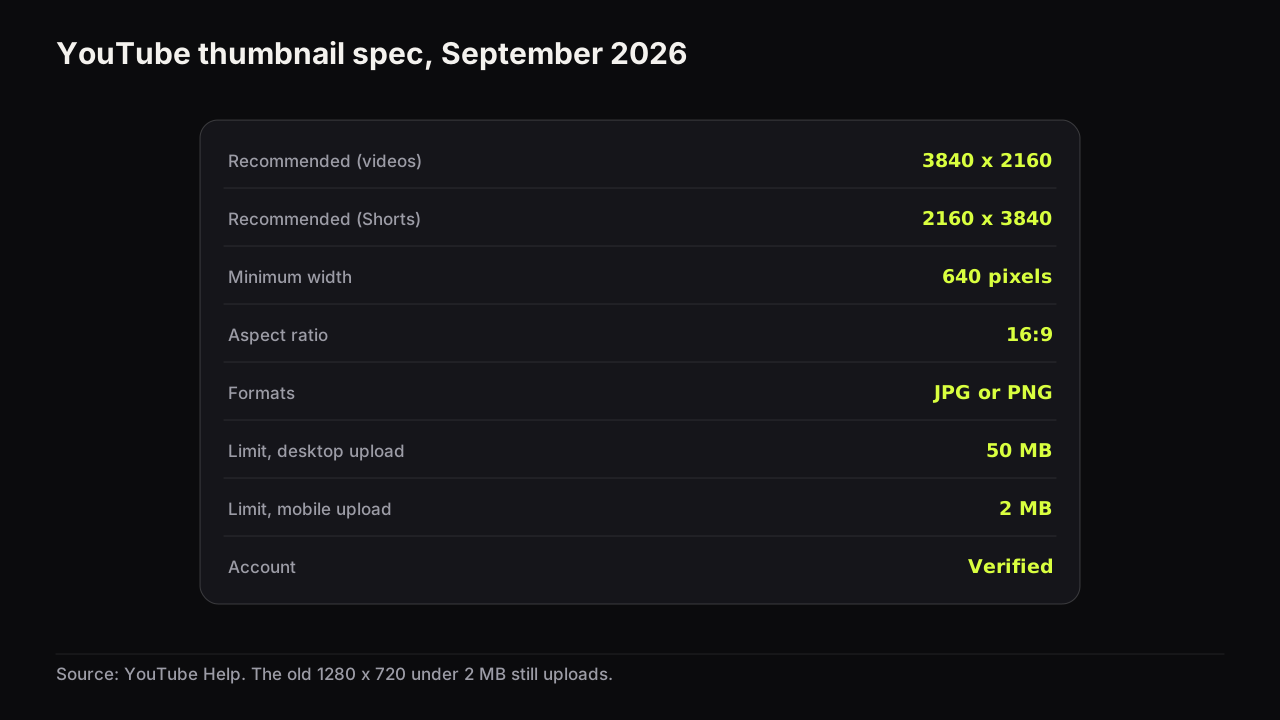
| Setting | Shorts | Long-form video, for comparison |
|---|---|---|
| Recommended resolution | 2160 x 3840 | 3840 x 2160 |
| Aspect ratio | 9:16 | 16:9 |
| Minimum | 640 pixels tall | 640 pixels wide |
| Formats | JPG or PNG | JPG or PNG |
| File limit | 50 MB, desktop upload | 50 MB desktop, 2 MB mobile |
| Where to add it | YouTube Studio on a computer only | Studio on desktop or the mobile app |
| A/B testing | Not available | Test & Compare, up to three variants |
YouTube's help page on adding custom thumbnails says custom Shorts thumbnails are available only in YouTube Studio on a computer, the account must be verified, the recommended size is 2160 x 3840 at 9:16 with a minimum height of 640 pixels, the format is JPG or PNG, and the desktop file limit is 50 MB. The thumbnail is added from Content, then Shorts, then the Short, then Upload file under Thumbnail.
The long-form column is there because the two specs are the same numbers rotated. A cover designed for a video and one designed for a Short share the minimum, the formats and the desktop limit; what differs is the orientation and the surfaces that show it. Everything else about the file, including what the late-2025 spec change means and how to export within the limits, is in the size and spec reference.
How to add a custom thumbnail to a Short
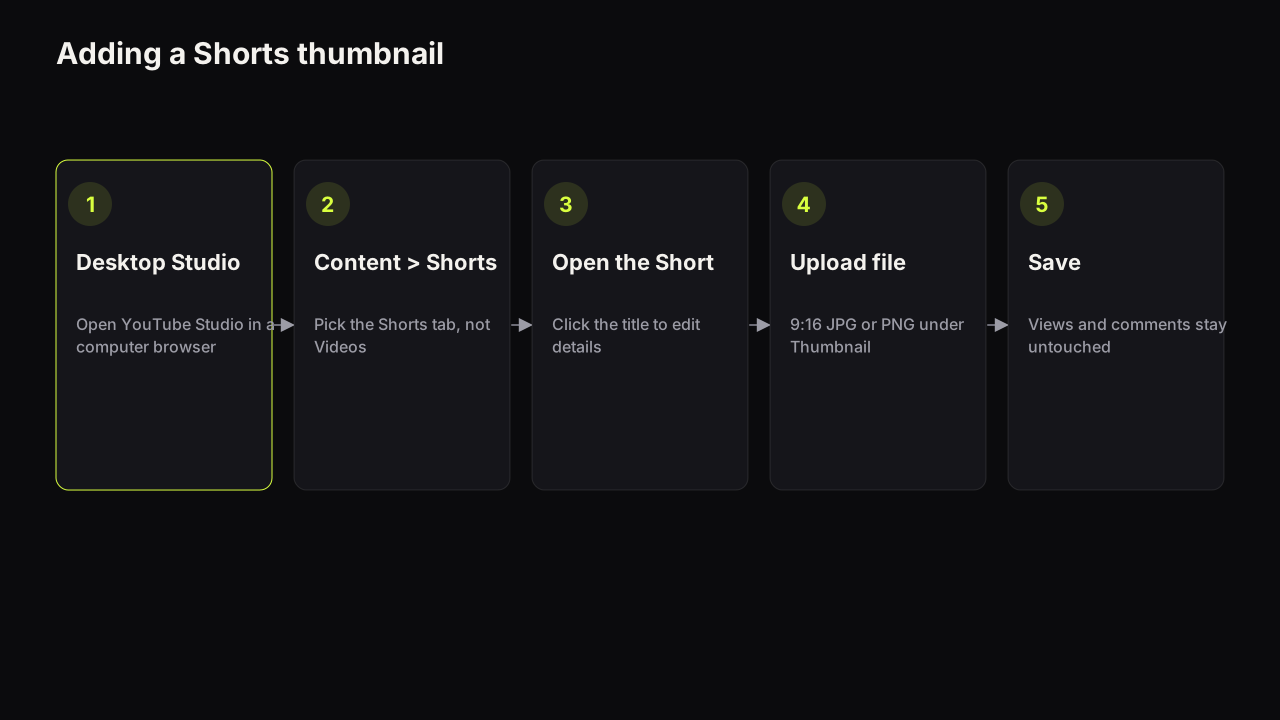
- Open YouTube Studio in a desktop browser. The help page is explicit that this is computer-only. A phone browser in desktop mode is not a reliable substitute; use a computer.
- Go to Content and choose the Shorts tab. Long-form videos and Shorts are listed separately, which is also the first place to look when a cover seems not to update: check you are editing the Short and not a video with the same title.
- Open the Short's details. Click the title or the pencil icon.
- Under Thumbnail, choose Upload file. Pick a 9:16 JPG or PNG, at least 640 pixels tall, under 50 MB.
- Save. The change applies to the surfaces that show a cover from that point on; the Short's views, likes and comments are untouched.
In the mobile upload flow, the cover for a Short is chosen as a frame from the video itself, and that is what most Shorts run with. In our experience the frame picker is fine for a Short that will only ever be seen in the vertical feed, and inadequate for one that needs to earn a tap from a grid, because a paused frame rarely has a readable face and never has a headline.
If the option is missing, the usual causes are the same as for any custom thumbnail: the account is not verified, or you are in the app rather than a desktop browser. Why a thumbnail is not updating walks through the rest of the causes in order.
Where a Shorts thumbnail is seen, and where it is not
The honest answer is that it depends on the surface, and the documentation does not list which surfaces show the cover. So we describe what we observe and tell you how to check your own channel rather than presenting a placement list as fact.
In the vertical Shorts feed, the Short starts playing as it arrives on screen, so the cover is rarely what earns the view there; the first second of video does that job. The cover is what a viewer sees where Shorts are shown as still images in a grid or a list: the Shorts tab on your channel page, search results, and shelves of Shorts on other surfaces. On those surfaces the cover competes the way a long-form cover does, small, in a row, at a glance.
Which of those surfaces sends you views is a property of your channel, not of Shorts in general. Open the Short's analytics in YouTube Studio and look at its traffic sources. A Short that earns almost everything from the Shorts feed is a video whose cover barely matters; a Short that earns a meaningful share from search, the channel page or Browse features is one whose cover is doing real work and deserves the same care as a long-form cover.
We recommend deciding per channel, not per Short. If your Shorts traffic is nearly all feed, spend the time on the first second of the video and let the frame picker choose the cover. If a noticeable share arrives from surfaces that show a still image, or if you want your channel's Shorts tab to look like one body of work, make the custom cover. A Shorts tab of readable, consistent covers is also the first thing a new subscriber scrolls, and that is a reason on its own for some channels.
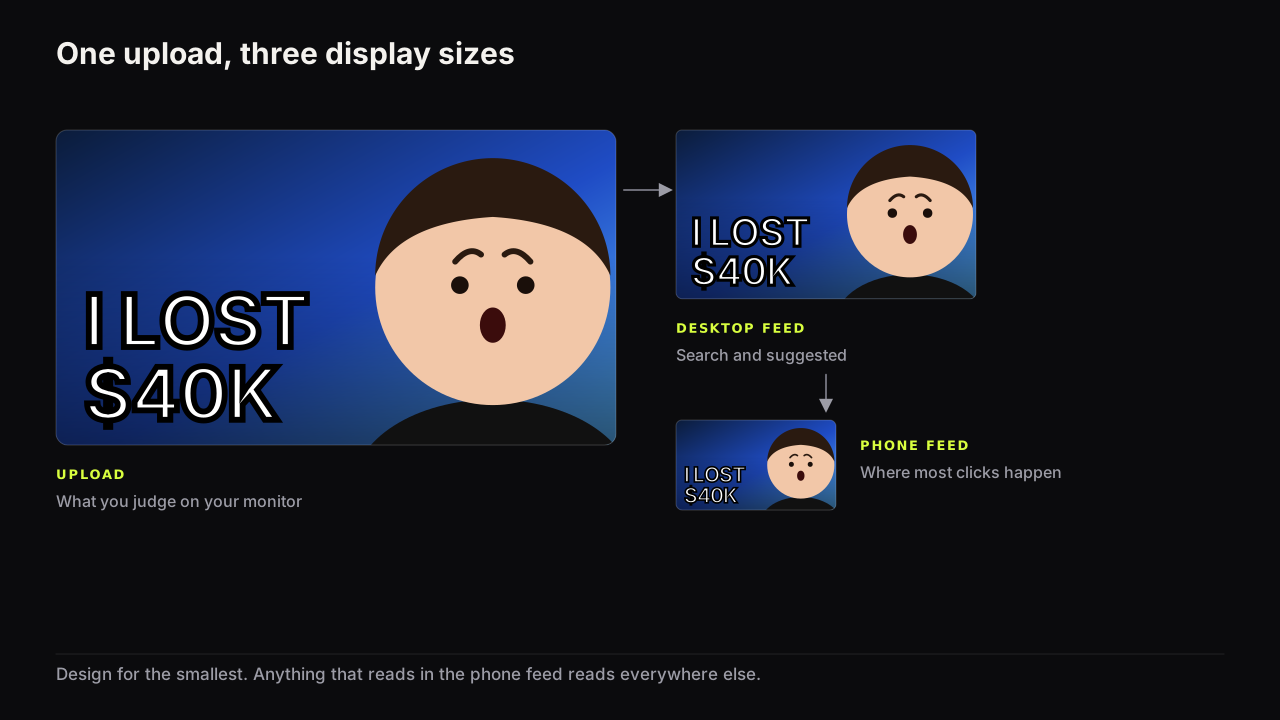
One more surface is worth naming: the same file is displayed at widely different sizes, and the smallest of them is the grid on a phone. The rules for checking a cover at feed size apply unchanged, except that the frame is tall, which changes where things go.
Composing for 9:16: face high, words in the middle band
A landscape cover cropped to portrait fails for two reasons. The crop removes the sides, which is where the headline sits in most 16:9 layouts, and the elements that survive land in the wrong places for a tall frame.
In the Shorts player, the bottom of the frame is where the title, channel name and description sit over the video, and the right edge is where the like, comment and share controls stack. When a custom cover is shown as a still in that player, anything placed low or along the right edge is partly covered. In grids, the whole image is visible but small. We do not give pixel values for these overlays because they change with app version and device.
Those two facts set the layout.
- The face sits in the upper half of the frame, filling at least a third of the height; the eyes above the centre line
- The headline sits in the middle band, between the face and the bottom third, three big words or fewer
- The bottom third carries nothing that must be read: background, the body, the lower part of an object
- The right edge is clear of text and of the face's eyes and mouth
- One dominant colour and one accent, with brightness contrast that survives the grid at phone size
- The cover is composed in a 9:16 canvas from the start, not cropped from a 16:9 render
The word budget is tighter than on a landscape cover, because the frame is narrow and each word has less room to grow. If a headline needs five words at 16:9, it needs three at 9:16, and how many words a cover can carry explains why the cut should be to the word that carries the stakes.
Picture a ramen Short whose cover was cropped from the long-form one. The landscape version had the creator's face left, a steaming bowl centre, "5 MIN RAMEN" in yellow on the right. Cropped to 9:16 the viewer gets half a face on the left edge, the bowl, and the letters "5 M" with the rest gone, and in the player the description sits over the bowl. Rebuilt in a portrait canvas: the face fills the top, eyes above the centre line; the bowl steams in the middle with "5 MIN" beside it, two words because three would not fit the width; the bottom third is the counter and nothing else. Same promise, and the player's overlays now cover only a worktop.
Faces do the same work in portrait that they do in landscape, and a tall frame gives a head more room, so the face-size floor is easier to clear. The risk runs the other way: a face that fills the frame with the headline squeezed to the bottom, where the player covers it.
On the bench, a render set to 9:16 is composed for the portrait frame rather than cropped from a landscape one: the model places the face, the headline and the object for a tall canvas. Export HD at 9:16 gives a 1080 x 1920 file, which is below YouTube's recommended 2160 x 3840 but well above the 640-pixel minimum, and Export 2K gives the full render for a desktop upload. We would upload the 2K export for a Short rather than the HD file, even though the HD file clears the minimum and the grid is too small to show the difference. The Shorts upload is desktop-only anyway, so the 2 MB mobile ceiling that makes HD useful for videos never applies here.
Why you cannot A/B test a Shorts thumbnail, and what to do instead
YouTube's help page on A/B testing titles and thumbnails says the feature runs from YouTube Studio on desktop with advanced features enabled, on public long-form videos and podcast episodes, and is not available for Shorts. Where it does run, it decides by watch time share and can take a few days or up to two weeks.
So the tool that tells you which of two covers earned more watch time is not available for the format where the cover matters least in the feed and most in the grid. Two workable substitutes exist, and both are described in full in the guide to A/B testing thumbnails.
The first is a manual swap on a Short that still receives impressions from surfaces that show the cover: note the impressions click-through rate from those traffic sources for a period, change the cover, wait for a comparable period, and compare like with like. The noise on a single Short is large, so only a wide gap means anything.
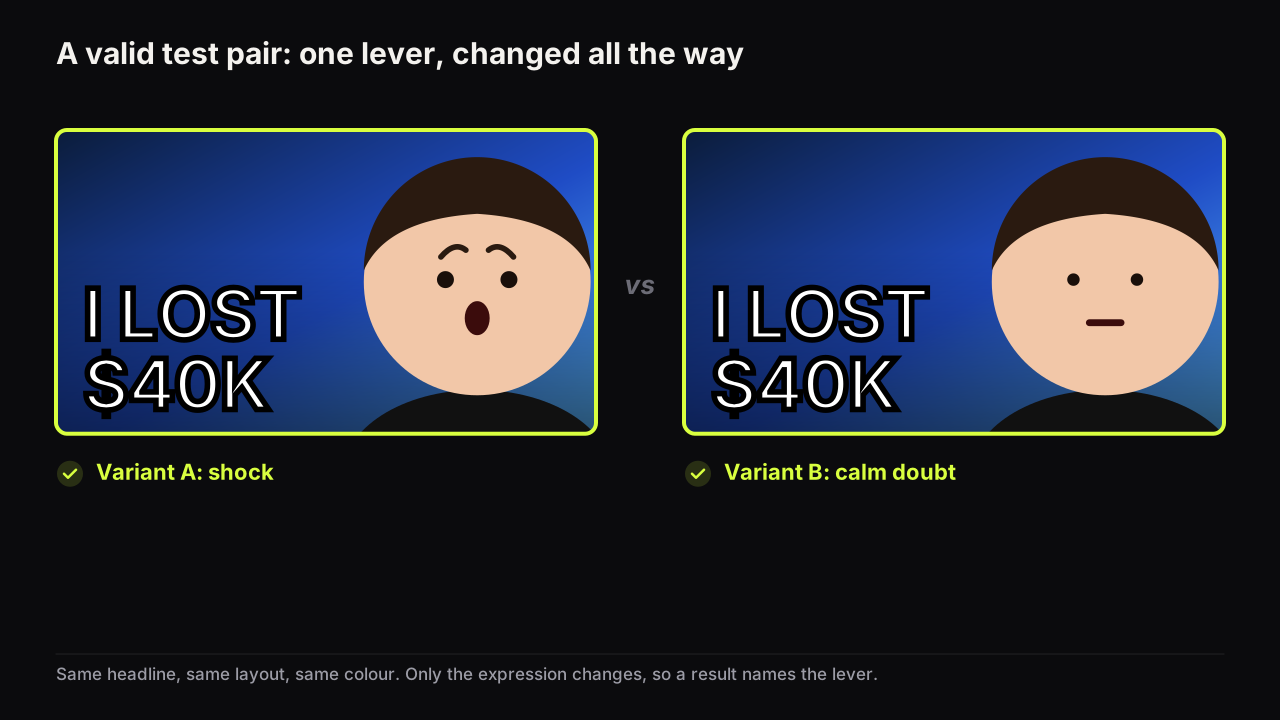
The second is to test the concept rather than the cover: make five Shorts with the same cover pattern (say, a big number and a calm face) and five with another, and compare the two groups' CTR from grid surfaces over the same weeks. This is slower, it is also the only way to learn something that transfers to the next fifty Shorts, and it is the method small channels use for long-form covers when a single video cannot collect enough impressions.
The title on a Short counts against the same 100-character limit as a video title, per YouTube's upload help page. In the vertical feed the title is overlaid at the bottom and often shortened, so the first three or four words carry the promise; the cover, where it is shown, carries the rest.
Common questions
Can I add a Shorts thumbnail from the YouTube app?
Not as a custom image file. YouTube's help page says custom Shorts thumbnails are available only in YouTube Studio on a computer, from Content, then Shorts, then the Short, then Upload file under Thumbnail. The account must be verified.
Can I A/B test a Shorts thumbnail with Test & Compare?
No. The A/B testing help page says the feature is not available for Shorts; it runs on public long-form videos and podcast episodes from desktop YouTube Studio. The alternatives are a manual swap judged like for like, or testing a cover idea across several Shorts.
What size should a Shorts thumbnail be?
YouTube recommends 2160 x 3840 pixels at 9:16, JPG or PNG, with a minimum height of 640 pixels and a 50 MB limit from desktop. A 1080 x 1920 file clears the minimum and uploads fine; it is simply below the recommended resolution.
What to do next
Open the analytics for your last ten Shorts and note how much of their traffic came from surfaces that show a still cover. If it is a meaningful share, compose one 9:16 cover per Short in a portrait canvas, face high and words in the middle band, and upload it from a desktop browser. If you produce Shorts as clips from longer recordings, the batch workflow for podcast and clip covers shows how one brief becomes both the 16:9 and the 9:16 cover. The rules behind every choice here, one idea, three words, a phone check, are in the full guide to how covers earn the click.