On this page
- What a thumbnail change does and does not touch
- The decision tree, branch by branch
- Swap it, or run Test & Compare?
- How to run a fair swap on a live video
- The Vevo case, and what it does and does not show
- Refreshing a back catalogue in priority order
- When not to change a thumbnail
- Making the decision a habit
- If it were our channel
- Common questions
- What to do next
It is day three. The click-through rate that opened near the top of your channel's usual range has slid to the bottom of it, the video is not taking off, and your cursor is on the button that changes the thumbnail. Most of the time, the right move at that moment is to close the tab.
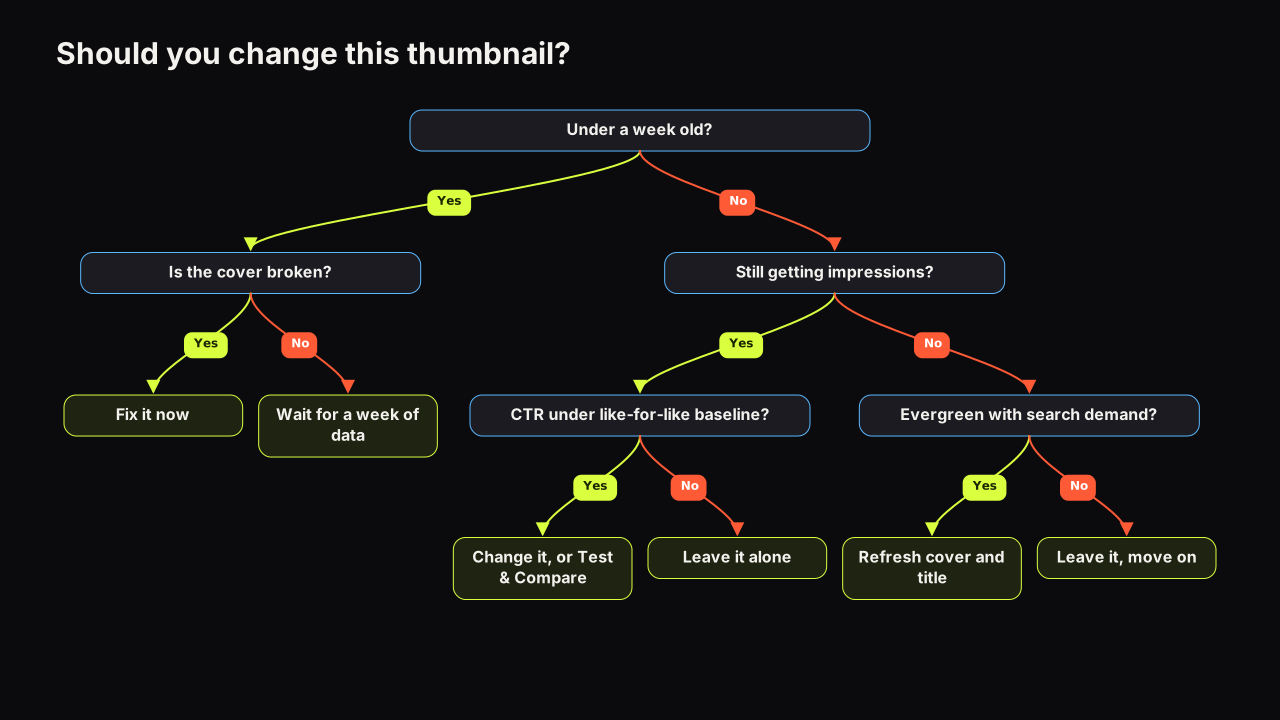
Change a YouTube thumbnail when the video is still receiving impressions and its click-through rate is below what comparable videos on your channel earn from the same traffic sources, or when the cover is broken. Leave it alone in the first week unless it is broken, and on an eligible video prefer Test & Compare to a straight swap, because the test measures both covers at once instead of comparing two different weeks. Nothing about a thumbnail change resets the video: views, watch time and comments stay where they are. The tree below has four questions, and the order matters more than any single answer.
What a thumbnail change does and does not touch
Changing the thumbnail is an edit to the video's details, the same kind of edit as changing the description. It does not create a new video, and it does not start the counters again.
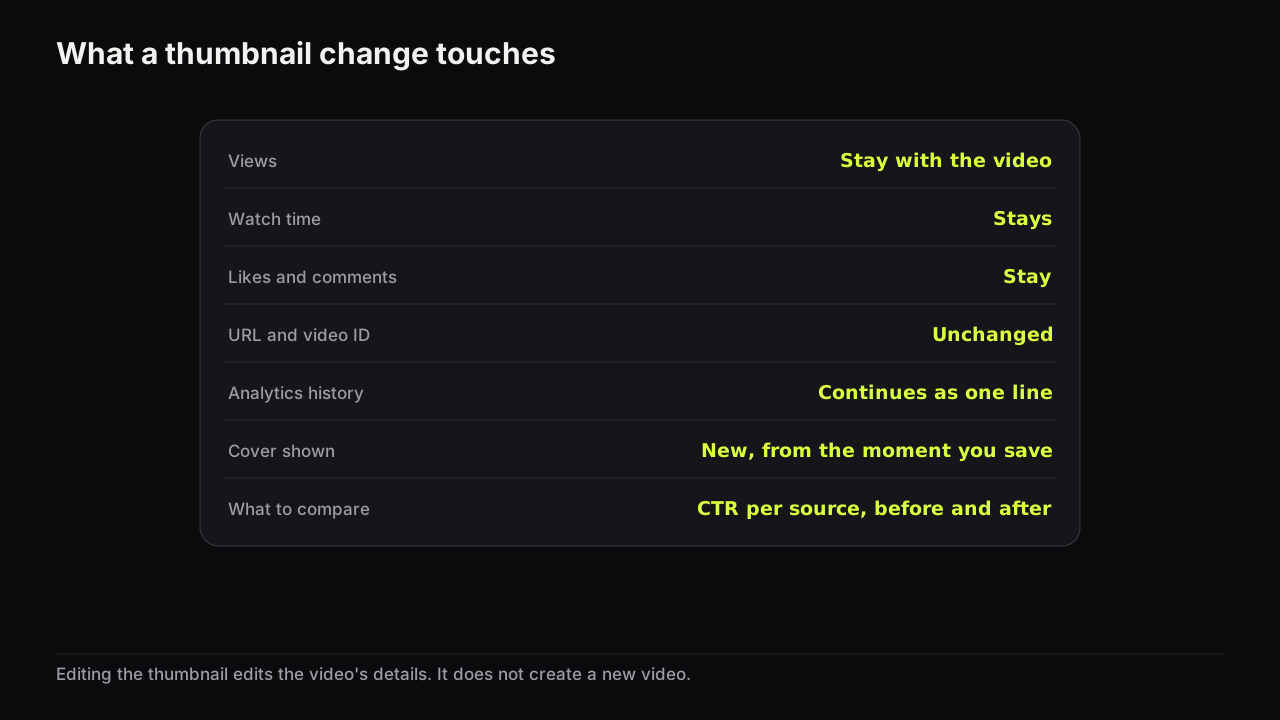
This is how editing a video works, not a statistic. Changing a thumbnail in YouTube Studio edits the metadata of an existing video; the views, watch time, likes and comments belong to the video and stay with it, the URL does not change, and analytics continue as one uninterrupted history. What changes is the cover shown in impressions from that moment, so the comparison to make is impressions click-through rate before the change against after it, not "did the numbers reset".
Two consequences follow. A thumbnail change is cheap in the sense that nothing is lost, so the reasons not to change are about judgement. And the new cover only matters where impressions are still arriving. A video that YouTube has stopped showing gets no benefit from a better cover until something (search, a suggested-video placement, a playlist, a link) shows it again.
I don't have a personal swap where I'd be comfortable quoting before-and-after numbers, so I'll give you the rule instead. Don't change a thumbnail because the first few hours make you nervous. I want enough impressions to establish that the packaging is underperforming against the channel's own baseline. If the impressions are coming and people aren't clicking, that is when the thumbnail and title deserve serious scrutiny.
The decision tree, branch by branch
The hero figure is the tree. It has four questions, and each one is only worth asking if the previous answer allows it.
Is the video under a week old? Wait, unless the cover is broken
The first days after upload are the worst time to judge a cover and the best time to fix a mistake.
YouTube's help page on impressions and click-through rate says that new videos or channels (for example, less than a week old) and videos with fewer than 100 views can see a wider range of click-through rates than the 2% to 10% band that half of all channels and videos sit in.
A wide range in the first week means an early CTR is not evidence of much. The impression mix is also still settling: the first hours are subscribers and the channel page, then the Home feed and Suggested videos widen the audience, and CTR usually falls as that happens, for the reason the CTR guide sets out. Swapping the cover on day two because the number dropped is reacting to a change in who saw it, not to a fault in what they saw.
The exception is a broken cover: a typo, the wrong person, a headline that repeats the title word for word, text that vanishes at phone size. Fix those now. A broken cover in a video's first week costs the most, because that is when it is shown to the most people who already like the channel.
We would run a broken-or-not check on every new upload within the first hour, at phone size, using the same checks as the pre-upload checklist, and then not touch the cover for a week no matter what the graph does. The cost is a week of watching a number you are not allowed to act on. The alternative is worse: a swap on day two throws away the only clean read of the original cover you will ever get. If the check fails, change it and leave the first day out of any comparison.
Is the video still receiving impressions? If not, a new cover changes nothing yet
A thumbnail can only earn clicks where it is shown. Open the video's reach data in YouTube Studio and look at impressions over the last few weeks. If the line is flat at nearly nothing, the cover is not the constraint; distribution is. Changing it is not wrong, but it will not show up in the numbers, and it is easy to conclude the new cover "did nothing" when it was never seen.
For those videos the question becomes whether the topic can be revived at all, which is the evergreen branch below. For videos that are still being shown, in search, in Suggested, or from a playlist, go to the next question.
Is CTR below your like-for-like baseline? If so, change or test
This is the branch most people get wrong, because they compare the video's CTR with a number they read somewhere. The only useful comparison is with your own videos, from the same traffic sources, at the same age.
The same YouTube help page states that a video shown a lot on the Home page will naturally have a lower click-through rate, and that videos whose impressions come mostly from the channel page may have a higher one. It also notes that an impression is only counted when the thumbnail is shown for more than one second with at least half of it visible, so CTR reflects a subset of the ways people reach a video.
A like-for-like baseline is the CTR your channel's comparable videos earn from the same traffic source over the same window. Build it once: take the last ten to fifteen videos of the same type, note CTR from Browse (Home), from Suggested and from Search separately, and take the middle of each set. Then compare the candidate video's CTR from each source with that middle value. If the video sits clearly under the baseline in the sources where it is still getting impressions, the cover is a suspect. If it sits at or above, the cover is doing its job and something else (topic, title, the video itself) explains any disappointment.
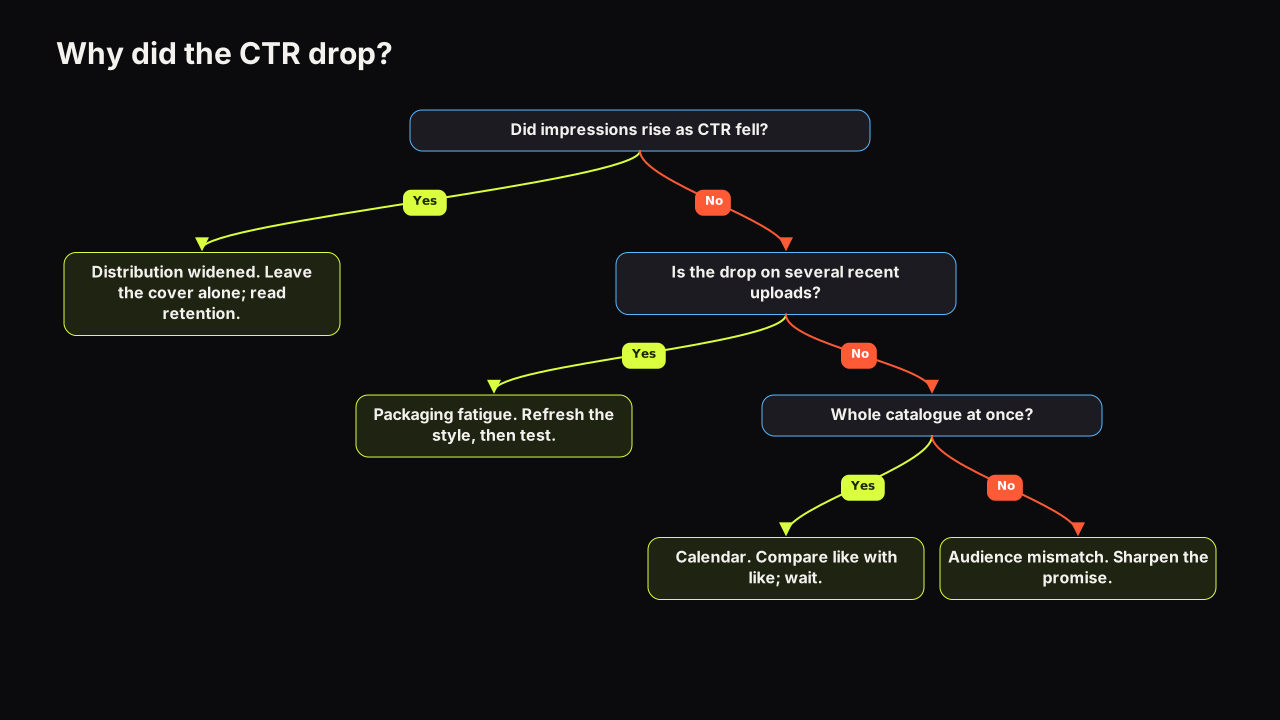
An invented case with invented figures makes this concrete. A video's blended CTR fell from about six and a half per cent in its second week to about four and a half in its fourth, and the creator is ready to swap. Split by source: Browse impressions roughly tripled between those weeks while Browse CTR barely moved from about four per cent, and Suggested CTR sat at about seven in both. Nothing about the cover got worse. The video was shown to far more Home-feed viewers, who click less on everything, and the blend fell because the mix changed. Leave the cover alone and enjoy the reach. A swap here would have replaced a working cover and then, as the blend kept falling with the mix, taught a false lesson about the new one.
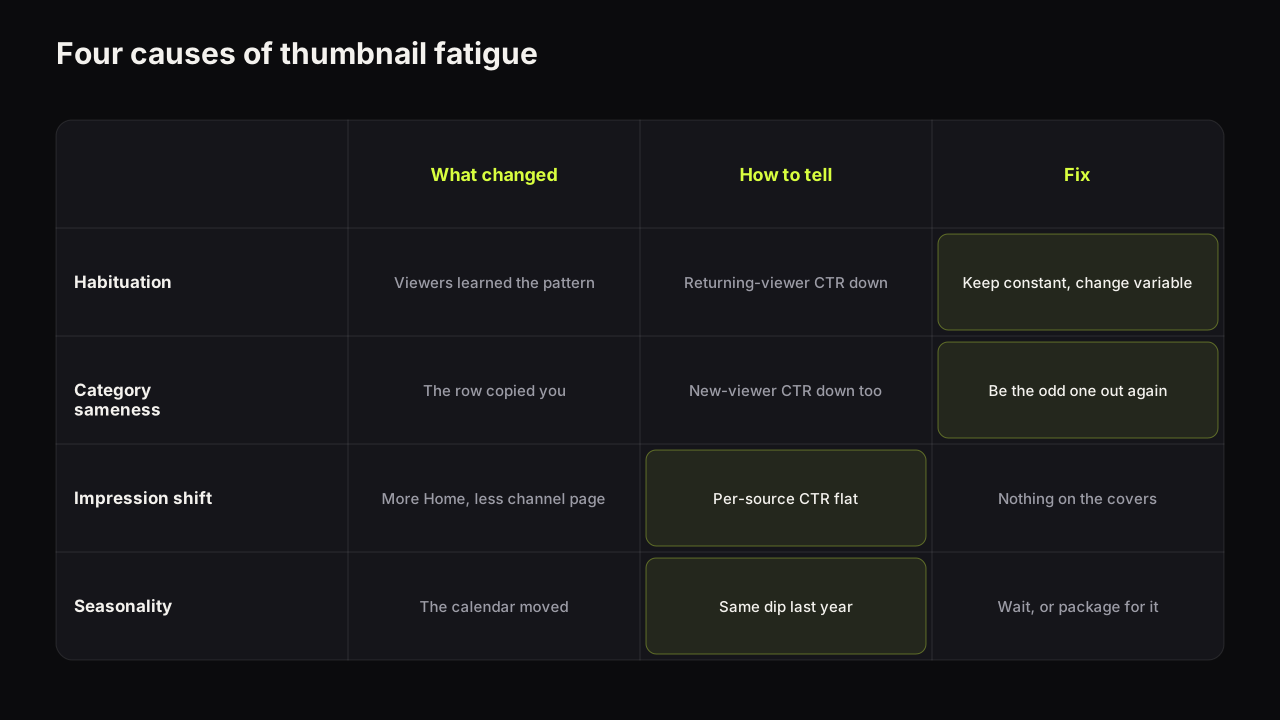
In practice most "my CTR dropped" cases turn out to be exactly that: a shift in the impression mix, not a weaker cover. The reasons a CTR can fall while a video is doing well walks through the diagnosis. Run it before you change anything, because a cover swap on a video whose CTR fell for distribution reasons throws away a working cover.
Below baseline, still getting impressions, past the first week: change it, or better, test it. Which one is the next section.
Evergreen or topical? Evergreen gets a packaging refresh; topical gets left alone
For a video that has stopped receiving impressions, the last question is whether anyone will search for it again. An evergreen how-to, a review of something people still buy, a story that gets rediscovered: those are worth a full packaging refresh, cover and title, because search impressions can return and the packaging decides whether they convert. A reaction to last month's news is not; a new cover cannot create demand that has passed.
For the evergreen branch, treat the refresh as a repackaging rather than a repaint. The title and cover work as one promise, so changing the cover alone on a video whose title no longer matches how people search for the topic fixes half the problem. Title and thumbnail as one unit is the frame to use. The trade-off is attribution: change both at once and you will not know which change mattered. On an evergreen video that is currently getting nothing, that is an acceptable trade, because the alternative is measuring nothing precisely.
Swap it, or run Test & Compare?
On a video that qualifies, YouTube's own test is the better instrument, because it shows the variants to comparable audiences at the same time instead of comparing this week's cover with last week's.
YouTube's help page on testing titles and thumbnails says a test can include up to three titles, thumbnails, or title and thumbnail combinations per video, that the result is decided by watch time share rather than clicks, that a test can take a few days or up to two weeks, and that it runs from YouTube Studio on desktop for public long-form videos and podcast episodes, not Shorts, scheduled live streams or Premieres.
| Situation | Swap the cover | Run Test & Compare |
|---|---|---|
| Cover is broken (typo, wrong face, unreadable) | Yes, immediately | No, fix it first |
| Video still gets impressions, CTR under baseline, video eligible | Only if you cannot test | Yes |
| Video is a Short or a scheduled Premiere | Yes, it is the only option | Not available |
| You want to know which cover is better, not only to improve this video | A swap gives a weak answer | Yes, the result is a measured comparison |
| Video gets almost no impressions | Neither changes much until distribution returns | A test resolves slowly with few impressions |
| You want to change the title as well | Change both, accept that you cannot attribute | Test a title and thumbnail combination |
The test's decision rule changes how you design the candidates. Because YouTube picks the variant with the higher watch time share, a cover that earns more clicks from people who leave early can lose. Why the tool can pick the thumbnail with fewer clicks explains the mechanism; the practical rule is that the new cover has to promise something the video delivers, not merely something people click. Running the test well, from choosing variants that differ in one thing to reading the result states, is covered in the A/B testing guide.
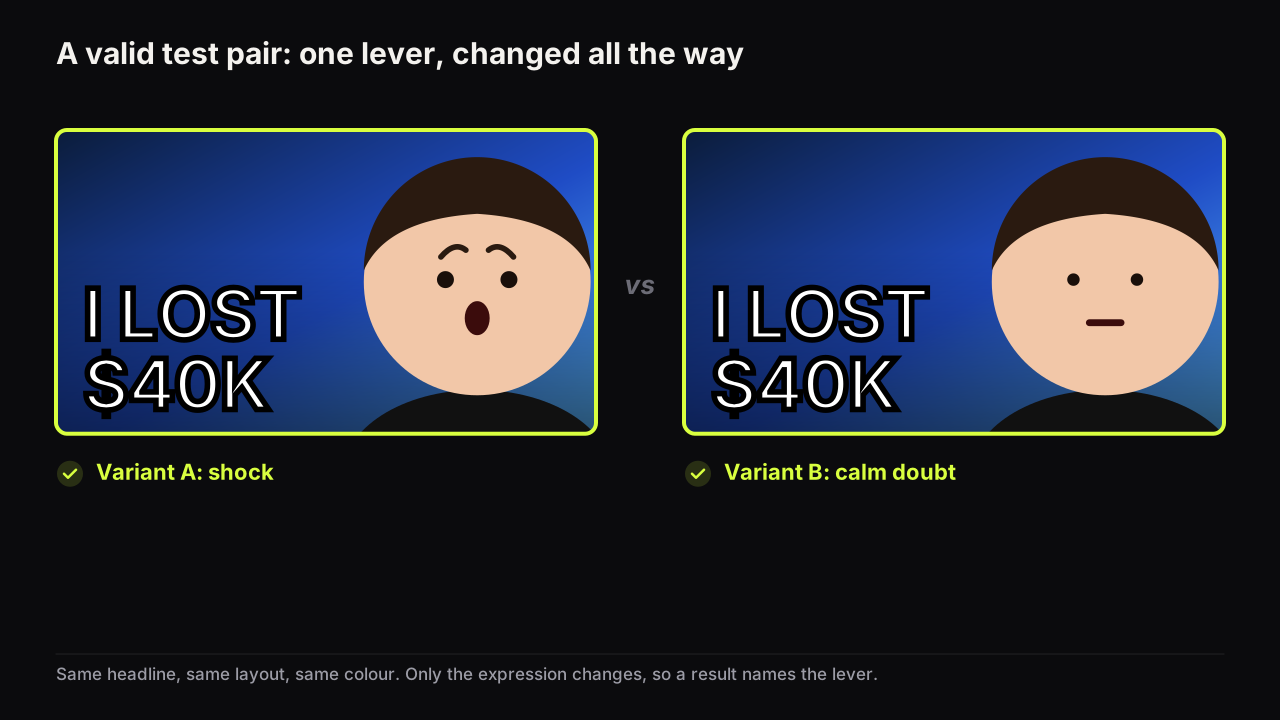
One more invented case, because the table hides a common shape. A five-month-old tutorial still earns steady search impressions, and its search CTR sits well under the channel's search baseline. Eligible, clear signal, past the noise. We would test rather than swap: the current cover plus two candidates that each differ from it in one lever. One keeps the layout and changes the headline from a label to the outcome; the other keeps the headline and makes the result the hero instead of the creator's face. The result says which lever this audience answers to. A single "improved" cover that changed both would win or lose without telling us why.
How to run a fair swap on a live video
When the test is not available, a swap can still teach you something if you treat it as a before-and-after experiment rather than a repaint.
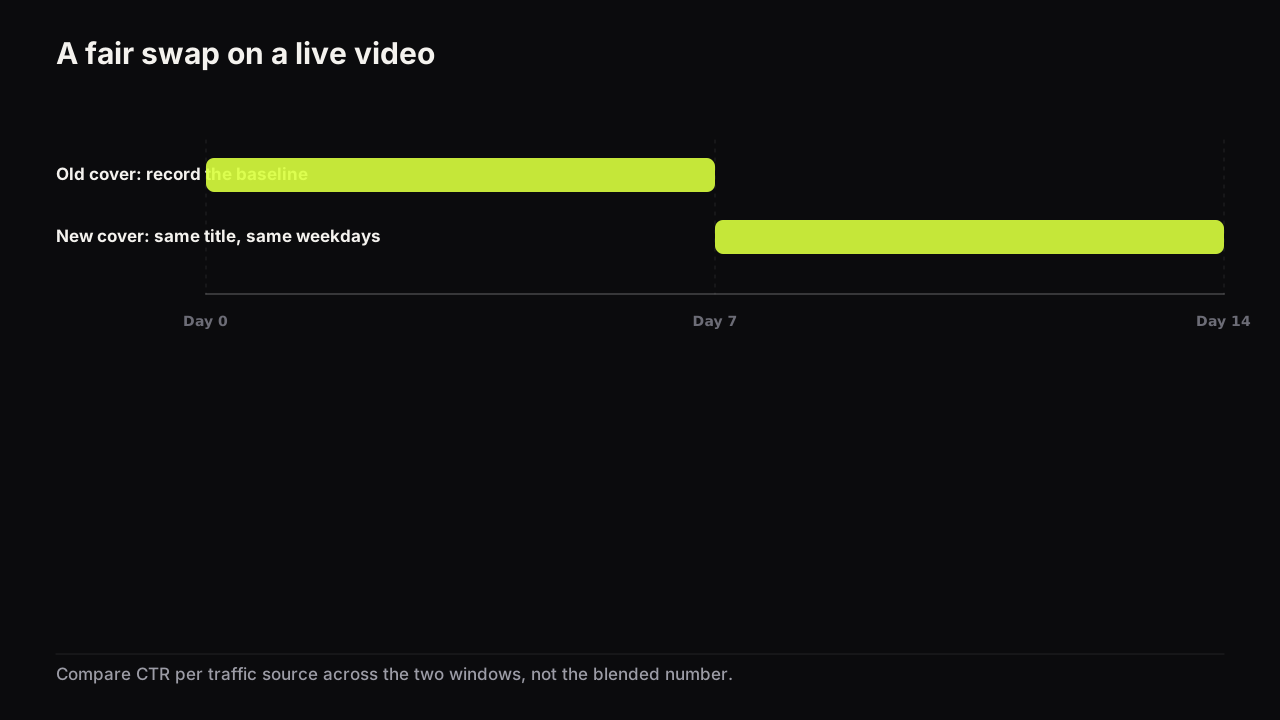
- Record the baseline first. Note impressions and CTR by traffic source for the seven days before the change. Write them down; do not rely on the chart later.
- Change one thing. The cover only. If the title changes as well, the comparison is between two packages, not two covers.
- Swap on the same weekday you will measure against. A Tuesday-to-Tuesday window against another Tuesday-to-Tuesday window keeps the weekly rhythm out of the result.
- Wait for a comparable batch of impressions. A week is a reasonable default; how long a thumbnail test needs explains what makes it shorter or longer. Fewer impressions need more time.
- Compare per source, not the blended number. If Home impressions doubled in the second week, the blended CTR will fall for reasons that have nothing to do with the cover.
- Write down the lesson, not the score. "Doubt beat shock on a review video" is reusable; "B won" is not.
We would treat any difference smaller than the channel's ordinary week-to-week wobble as no result, even when the new cover is ahead and it would be satisfying to call it a win. Look at how much CTR moves between two normal weeks on a video you did not touch; that is your noise floor, and a swap has to clear it before it means anything. Many swaps will end as "no result". That is a finding too, and it stops you rebuilding the channel's style around a coin toss.
The Vevo case, and what it does and does not show
The most quoted evidence that refreshing old thumbnails works comes from a music catalogue, and it is worth knowing exactly what it says.
Variety reported in 2019 that Vevo refreshed thumbnails across roughly 4,000 catalogue music videos and saw about a 12% average lift in views over the first 20 days after the change.
Three caveats limit what you can take from it. It is from 2019, and the feed has changed since. It is music video, a catalogue with steady replay and search demand regardless of packaging, which is not how a how-to or commentary channel behaves. And there was no control group, so some of that lift may be the ordinary variation of a large catalogue over three weeks, or the refresh drawing attention to the videos in other ways.
We would still use the Vevo result, caveats and all, as the reason to start a back-catalogue refresh, even though it cannot tell any individual channel what to expect. It is evidence for one narrow claim: on a catalogue with continuing demand, a systematic refresh of old covers can move views, and the effect shows up within weeks. It is not evidence that any particular video will gain, or that the gain is 12%, or that the refresh works on videos nobody is looking for. Treat it as permission to refresh in priority order, and measure your own result.
Refreshing a back catalogue in priority order
A channel with a few hundred videos cannot refresh them all, and should not. Rank them by how much a better cover could still change, which is a combination of impressions still arriving and CTR still below baseline.
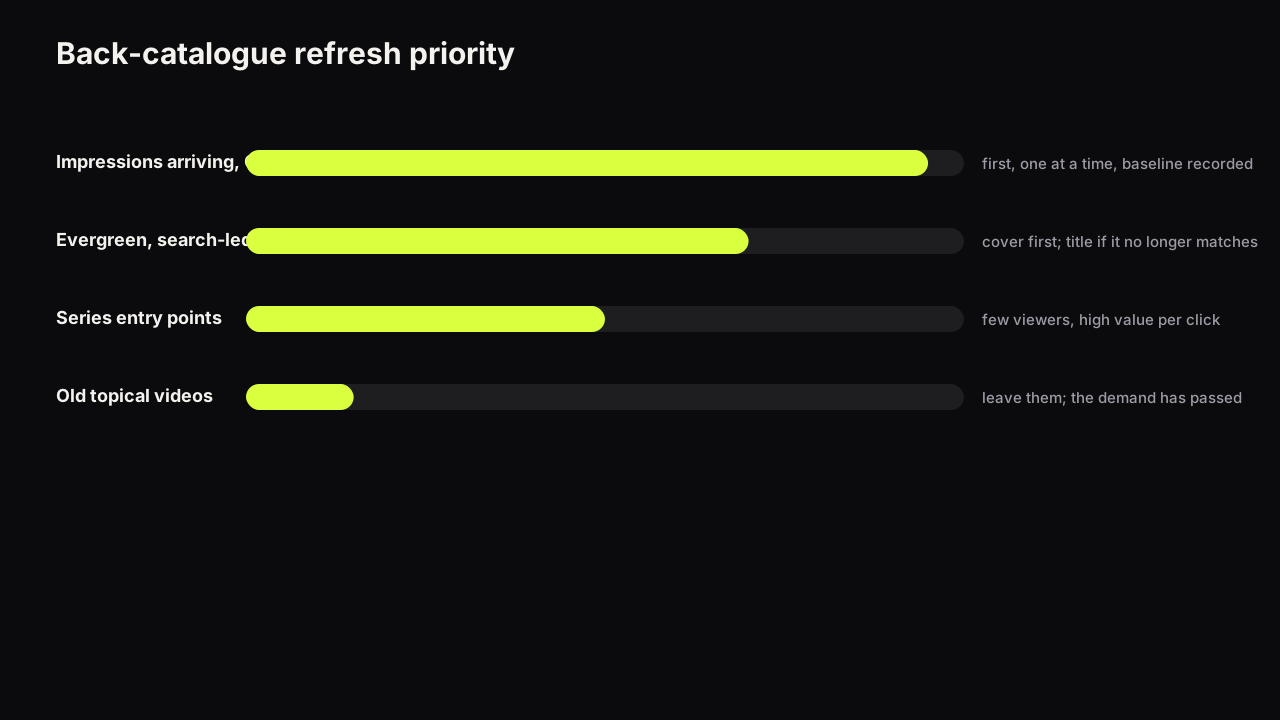
- Still getting impressions, CTR below baseline, past the first month. These are the only videos where a better cover has an immediate, measurable effect. Do them first, one at a time, with a baseline recorded.
- Evergreen, search-led, with a title that still matches how people search. Refresh the cover; if search impressions are steady, you will see the change in search CTR within a couple of weeks.
- Series entry points. The first video in a playlist or the one you link from every new upload. Its cover is seen by every new viewer who follows the link, so the audience is small but the value per click is high.
- Evergreen with a stale title. Repackage both, accept the lost attribution.
- Old topical videos. Leave them. The demand has passed and a cover cannot bring it back.
While you are ranking, look for the pattern across the low-CTR group. If the same layout, expression or colour keeps appearing on the underperformers, the problem is a style, not a video, and when a style stops working is the article for that. The fix there is a refresh that keeps the channel recognisable, not a new look for every video.
For the work itself, the fastest route is to remake your own old covers rather than start from nothing. On the bench you can paste the video's own YouTube link and the maker grabs that thumbnail as the source, so a dated cover can be rendered again with the current headline, a saved face and one of the eight styles; the free thumbnail downloader grabs the old cover as a file if you want to keep it for comparison. Remix, under Tweak and Remix, does the same from any past render you made on the bench.
When not to change a thumbnail
The tree has three exits that say "leave it", and they matter as much as the branches that say "change".
The video is at or above baseline. A cover that is earning its share of clicks does not need to be improved because you are tired of looking at it. Your boredom is not the audience's; you have seen it a hundred times and they have seen it once. That is also the reason a consistent style keeps working longer than creators expect, a point the full thumbnail guide makes about consistency versus sameness.
A test is running. Let it finish and read the result state; a swap in the middle discards the evidence.
You changed the title in the last week. Two changes in one window leave you unable to say which one moved the number. Wait for the title change to settle, then decide about the cover on its own.
The video is doing well for a reason the cover carries. Occasionally a cover works because it makes a specific promise, and the new "better" cover makes a more generic one. If the comments mention what is on the thumbnail, the cover is part of why people watched. Change with care, and test rather than swap.
There is one case where we would break the first rule and change a cover that is above baseline. Invented example: a review video's cover shows a product with a cracked screen and a horrified face, and the video is about a scratch. CTR is fine. First-minute retention is poor, and the comments say why. That cover is earning clicks it cannot keep, and it sits close to the line YouTube's deceptive practices policy draws. We would change it, expect the CTR to fall, and count the fall as the price of a promise the video can honour. A cover that wins the click and loses the viewer only looks like a working cover in the CTR column.
On cadence: we would run this decision monthly, not weekly, even though weekly feels more responsive. A week is inside the noise for most videos on most channels, so a weekly pass generates decisions the data cannot support, and the channel ends up swapping covers on the strength of one good or bad Tuesday. Monthly gives every candidate a full window against its own baseline, and a queue short enough to work one video at a time.
Making the decision a habit
The tree is only useful if it is run on a schedule rather than on a bad mood. A monthly pass over the channel takes an hour: sort videos by impressions over the last month, pull out the ones still being shown, compare their per-source CTR with the baseline, and put the ones that fall short into the refresh queue. Then work the queue one video at a time with the swap procedure above, or with a test where the video qualifies. That pass sits at the end of the five-step thumbnail workflow, where the runner-up from the original upload is already waiting as the first refresh candidate.
If it were our channel
Say we ran a channel with a couple of hundred videos, half evergreen tutorials and half topical commentary, and had never done this systematically. We would not start with the videos that annoy us. We would start with the baseline: ten to fifteen recent videos of each kind, per-source CTR for each, the middle value written down for Browse, Suggested and Search. An hour, once.
Then the monthly sort by impressions. Most of the topical videos would fall out at the second question, high in the view count and getting no impressions, and we would leave every one of them alone however dated their covers. Of the tutorials still being shown, the ones under the search baseline go into the queue, with the series entry point at the top even if its numbers are middling, because every new viewer we send to the playlist meets that cover first.
The first video in the queue gets a test if it is eligible: the current cover plus two candidates, one lever each. We would run one test at a time across the channel, because one lesson a fortnight is about as fast as we can turn a result into a rule for the next upload. The cost is a queue that takes most of a year to clear. We would accept it. A channel that changes ten covers in a week has ten confounded comparisons; a channel that changes one a fortnight against a baseline has twenty findings by next autumn.
Common questions
Does changing a YouTube thumbnail reset views?
No. Changing the thumbnail edits the video's details in YouTube Studio; it does not create a new video. Views, watch time, likes and comments stay with the video, the URL does not change, and analytics continue as one history. Compare CTR before and after rather than expecting the counters to restart.
How soon after upload can I change the thumbnail?
At any time, but in the first week the numbers are too noisy to judge, and YouTube's own CTR documentation says new videos can show a wider range. Wait unless the cover is broken, in which case fix it immediately.
How long should I wait before judging a new thumbnail?
Long enough for the video to collect a comparable batch of impressions from the same sources as before, which for most channels is a few days to a week. Compare the same traffic sources, on the same days of the week, with the title untouched. A difference smaller than the ordinary day-to-day wobble is noise.
Will changing the thumbnail hurt the video?
Nothing in the YouTube help pages this library relies on describes a penalty for changing a thumbnail. The risk is ordinary: a worse cover earns fewer clicks, and a cover that promises something the video does not deliver earns clicks it cannot keep. Change one thing, keep the promise true, and measure.
What to do next
Pick the one video on your channel that is still getting impressions and sits furthest under its like-for-like baseline. Record its per-source CTR for the last seven days. If it is eligible, set up a Test & Compare with two new covers that each change one lever; if not, swap on a weekday, wait a week, compare per source, and write down what you learned. Then do the monthly pass, so the next decision comes from the numbers rather than from the feeling that something should change.
Related decisions: how many thumbnails to make per video, refreshing a whole back catalogue in priority order, the short answer on whether a change resets views, and a batch workflow for podcast and clip covers.
For the routine around this decision: a weekly thumbnail review, briefing a designer or editor, running thumbnails for several channels, one cover in three ratios, consistency without sameness, using a co-host's or client's face with consent, and whether a logo belongs on the cover.