On this page
Seasonality is the part of your click-through rate that moves with the calendar rather than with your thumbnails. The same covers earn a different rate in the week before a holiday, in the first week of a school term and on a Saturday, because the people on YouTube, what they are looking for and what sits beside your cover all change with the date. The way to see it is to compare a week with the matching week in a previous year rather than with the week before, and the way to live with it is to know your channel's calendar before the dip arrives.
How the calendar reaches a number the cover controls
The calendar cannot touch a cover. It reaches CTR through three things that sit around the cover: who is looking, what they want, and what else is in the row. Every seasonal pattern we see is one of those three moving. Name which one and you have a diagnosis; skip it and you have a shrug.
Who is looking. The mix of people behind your impressions is the biggest lever on CTR that has nothing to do with design, and it moves with the date.
YouTube's help page on impressions and click-through rate says a video that gets a lot of impressions, for example on the Home page, will naturally have a lower CTR, while videos whose impressions come mostly from the channel page may have a higher rate.
A long weekend changes that mix the way a traffic-source shift does: more casual browsing on Home, longer sessions on a television, fewer people typing your topic into search with a job to finish. The cover is judged by a different crowd, and the different crowd clicks differently. How each traffic source treats a cover explains why the blended number moves when the mix moves; seasonality is one of the things that moves the mix.
What they want. Intent follows the date. A viewer in the first week of January and a viewer in the last week of December are often the same person with a different question, and a cover that answered December's question is now beside covers that answer January's.
What else is in the row. The supply of competing covers changes too. Creators pause over holidays and the row thins; a news story arrives and the row fills with covers about it. Your cover did not change, but the neighbours it is judged against did.
In practice, seasonality shows up in impressions before it shows up in CTR. When the audience moves, the number of times your covers are shown moves first, and the rate follows. A CTR reading that ignores the impressions line beside it will mistake a quiet week for a weak cover. Reading a CTR drop starting from impressions is the habit that catches this.
Four rhythms and which channels feel each one
Not every channel has every rhythm. The table names the four we see most, what each one moves, and the sign that tells you it is the calendar and not you. No figures are attached because nobody has published any that hold across niches, and a direction that is true for a study channel is often reversed for a gaming channel in the same week.
| Rhythm | What it moves | Who feels it most | The tell |
|---|---|---|---|
| Weekday and weekend | Who is looking, and how long they stay | Channels with a fixed upload day | The same weekday pattern repeats week after week |
| School terms and holidays | Who is looking and what they want | Education, family, gaming, hobby channels | The whole catalogue shifts at a term boundary |
| The niche's own season | What they want | Finance, fitness, food, tech, travel | The same weeks every year, and the niche moves together |
| News and events | What is in the row | Commentary, tech, sport, finance | A short spike or dip tied to one story, then a return |
The niche season is the one to write down first, because it is the most predictable and the most often forgotten. Finance channels move with tax deadlines and market moods, fitness channels with new-year resolutions and summer, food channels with holidays that involve cooking, tech channels with launch cycles, and travel channels with booking seasons rather than travel seasons. If you cannot name your niche's two or three peaks, ask which weeks your search impressions climb without a new upload.
The rhythm that fools creators most often is the term boundary, because it arrives gradually and coincides with the moment many channels change something else. A study channel that redesigns its covers in the last fortnight of a term sees CTR fall as the audience leaves for the holiday and blames the redesign. The redesign may be fine; the audience left.
Seasonality has a signature, and fatigue has a different one
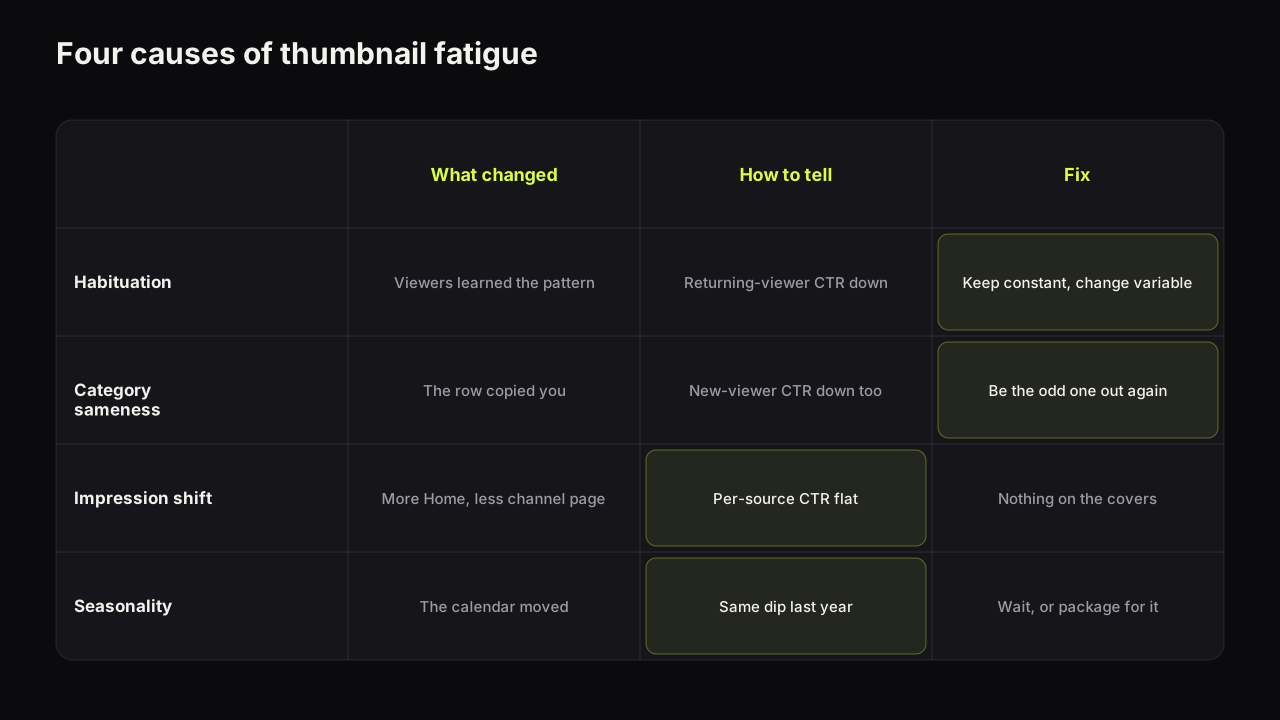
The guide to thumbnail fatigue lists "the same dip last year" as the tell for seasonality, and it is the right first check. It is not enough on its own, because a channel under a year old has no last year, and a channel that changed its style in the same month cannot separate the two with one comparison. Seasonality leaves four marks, and a calendar dip carries all four.
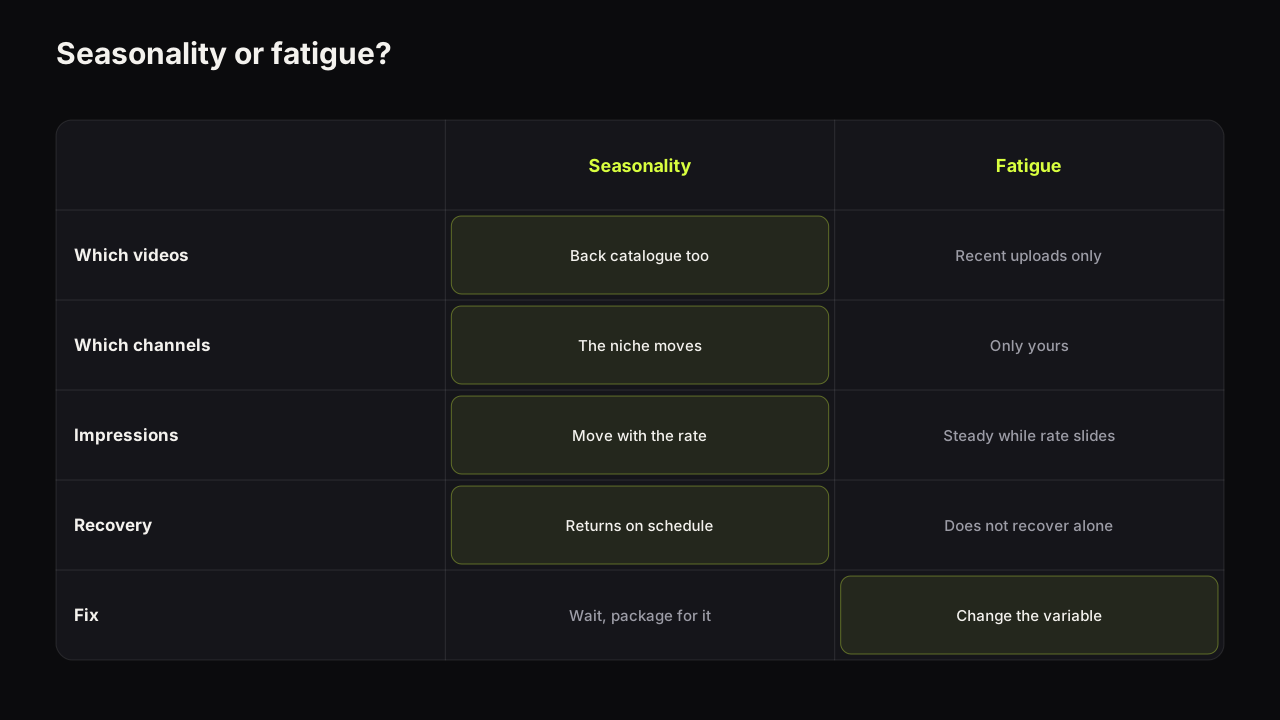
- It touches the back catalogue. Old videos with covers you have not changed dip alongside the new uploads. Fatigue lives in recent uploads that share a look.
- It touches the neighbours. Other channels in the niche slow their uploads, or their public view counts on new videos soften in the same weeks. Fatigue is yours alone.
- It moves impressions as well as CTR. The audience is smaller or elsewhere, so you are shown less and clicked less. Fatigue usually leaves impressions steady while the rate slides.
- It returns on schedule. The dip ends when the calendar moves on, without anything changing on your side. Fatigue does not recover by itself.
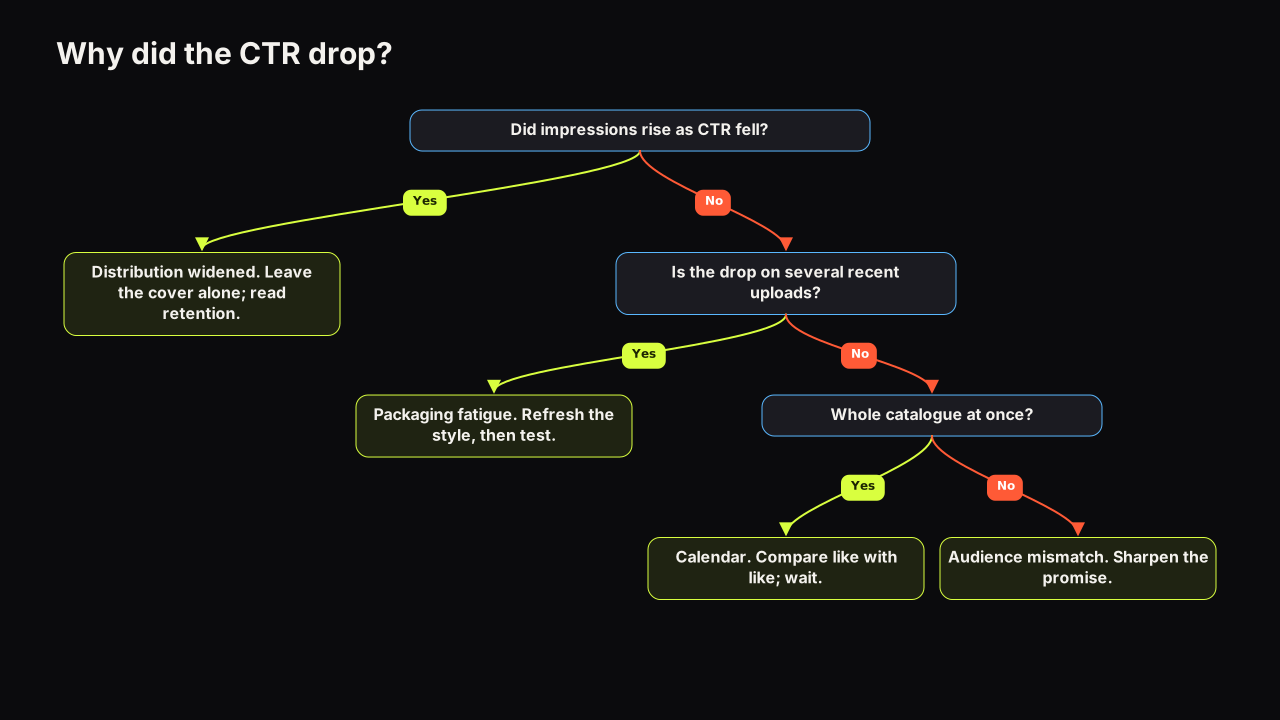
A dip with all four marks is the calendar. A dip with none of them is a cover problem or a distribution shift, and the four causes of a CTR drop linked above separate those. A dip with two of the four is the honest answer most channels get, and it means waiting one more like week before deciding.
We would hold a redesign until the first calm week after a term boundary or a niche peak, even though that can mean shipping three or four more covers in a style we already suspect is tired. A tired style costs a few clicks for a fortnight. A redesign judged against a holiday audience can be wrongly reverted, or wrongly kept, for a year.
Never diagnose a style change in a week the calendar moved. If a redesign, a new expression or a new layout went live within a fortnight of a holiday, a term boundary or a niche peak, treat the first reading as unreadable and judge the change on the first calm week that follows. The cost of waiting is a fortnight; the cost of reverting a working style because the audience went on holiday is a year of doubt.
Compare like weeks, not last week
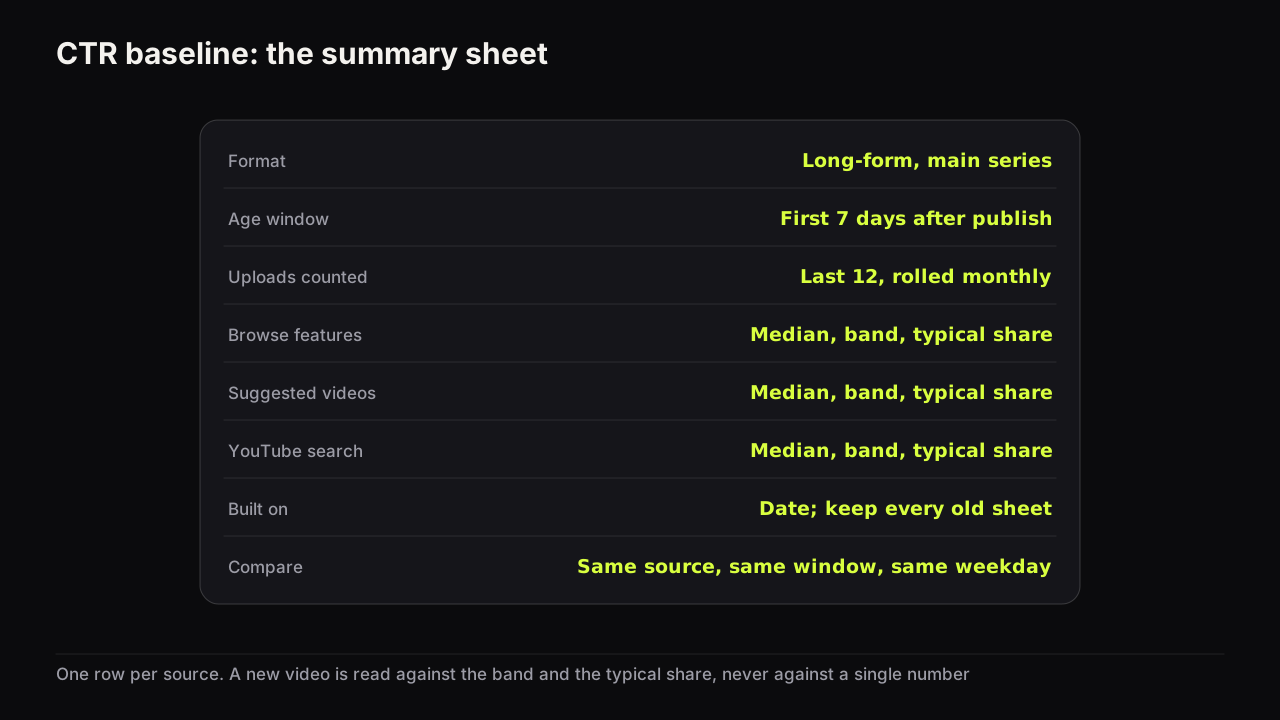
A baseline built from the last ten or twenty uploads assumes those uploads landed in comparable weeks. Seasonality is the case where they did not, so the comparison window has to match the calendar as well as the traffic source and the video age. The worksheet for building a CTR baseline from your own uploads sets up the number; this is how to read it across the year.
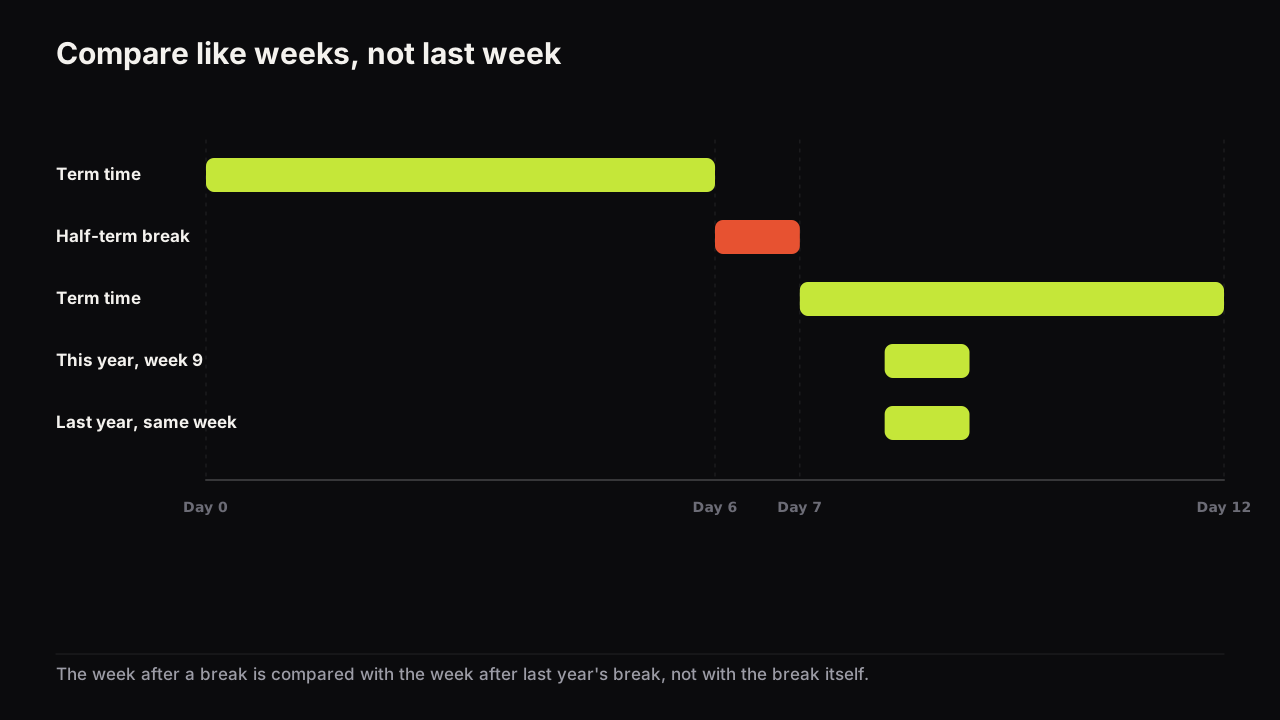
- Anchor to the event, not the date. Compare the week before this year's holiday with the week before last year's holiday, not the same calendar dates, because the event moves and the audience moves with it.
- Align the weekday for daily reads. A Saturday against a Saturday. If you upload on a fixed day, a week-over-week read is already aligned; a day-over-day read is not.
- Hold the source and the age. The like-week rule stacks on top of the ordinary rule, it does not replace it. Same traffic source, same video age, then same position in the calendar; the CTR pillar sets out why the first two are non-negotiable.
- Read impressions beside the rate. If both moved in the same direction, the audience moved. If the rate fell while impressions held or rose, look at distribution before the calendar.
- Write the calendar note. Any reading taken inside a seasonal window goes into your log with the reason attached, so nobody treats it as a clean number later.
If you do not have a last year, borrow one. The niche's peaks are visible in other channels' upload rhythms and in your own search impressions, and a week the same distance from the last comparable event is a fair substitute until you have your own history.
Keep a channel calendar: one page listing the dates and weeks that moved your numbers, with a word on which direction and which rhythm. Add to it every time a like-week comparison explains a dip. After a year it is the first thing to check when a number surprises you, and after two it is the most reliable forecast the channel owns.
Planning packaging around the calendar
Once the calendar is known it becomes a schedule. Three moves follow from it. None needs a new style.
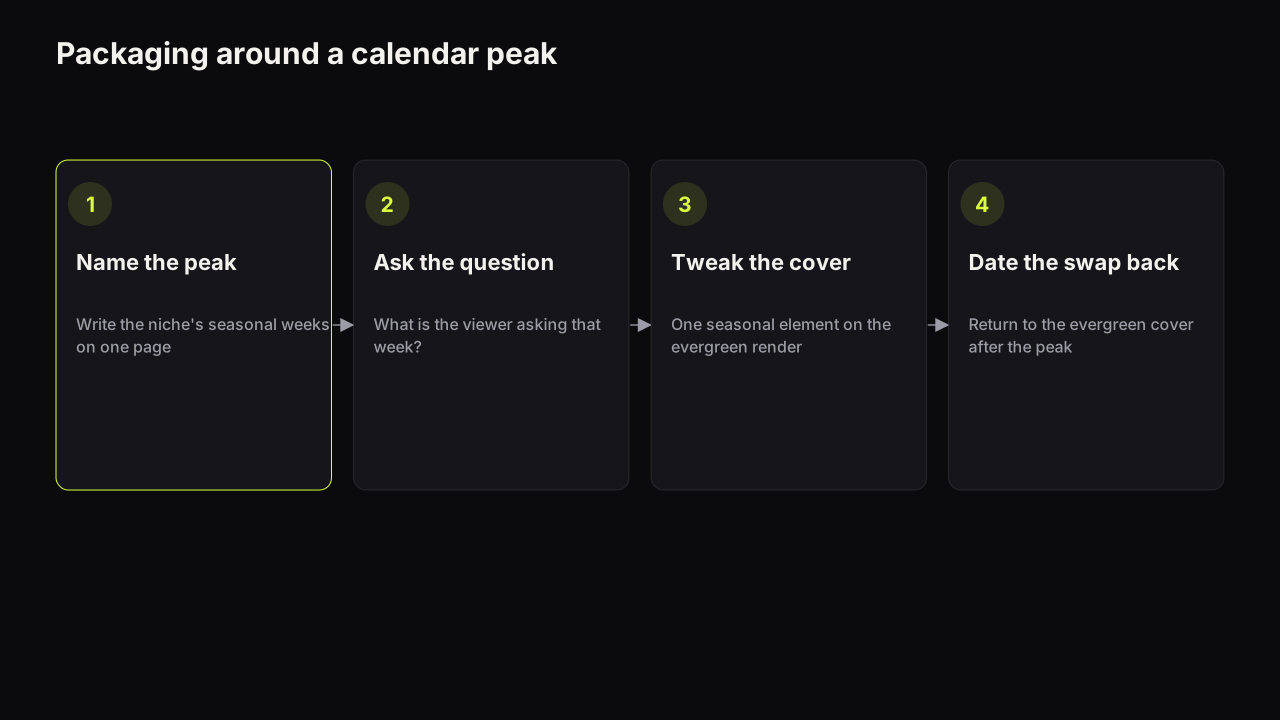
At a peak, package for the season's question. The viewer's intent has changed, so the promise on the cover should answer the question they are asking that week rather than the one they asked in June. That is a packaging decision made in the brief, and title and thumbnail as one promise is where it belongs. A seasonal cover dates the video afterwards, so plan the swap back to an evergreen cover for the rest of the year, using the decision rules for changing a live thumbnail rather than a guess about timing.
Say a home-fitness channel's evergreen cover for its beginner programme is a calm face on a dark ground with 12 WEEK PLAN in white and a rolled mat as the object. In the first week of January the viewer is not asking how long it takes; they are asking where to start, this week, before the resolve fades. The seasonal version keeps the face, the ground and the mat and changes the headline to START MONDAY. Nothing else moves, so a returning viewer still recognises the channel, and the brief carries a note: swap back to 12 WEEK PLAN in the first week of February. We would not add a party hat or a "NEW YEAR" banner. The viewer's question changed; the channel did not.
Making the seasonal variant should not mean rebuilding the cover. On the bench, Tweak takes the evergreen render as the source, so the seasonal version changes the one element the season needs (a headline, a prop, a colour) and keeps the face, layout and everything else identical. The evergreen original stays in the history strip for the swap back.
In a trough, hold the standard. When creators pause and the row thins, a cover that would be lost in a crowded row has more room to be seen. That is a reason to keep uploading through a quiet week, not a reason to relax the phone check.
During a news flood, be off-pattern inside the story. When every cover in the row is about the same event, the event itself stops being a difference. The channel that earns the click is the one that is recognisably about the story while looking unlike the flood, which is the ordinary logic of being the odd one out in your row applied to a week when the row has converged.
One rule covers all three. Do not run a test across a calendar edge. A manual swap whose two windows sit either side of a holiday compares two audiences, not two covers, and even Test & Compare, which splits viewers at the same moment, is reading an audience that is changing under it; the A/B testing guide covers what a test needs to hold still. Start the test after the edge, or before it with time to finish.
Our view is that most channels would gain more from a one-page calendar than from another redesign. The redesign fixes a problem the channel may not have; the calendar prevents the misdiagnosis that causes redesigns.
What to do next
- Write your channel's calendar today: the niche's peaks, the term boundaries if they matter to your audience, and the fixed upload day's weekly shape.
- Take the last dip that worried you and check it against the four marks. If it carried them, note it on the calendar and leave the covers alone.
- Set the baseline worksheet up with a like-week column so next year's comparison is ready before the week arrives.
- For the next peak, brief a seasonal variant of the cover as a Tweak of the evergreen one, and put the swap-back date in the same brief.