On this page
Your YouTube CTR usually drops because your impressions went up, not because your thumbnail got worse. YouTube's own documentation says a video that gets a lot of impressions, for example on the Home page, will naturally have a lower click-through rate, so a CTR that falls while views rise is a sign the video is reaching beyond the people who already liked you. There are three other causes (audience mismatch, packaging fatigue and the calendar), each leaves a different trace in YouTube Analytics, and only two of the four are fixed by touching the cover.
Start with impressions, not with CTR
CTR is a ratio, and a ratio can fall because the top shrank or because the bottom grew. Before deciding anything about a thumbnail, look at what the bottom did.
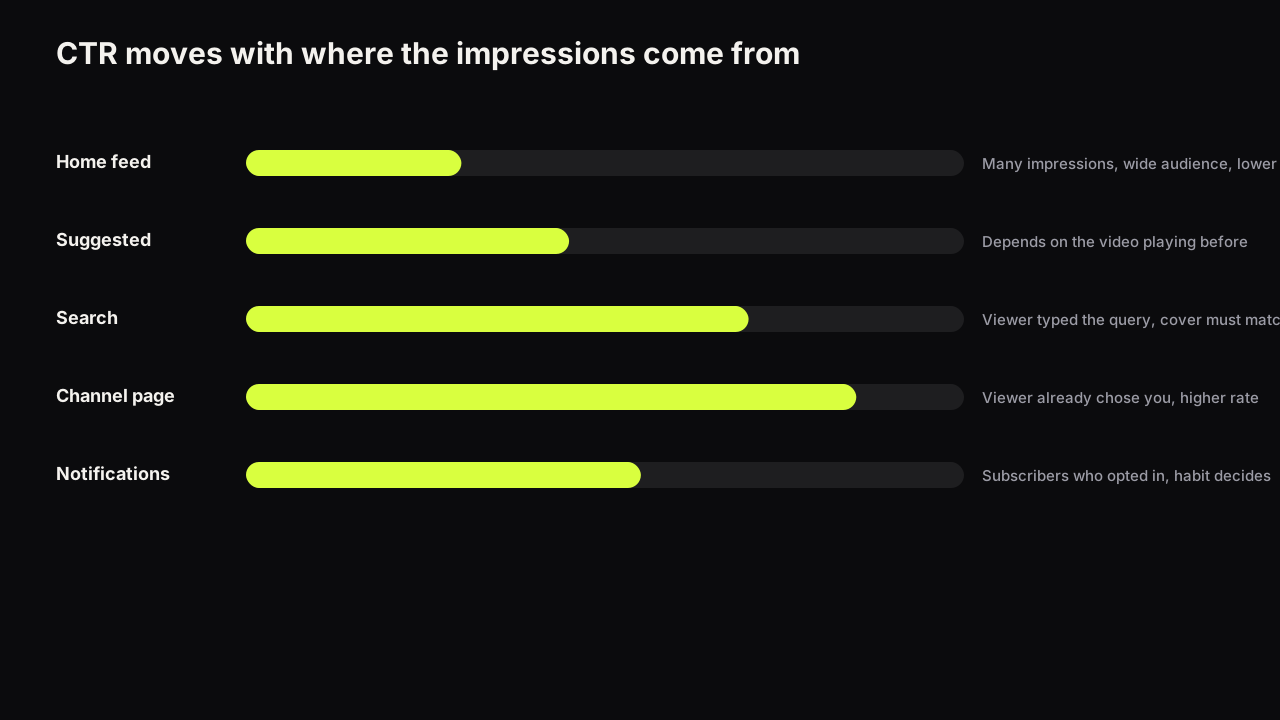
YouTube's impressions and click-through rate FAQ says that a video that gets a lot of impressions, for example on the Home page, will naturally have a lower CTR, while videos whose impressions come mostly from the channel page may have a higher rate. It also says new videos and channels, for example those less than a week old, can see a wider range than the 2% to 10% band in which half of all channels and videos sit.
The mechanism is the audience behind each impression. The first impressions a video gets tend to go to the people most likely to click it: subscribers, people on your channel page, people who opened a notification. If the video does well with them, YouTube shows it to wider circles on the Home feed and next to other videos, and those circles contain many people with no history with you. Each new circle clicks at a lower rate than the last, so the CTR slides even when the cover is doing its job with every group it meets.
This is why a CTR figure means nothing without the impressions figure and the traffic mix beside it. What impressions click-through rate actually measures, and how to build a baseline for your own channel that accounts for source and video age, is the foundation for everything below; if you have not built that baseline, the drop you are seeing may be a comparison you should never have made.
The four causes, and how to tell them apart
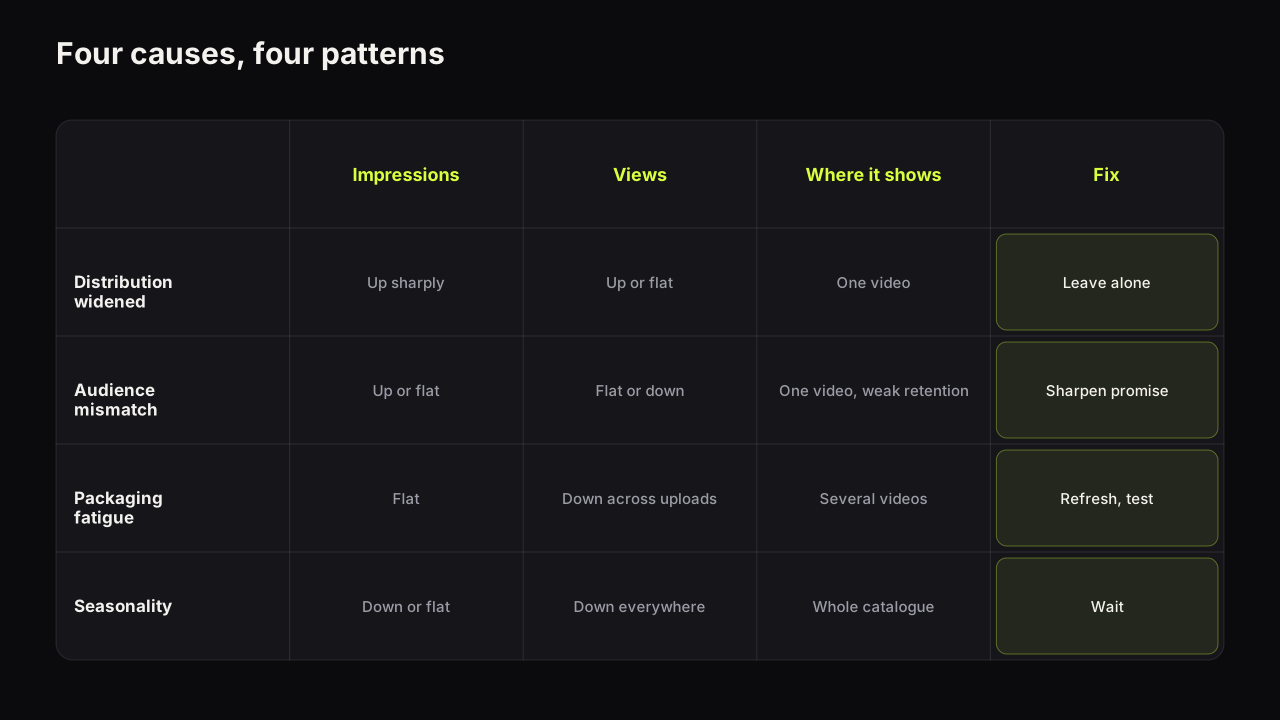
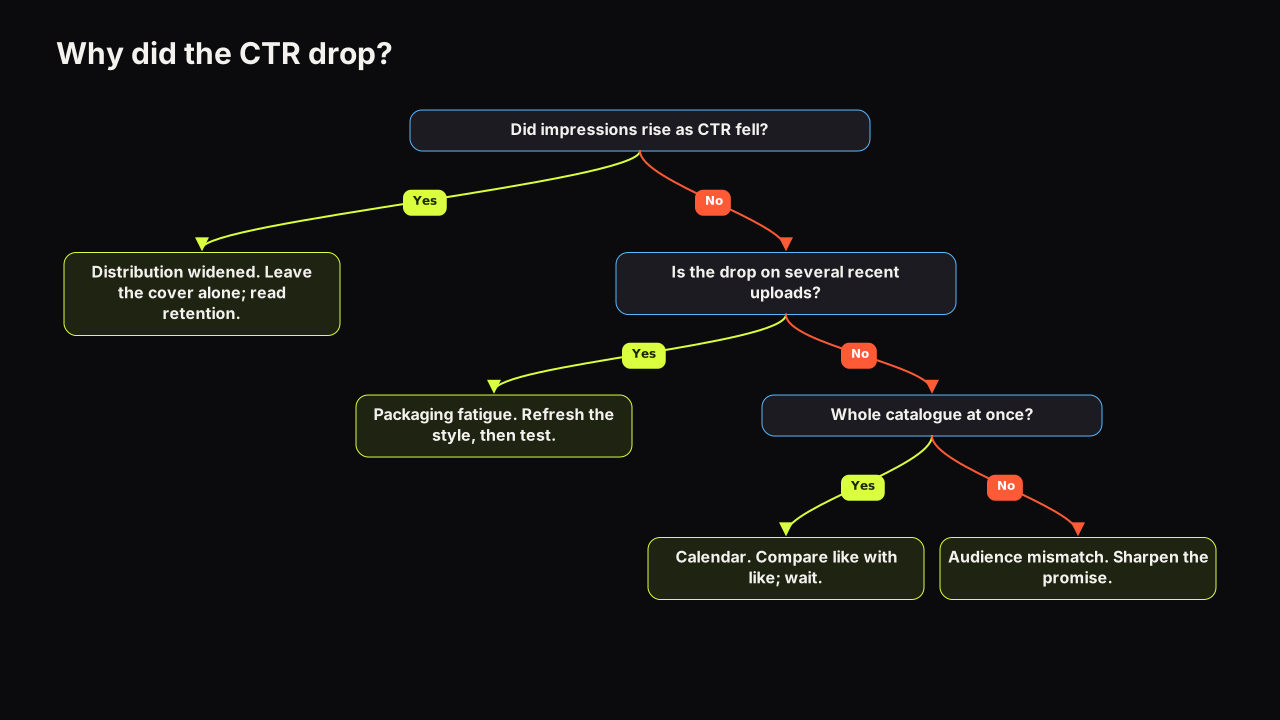
| Cause | Impressions | Views | Where it shows | Fix |
|---|---|---|---|---|
| Distribution widened | Up sharply | Up or flat | One video, Browse or Suggested share rising | Leave the cover alone |
| Audience mismatch | Up or flat | Flat or down | One video, weak retention from new sources | Sharpen the promise |
| Packaging fatigue | Flat | Down across uploads | Several recent videos, same layout | Refresh the style, then test |
| Seasonality | Down or flat | Down everywhere | Whole catalogue at once | Wait, compare like with like |
Distribution widened: the drop that is good news
The signals are impressions rising sharply, views rising or holding, and a growing share of impressions from Browse features or Suggested videos on that one video. Older videos on the channel look normal.
Nothing is wrong. The video escaped its subscriber base and is being shown to strangers, and strangers click less. The number to watch now is retention: if the new audience watches as long as the old one, the video is working and the CTR will settle wherever the wider mix puts it. If retention from the new traffic is weak, the video has found an audience it does not serve, and that is the next cause.
We recommend never changing a cover during a distribution surge. A swap resets the one thing you could learn from the surge (how the new audience responds to this packaging) and the new cover will be judged by a mix that is still moving.
Audience mismatch: the cover speaks to people the video does not serve
The signals are impressions up or flat, CTR down, views flat or falling, and Suggested traffic arriving from videos unrelated to yours. Retention from the new sources is weak, and the comments may show viewers who expected something else.
The cause is packaging that promises a broader or different video than the one you made: a title with a term that pulls a general query, or a cover whose object tells the wrong audience it is for them. The impressions go to the wrong people. Most of them do not click, and the ones who do click leave.
Imagine a woodworking channel uploads a desk build. The cover is a shocked face, a big yellow "$80" and, because it was the nicest photo, a laptop and monitor sitting on the finished desk. Suggested starts sending impressions from budget desk-setup and PC videos, whose viewers see a tech cover, click at a low rate, and leave in the first minute when a hand plane appears. We would keep the number, replace the laptop with the plane and a pile of shavings, and swap shock for a quietly pleased face. The cover now says "I built this for $80" to woodworkers and says nothing to the setup crowd. Fewer impressions from them is the fix working.
The fix is a more specific cover. Make it say who the video is for and what it delivers: the place instead of "abroad", the verdict instead of "review". Title and thumbnail as one promise covers how the two halves divide that job, and the mismatch failure modes in detail.
Packaging fatigue: the covers stopped working as a set
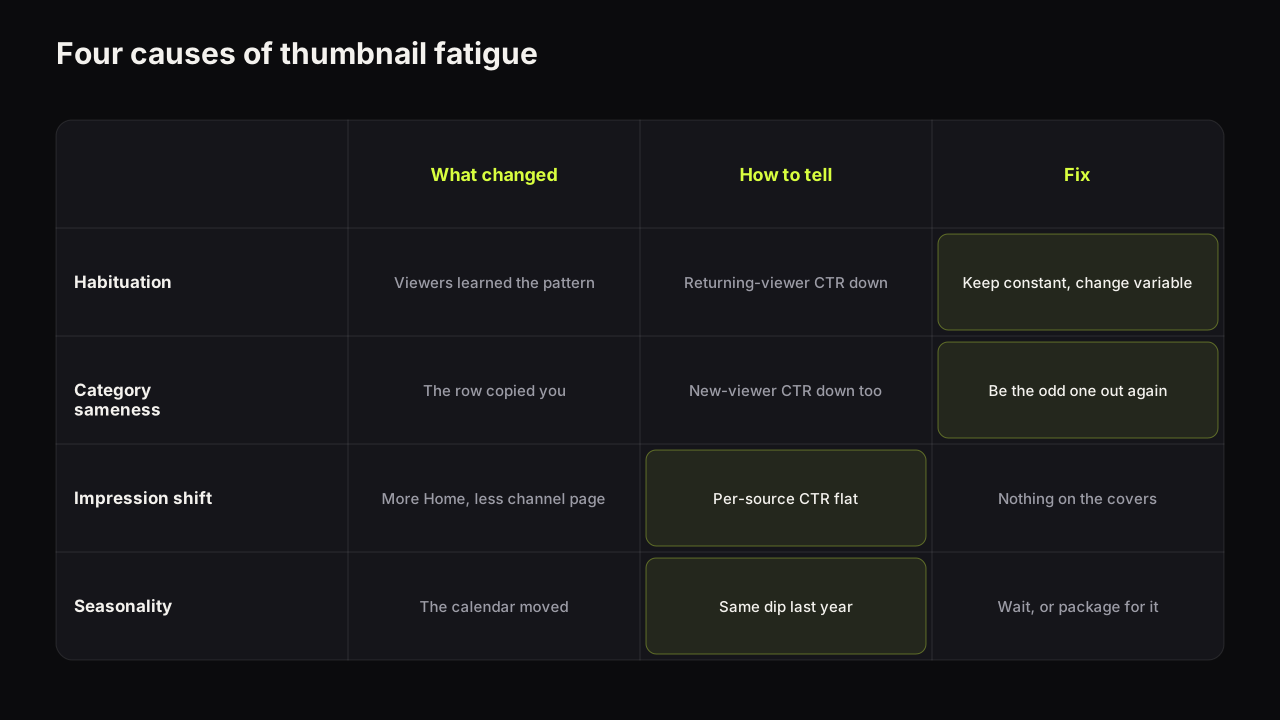
Look for a CTR decline across several recent uploads, not one, with a traffic mix that has stayed about the same. The covers share a layout, an expression, a colour scheme. Often the niche's other channels have converged on the same look, so the covers that once stood out now match the row.
This is the cause most creators assume first, and it is the least common of the four in the channels we look at. It is real, though, and it has four sub-causes of its own: the audience habituating to a layout, the category converging on one style, a shift in the impression mix that only looks like fatigue, and seasonality misread as fatigue. When a style stops working separates the four and gives a refresh plan that keeps the channel recognisable.
The fix is a refresh of the style tested on the next uploads, not a swap on the video that happened to trigger the worry.
Seasonality and the calendar: the drop that is not about you
Here the whole catalogue dips at once, including old videos with covers that have not changed. Weekends behave differently from weekdays. Holidays, school terms, a sporting event, a news cycle or your niche's own season move the number for every channel in the niche at the same time.
Nothing about your covers explains a dip that hits videos you did not touch. The test is to compare the same period a year earlier, or the same weekday a few weeks earlier, rather than the day before.
In practice, the calendar shows up most clearly on channels that upload on a fixed day. A Friday upload and a Sunday upload on the same channel can show different first-day CTRs with identical covers, because the audience on the two days is not the same audience. Any comparison across uploads has to match the weekday, or accept that a small gap is noise.
The first-week drop that every video has
There is a fifth pattern, and it is not a cause so much as a reading error. Nearly every video's CTR is highest in its first hours and lower by the end of its first week, because the earliest impressions go to the people most likely to click and the later ones go to wider circles. A creator who reads a day-one CTR, then reads the day-seven figure, sees a drop that every video has.
The FAQ cited above says the range is wider for new videos, which is YouTube's way of saying the same thing: early numbers are not settled numbers. The reading rule is to compare a video with your baseline at the same age, and to wait before acting. How long a thumbnail test should run gives the waiting rules, and they apply to reading a single video's CTR as much as to a formal test.
We would leave a cover alone for the whole first week even when the day-three number looks poor, even though on a topical video that means the window in which a swap could have mattered may have closed by the time we act. Day-three data on a fresh upload is mostly a description of who saw it first.
A diagnosis routine in YouTube Studio
As of September 2026, the reach reporting in YouTube Analytics shows impressions, impressions click-through rate and the traffic sources behind the impressions, and that is all the routine needs. Six steps, in this order.
- Put impressions and CTR on the same chart for the video. If they moved in opposite directions, with impressions up and CTR down, you are looking at distribution. Stop here unless retention has also fallen.
- Open the traffic sources for impressions. A rising Browse or Suggested share confirms distribution widened. A steady mix with a falling CTR points to packaging.
- Compare with your baseline at the same age. A day-three CTR against a day-three median, from the same source. If the video is inside your usual spread, there is no drop to diagnose.
- Check whether it is one video or many. Look at channel-level reach over the last few months. A decline across several uploads with a steady mix is fatigue; a dip across the whole catalogue on the same dates is the calendar.
- Read retention for the same period. Weak retention from the new sources turns a distribution story into a mismatch story. Steady retention means the video is doing its half.
- Check the calendar. Weekday, holiday, season, news. If other channels in the niche dipped at the same time, it was not your cover.
The order matters because the first two steps clear the most common cause, and most diagnoses end at step two with nothing to change.
What to change, and what to leave alone
| If the routine says | Change | Leave alone |
|---|---|---|
| Distribution widened | Nothing now; read retention | The cover and the title |
| Audience mismatch | The promise: more specific cover, sometimes the title | The layout, the video |
| Packaging fatigue | The style, across the next uploads, tested | The video that triggered the worry |
| Seasonality | Nothing | Everything; compare like with like |
| First-week slide | Nothing; wait | The cover until the age window closes |
Two of the five rows call for a new cover, and both should be tested rather than swapped blind. Test & Compare picks the winner by watch time share, which is the right judge for a mismatch fix, because the cover that brings the right audience keeps them watching even if it earns fewer clicks; why the tool can pick the thumbnail with fewer clicks explains the measure. For a fatigue refresh, how to A/B test YouTube thumbnails covers designing variants that differ in one thing and are different enough to resolve.
On the bench, that one-variable variant is what Tweak is for: a finished render becomes the source for the next one, and you change only the expression, the headline or the dominant colour, so the test compares the thing you meant to compare. Remix does the same from any past render when the refresh needs a new style.
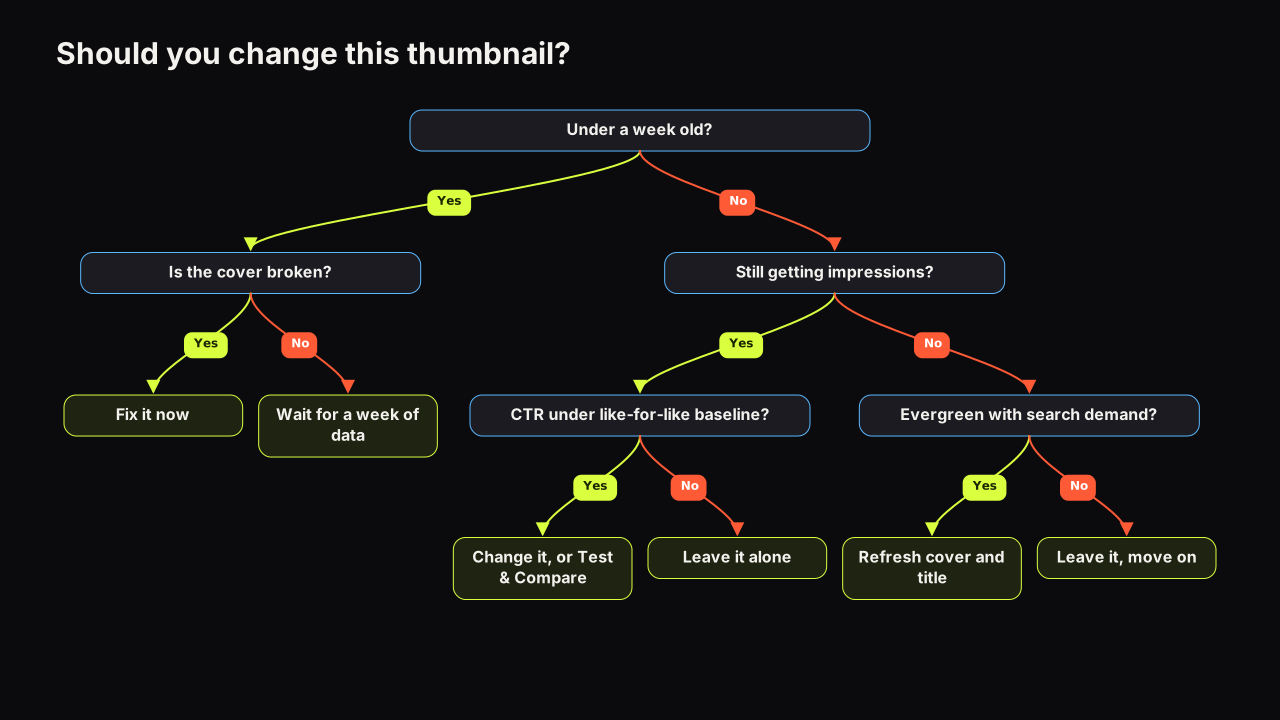
For a video that is already live and outside the first-week window, whether a swap is worth doing at all depends on its age, its impression volume and whether it is evergreen or topical. The decision tree for changing a thumbnail works through those, including what does not reset when you change a cover. And before any new cover goes up, run it through the pre-upload checklist; a replacement that fails the read at feed size will produce a second drop that is entirely your own.
What to do next
Open the video that worried you and do steps one and two of the routine: impressions and CTR on one chart, then the traffic sources. If impressions rose and Browse or Suggested grew, close the tab and check retention tomorrow. If the mix is steady and the decline spans several uploads, read the fatigue piece and plan a tested refresh for the next three videos rather than a swap on this one. Either way, build the baseline described in the CTR guide before the next upload, so the next drop can be read in a minute instead of an evening.
If the problem is not a falling rate but a video that collects impressions and almost no views at all, that is a different diagnosis, covered in impressions but no views.