On this page
- What Test & Compare is and what it decides by
- Which videos the tool can test
- Running a test, step by step
- Designing variants that can resolve
- Reading the result
- The manual swap, for videos the tool cannot test
- Write down the lesson, not the score
- Six mistakes that waste a test
- Common questions
- If it were our channel
- What to do next
The test most creators run goes like this: two versions of the same cover with the text nudged, uploaded in whatever order they came out of the editor, judged by whichever CTR line in Analytics is higher after a day. Every part of that is wrong, and YouTube's own tool is built to show you why. The reliable way to A/B test a YouTube thumbnail is Test & Compare in YouTube Studio: you upload up to three thumbnails for one video, YouTube shows them to different viewers at the same time, and it names a winner by watch time share rather than by clicks. That last detail changes how you should design the variants, and it is the part most testing guides get wrong. For videos the tool cannot test, a manual swap with a strict set of rules gives a usable answer, provided you accept what a swap cannot measure.
Test & Compare comes first, because it is the only method where YouTube does the splitting for you. The manual method is the fallback for Shorts, for channels without advanced features, and for the fourth idea that would not fit a three-way test.
What Test & Compare is and what it decides by
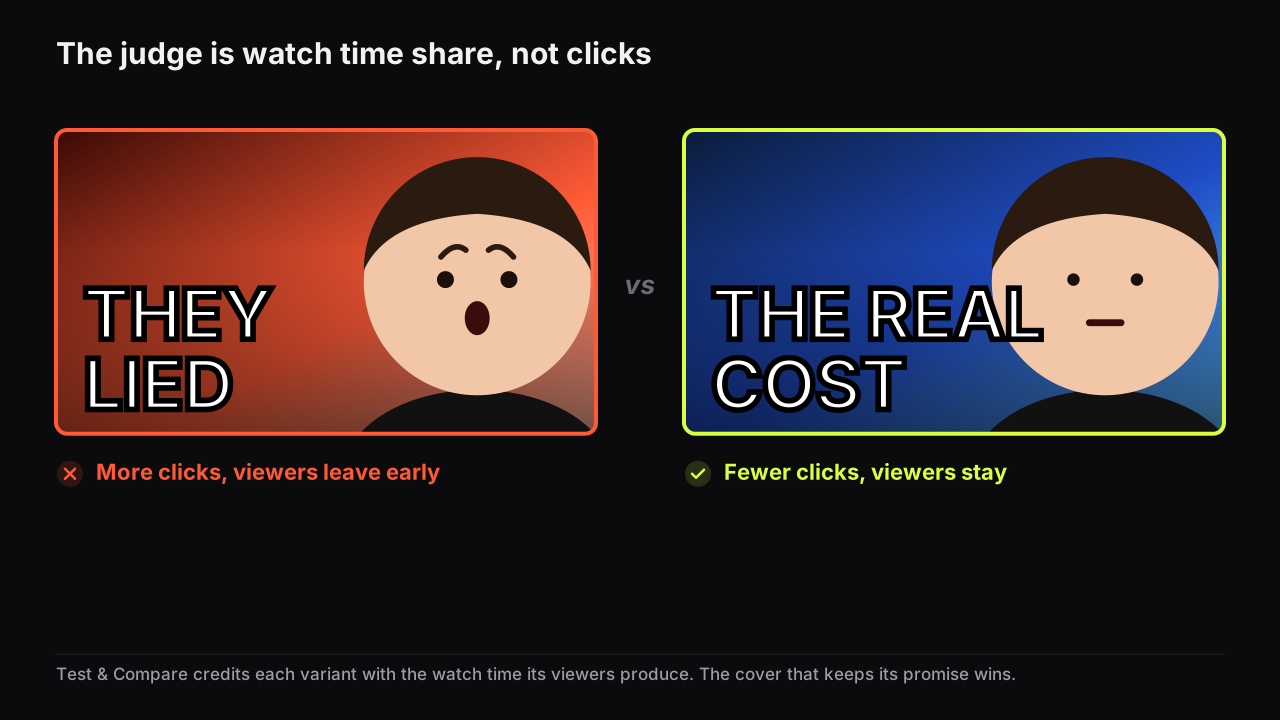
Test & Compare is the split-testing feature inside YouTube Studio. YouTube's help page on testing titles and thumbnails says you can test up to three titles, thumbnails, or title and thumbnail combinations per video, and that the result is decided by watch time share, not clicks.
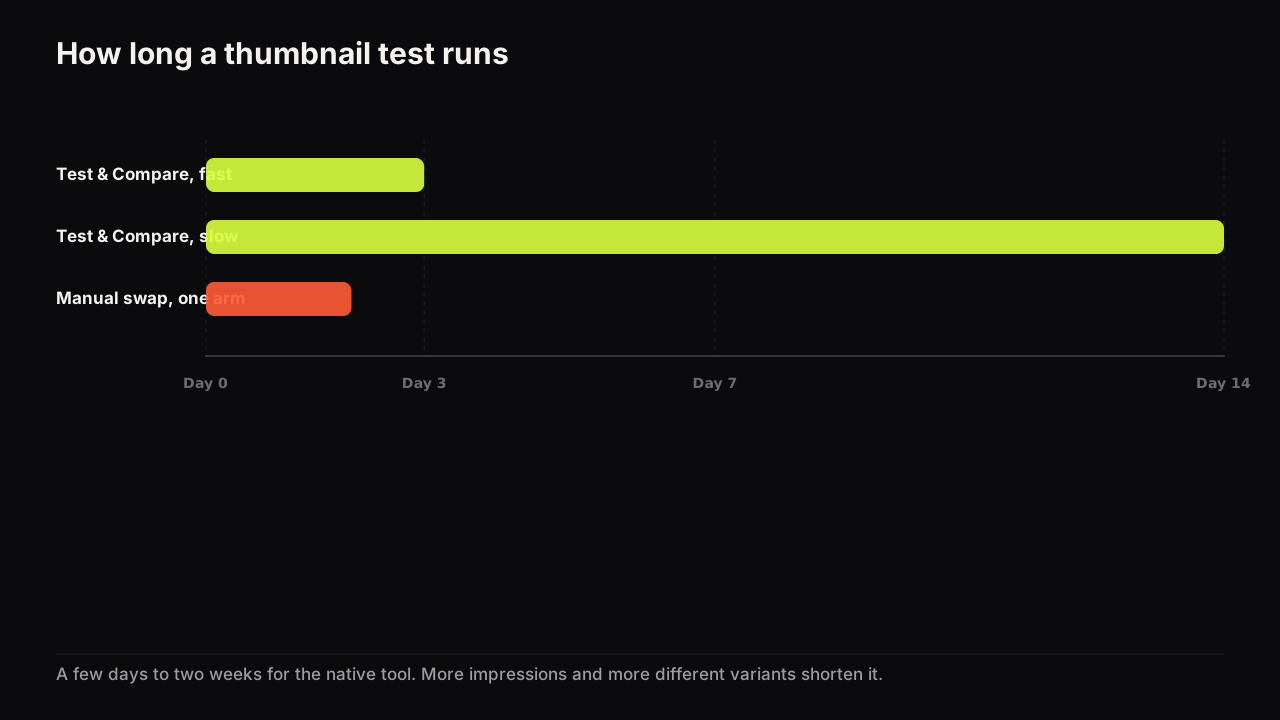
According to YouTube's help page, a test can take a few days or up to two weeks, it resolves faster when the variants are more different and the video receives more impressions, and it runs from YouTube Studio on desktop for channels with advanced features. Eligible videos are public long-form videos and podcast episodes. Shorts, scheduled live streams and Premieres are not eligible, although a Premiere becomes eligible once it converts to a long-form video.
Watch time share is the proportion of the video's total watch time during the test that each variant accounted for. If viewers who saw variant A watched 30 hours in total and viewers who saw variant B watched 70 hours, A's share is 30% and B's is 70% (invented figures, to show the arithmetic). Why YouTube judges this way, and what it does to a provocative cover, is in our explainer on why the test picks the winner by watch time rather than clicks.
For the design stage the consequence is simple. A cover that pulls in curious viewers who leave in the first minute adds clicks and subtracts watch time. It can top the CTR line in Analytics and still lose the test. The tool is judging the promise and the delivery together, which means you are testing title and thumbnail as one promise, not just a picture.
I've studied Test & Compare closely while building Thumbnail Bench, but I won't quote a personal result unless I can pull up the exact experiment, so you won't find one here. The thing I find most interesting about YouTube's system is that the thumbnail with the highest raw CTR isn't automatically the most valuable one. What you actually want is the right click and the watch time that follows it, not the maximum number of clicks.
Which videos the tool can test
Eligibility is the first thing to check, because it decides which method you use. As of September 2026, YouTube's help page gives these conditions.
| Video or situation | Can Test & Compare run? |
|---|---|
| Public long-form video | Yes |
| Podcast episode | Yes |
| Short | No |
| Scheduled live stream | No |
| Premiere | Not until it converts to a long-form video |
| Channel without advanced features | No |
| YouTube Studio on a phone | No, desktop only |
Every "No" in that table is a job for the manual swap described later. So is a fourth variant, since the tool takes three at most.
Running a test, step by step
The setup is quick; the preparation is where the value is. One action per step.
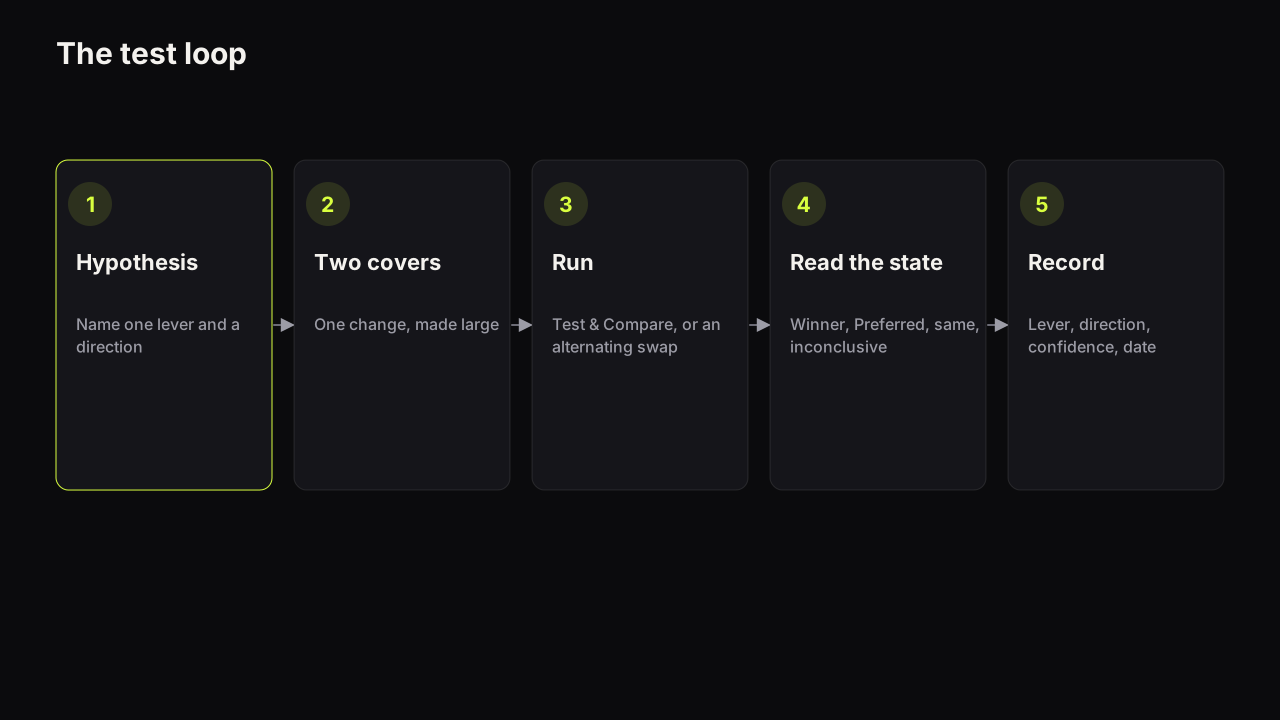
- Make the variants before you open Studio. Two is enough for most tests; three only if the video draws enough impressions to split three ways. Run each through the pre-upload checklist so you are not testing a typo.
- Decide the upload order on purpose. YouTube's help page says that when a test is inconclusive, the first uploaded option becomes the default. Upload the cover you would be happiest shipping first.
- Open the video in YouTube Studio on desktop and use the test option in the thumbnail section to add your variants. Labels in the interface change from time to time; the help page linked above describes the current flow.
- Leave the title alone unless you are deliberately testing title and thumbnail combinations. A mid-test title change muddies whatever the test was measuring.
- Let it run without swapping anything else on the video. Expect a few days to two weeks. If you are tempted to end it early, read how long a test needs first.
- Read the result state, not the CTR line. The state (Winner, Preferred, Performed the same, Inconclusive) is the verdict. The CTR you see in Analytics is context.
- Write the lesson down in one sentence that names the lever, the direction and the video type. More on that below.
We would let every Test & Compare run to its result state even when one variant is obviously ahead after two days, and even though that means shipping the weaker cover to a share of viewers for another week. An early lead is exactly what a provocative cover produces before the watch time catches up with it, and the state is the only thing that separates a lead from a verdict. Ending early trades the lesson for a few days of a cover that might be the wrong one.
Designing variants that can resolve
The help page's note that a test resolves faster with more different variants is a design instruction, not a footnote. Two versions of the same cover with the text nudged are twins. Viewers treat them the same, the tool has nothing to separate, and the result is Inconclusive or Performed the same.
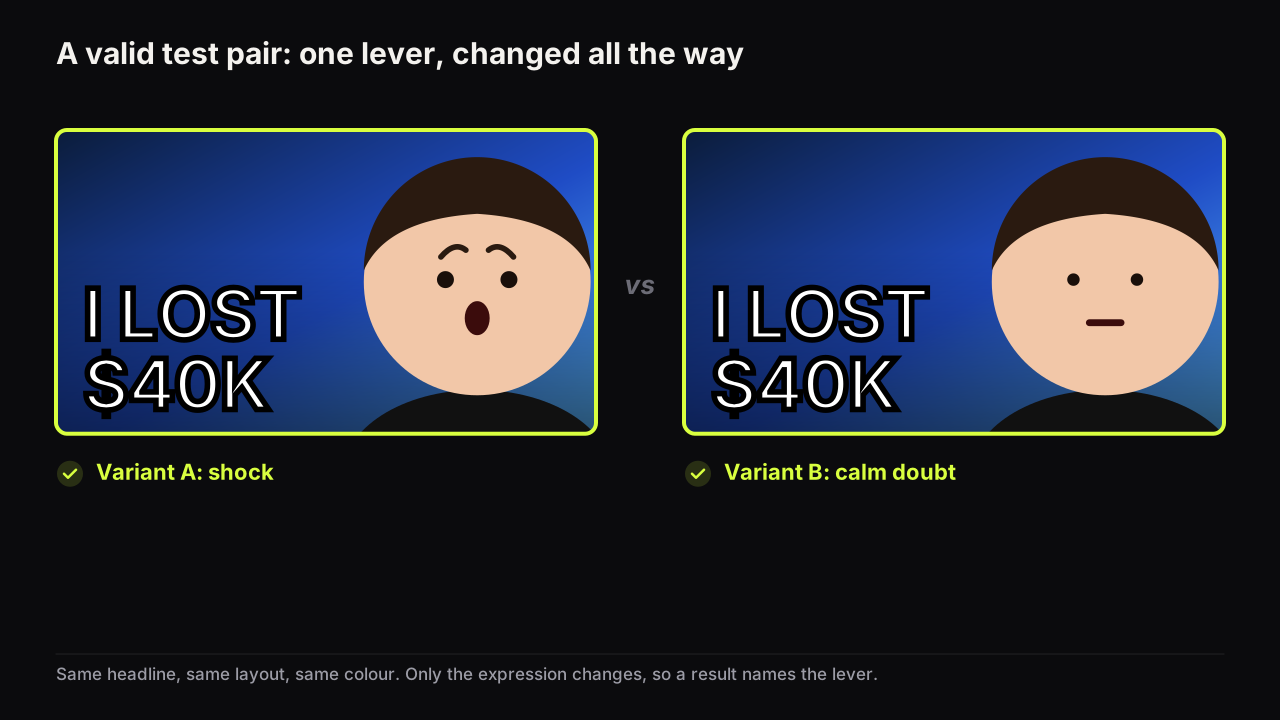
Two rules pull against each other. Change one thing, so a result tells you which lever moved. Make the change big, so the test can resolve. The way to satisfy both is to change one lever, and change it all the way.
| Lever | Twin (likely to stall) | Real variant |
|---|---|---|
| Expression | The same shocked face with wider eyes | Shock versus calm doubt |
| Headline | "I LOST $40K" versus "LOST $40K" | "I LOST $40K" versus "NEVER AGAIN" |
| Layout | Face moved slightly left | Face right and text left versus a full-frame object with a small face |
| Dominant colour | Two shades of blue | Night blue versus warm cream |
| Object | The same laptop from a new angle | The laptop versus the bank statement |
Pick the two variants for different reasons, not because they are your two favourites. If cover A bets on the face and cover B bets on the headline, the result tells you which lever this audience pulls harder, and that lesson transfers to the next ten videos. We would enter a variant we privately expect to lose if it isolates a lever cleanly, and accept that the test sometimes confirms what we thought, because a confirmed lever is a rule we can stop testing. A win between two favourites tells you which favourite won, and nothing about the next video.
For a three-slot test, a useful structure is A as the safe default, B with one lever changed one way, and C with the same lever changed the other way (shock, doubt, calm; or a number headline, a word headline, no headline). That keeps the test about one lever while giving the tool three genuinely different options. If the video will not draw many impressions, stay with two.
There is a case for breaking the one-lever rule, and it is worth naming so nobody breaks it by accident. Suppose a sponsored video has a two-week window that matters to the sponsor, on a format the channel will not repeat. A clean one-lever test would teach something for next time; there is no next time, and what the video needs is the biggest swing it can get inside the window. Here we would test two whole packages as title and thumbnail combinations, each internally coherent (a stakes cover with a stakes title against a curiosity cover with a curiosity title), and accept that a Winner says "this package" rather than "this lever". Less is learned, more is earned, and the trade is only worth it on a one-off.
Making a clean second variant is where most creators lose an evening. On the bench, Tweak uses a finished result as the source for the next render, so a new headline or a changed scene detail leaves everything else in place. To test the expression, change it on the finished result instead (two options from the same saved face, two credits). To test the object or the background, draw a box in the editor and change only what is inside it. To test a different layout, Remix the render with a new style. Each route changes one thing and holds the rest.
Reading the result
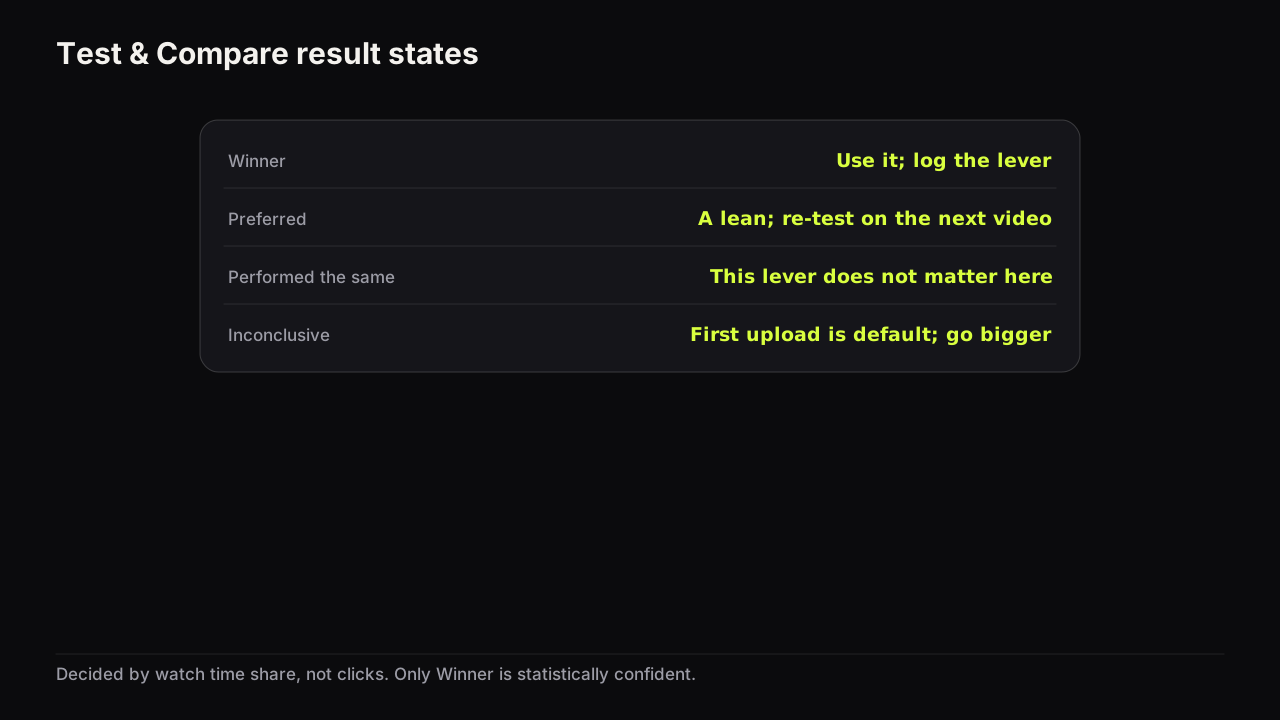
YouTube reports a test in one of four states, and each one calls for a different action. The wording below is YouTube's own, from the help page cited above.
| Result state | YouTube's description | What to do |
|---|---|---|
| Winner | "clearly outperformed the others based on watch time share... statistically significant" | Use it. Record the lever and the direction. |
| Preferred | Thumbnail-only tests: likely outperformed but not confidently | Treat it as a lean. Re-test the same lever on the next similar video before calling it a rule. |
| Performed the same | The variants did not differ in watch time share | A finding in itself: this lever does not matter to this audience on this kind of video. Stop spending time on it. |
| Inconclusive | Not enough separation; the first uploaded option becomes the default | The variants were probably too similar or the impressions too few. Re-test with a bigger difference, or accept the default. |
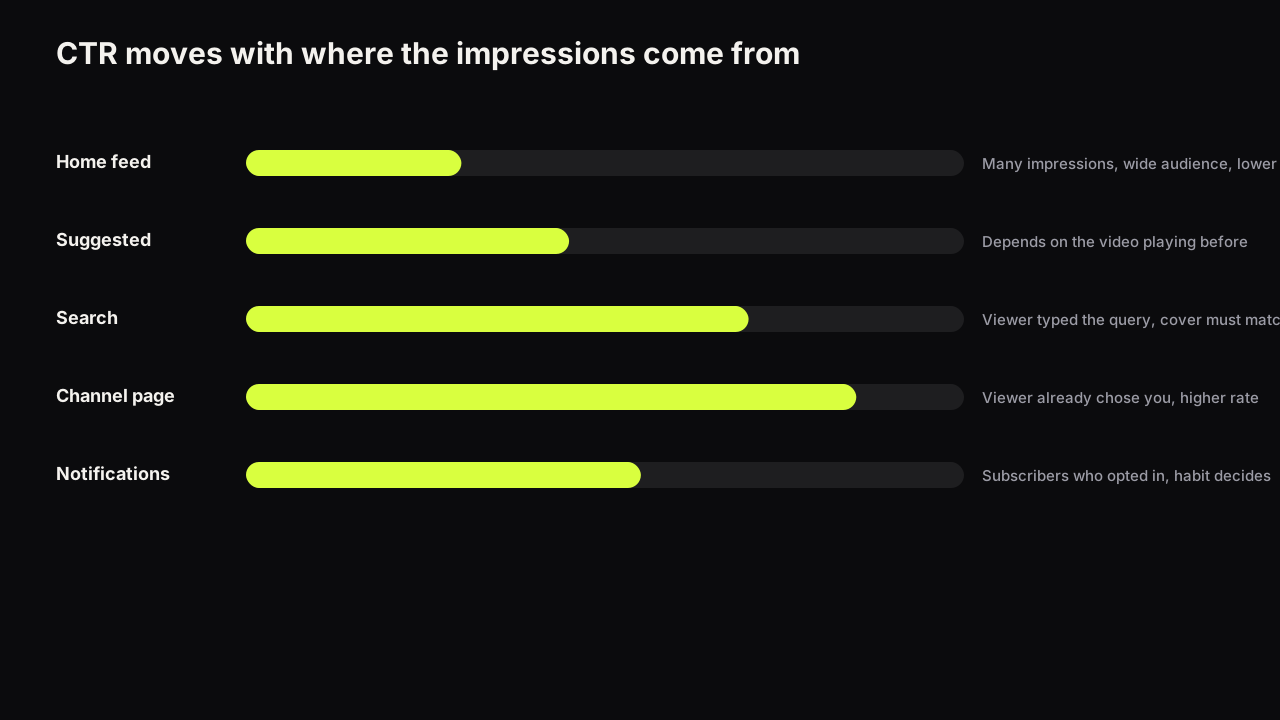
Expect the Analytics CTR line and the result to disagree sometimes. The help page on impressions and click-through rate explains that CTR moves with where impressions come from: a video shown widely on Home naturally has a lower rate than one shown mostly on the channel page. During a test the variants are shown to different viewers in a changing mix of surfaces, and CTR alone cannot tell you which cover kept its promise. If you are not yet sure what impressions click-through rate actually measures, read that before reading any test.
The usual story behind "the wrong thumbnail won" is that the losing cover was the more provocative one. It earned the click and lost the viewer. That is the test working as designed, and it is the most valuable lesson a test can give: the audience clicks on the bait and punishes it.
The manual swap, for videos the tool cannot test
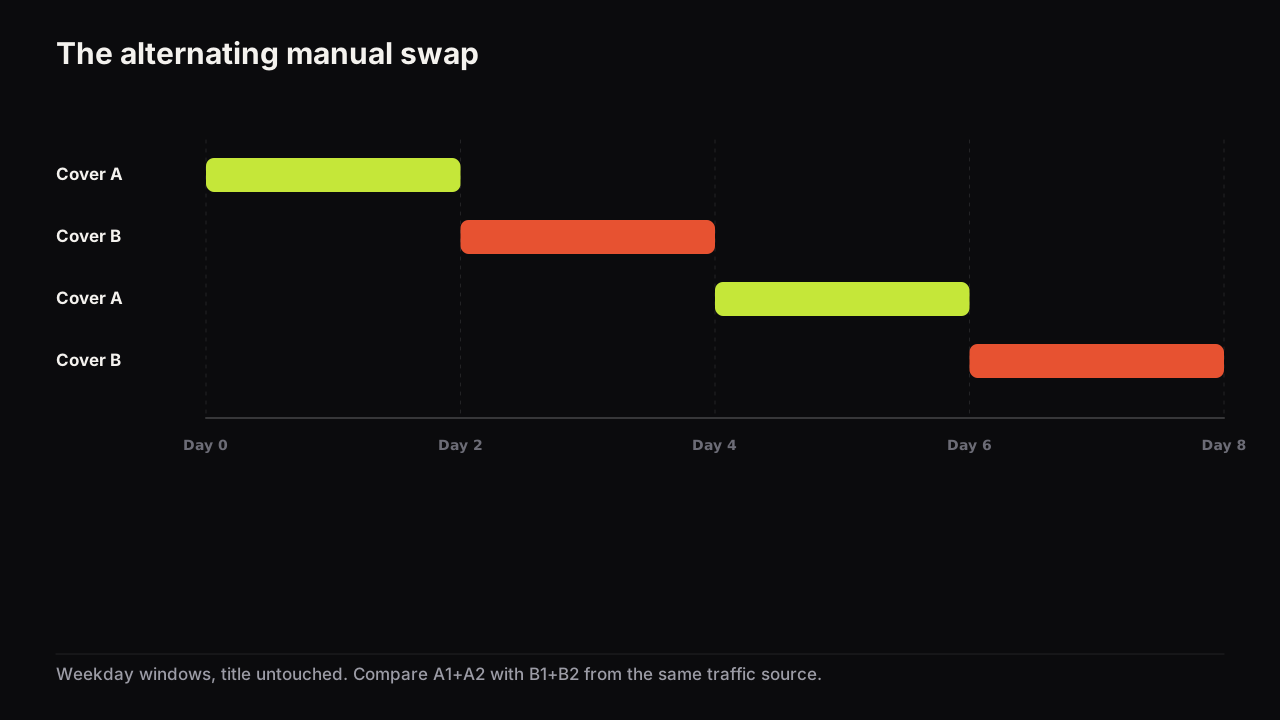
The manual method is sequential rather than simultaneous. You show cover A to everyone for a window, then cover B to everyone for a window, and compare the two windows. Because the audience in each window is different, the method is noisier than Test & Compare, and every rule below exists to reduce that noise.
- Two covers, one difference. The same rule as the native tool, for the same reason. If the two covers differ in three ways, a win is unexplainable.
- Prefer a video in a steady state. A fresh upload is the worst place for a swap. The first day's viewers are mostly subscribers arriving from notifications; by day two the mix has shifted toward Home and Suggested, so comparing day one with day two compares audiences, not covers. A video whose daily impressions have been roughly flat for a week gives you two comparable windows. If the test has to be on a new upload, the result is a hint, not a verdict.
- Give each cover 24 to 48 hours. Long enough to include a full daily cycle of traffic, short enough that the video's own trajectory does not change much between windows. This is our recommendation, not a YouTube figure.
- Weekday to weekday, and alternate. A single A-then-B swap is exposed to whatever happened on those days. A-B-A-B over eight days lets you compare the two A windows with the two B windows and see whether the gap holds. If A beats B in the first pair and loses in the second, you have measured noise.
- Leave the title untouched. A title change resets the experiment, and it also changes what the cover has to do.
- Compare like with like. In YouTube Analytics, read impressions and impressions click-through rate for each window from the same traffic source (Browse features or Suggested videos, whichever carries most of this video's impressions) rather than the blended number. A blended CTR that moves because the surface mix moved will fool you.
- Call a result only for a large gap. Our rule of thumb: a relative gap of at least a fifth between the windows, with impressions of a similar size and source in both. Anything smaller is inside the day-to-day noise of a single video and stays "no result".
- Check average view duration for both windows. This is your approximation of what the native tool measures. If the higher-CTR cover's window shows a noticeably shorter average view duration, the extra clicks were not kept, and the "winner" is the cover that made a promise the video did not deliver.
- Write the lesson, not the score.
What a filled sheet looks like when it says nothing, with invented numbers. A steady evergreen video runs A-B-A-B on Browse impressions of a similar size each window. The Browse CTR reads 4.1% in A1, 5.0% in B1, 4.4% in A2, 3.9% in B2. B won the first pair by more than a fifth and lost the second. The A windows sit close together; the B windows do not, and B1's "anything unusual" cell says a larger channel mentioned the video that day. The honest entry is "no result, B1 contaminated", and the next step is another pair, not a swap to B. Most creators would have stopped after B1.
Where the test can run on Test & Compare, run it there even if the swap seems quicker. The native tool splits viewers at the same moment, judges by watch time share and tells you how confident it is. A swap can do none of those things. We would wait for eligibility (a Premiere converting, advanced features arriving) rather than swap on a video the tool will be able to test next week, even though waiting feels like doing nothing, because a swap result on that video is one we would have to re-test anyway.
A recording sheet keeps you honest. One row per window, filled in from Analytics after the window closes, not while it is running.
| Field | Window A1 | Window B1 | Window A2 | Window B2 |
|---|---|---|---|---|
| Dates and days of week | ||||
| Main traffic source | ||||
| Impressions (that source) | ||||
| Impressions CTR (that source) | ||||
| Average view duration | ||||
| Anything unusual (a mention, a post, a holiday) |
Three limits are worth stating plainly. The two windows never have identical audiences, so a swap can suggest but never prove. The most recent day or two of Analytics figures can still be settling when you look at them, so wait a day after a window closes before filling in its row. And changing the thumbnail on a live video is itself a decision with consequences for an evergreen video's distribution; if the video is old and still earning views, read the decision tree for changing a thumbnail before you swap anything.
A swap on a fresh upload is common practice and we are not going to pretend nobody does it. If you do, use the 48-hour windows, alternate at least once, and treat the result as a reason to run a proper Test & Compare on the next eligible video rather than as a rule.
Write down the lesson, not the score
"B won" is useless a month later. "Doubt beat shock on a review video, confident Winner" is a rule you can apply to the next review video without testing again. Keep a lessons log with one line per test: the video type, the lever, the direction, the confidence (Winner, Preferred, or a manual gap), and the date.
Stop testing a lever when the lesson repeats. If calm beats shock on three education videos, that is your house rule for education videos; move on to the next lever. The point of testing is to stop guessing, not to test forever. A log like this is the backbone of a repeatable thumbnail workflow, because the research step for a new video starts with "what have we already learned about this format".
Our view is that a channel gets more from ten tests on ten different levers than from thirty tests that keep re-running the face. We would spend a test slot on a lever we suspect does not matter, the colour of the background or whether the object is in frame, and accept a run of Performed the same results to get there, because each of those is a thing we never have to argue about again. After the first few results the surprises are in the levers you assumed were settled: the headline's number, the background, the object.
Six mistakes that waste a test
- Testing twins. Small differences produce Inconclusive. Change one lever all the way.
- Testing on a video nobody will see. The help page ties speed to impressions. A video that gets a few hundred impressions a day may never resolve; test on the videos that are being shown.
- Changing the title mid-test. The test was measuring a package. Now it is measuring two.
- Reading a manual swap after six hours. Half a day is half an audience. Wait for the window.
- Testing the two favourites. Two similar bets give one uninteresting answer.
- Reading CTR as the verdict. The tool judges by watch time share; a manual swap should at least check average view duration. If you see a CTR fall during a test, note that a falling CTR often has other causes before blaming the cover.
Common questions
How many thumbnails can you test at once on YouTube?
Up to three per video. YouTube's help page says Test & Compare accepts up to three titles, thumbnails, or title and thumbnail combinations for one video. If you have a fourth idea, run it as a follow-up test or as a manual swap.
Can you A/B test a Shorts thumbnail?
Not with Test & Compare. YouTube's help page lists Shorts, scheduled live streams and Premieres as ineligible, though a Premiere becomes eligible once it converts to a long-form video. The tool runs on public long-form videos and podcast episodes only.
Does the thumbnail with the highest CTR win the test?
Not necessarily. YouTube decides by watch time share, the proportion of the video's total watch time each variant accounted for during the test. A cover that brings in viewers who leave early can have the highest CTR and still lose.
How long does a thumbnail test take?
YouTube says a test can take a few days or up to two weeks, and that it resolves faster when the variants are more different and the video gets more impressions. Our recommendation for a manual swap is 24 to 48 hours per thumbnail, alternated at least twice.
If it were our channel
Suppose we ran a tech-review channel, long-form, advanced features on, and the next upload was a review of a budget phone that turned out better than its price. Suppose too that the log already holds a house rule from earlier tests: doubt beats shock on reviews. This is how we would set up the next test, as a plan rather than a report.
The lever comes first, before any cover exists. The face is settled, so this test goes to the headline: does a price ("£179") or a verdict ("BETTER THAN FLAGSHIPS") pull harder on this audience? Both covers get the same layout, the same doubtful face on the right, the same phone held up as the object, the same dark ground. Only the words change, and they change all the way. Two variants, not three: the channel's reviews draw steady but not enormous impressions, and a third slot would slow the test for a question we can ask again on the next phone.
Upload order is a real decision. If the test comes back Inconclusive the first upload becomes the default, so the price cover goes in first, because a specific number is the safer bet on a review and the one we would ship anyway. The title stays fixed for the whole run: "I used a £179 phone for a month", which says what the video is and lets both covers say why it matters.
Then nothing. No title tweaks, no early read of the CTR line, no ending the test because one variant is ahead. When the state arrives, the log gets one line. Winner for the verdict headline: "verdict beat price on a review, Winner". Performed the same: "headline type does not matter on reviews; stop testing it". Inconclusive: the difference was big enough, so put it down to impressions and re-run on the next review that draws more. What we would not do is call the day-three CTR a result.
What to do next
- Pick the next public long-form upload and decide one lever to test before you make the cover. If you are unsure which lever, the seven reasons people click is the list to choose from.
- Make two covers that differ only in that lever, and make the difference large.
- Upload the safer one first, start the test, and do not touch the title.
- When the state arrives, write the lesson in the log. Then re-read the section on watch time share above so the next result surprises you less.
- If the video is ineligible, run the alternating swap, wait a day before reading each window, and call nothing under a fifth. The broader rules for how a cover earns a click are in the YouTube thumbnail guide.
Three follow-ups cover the cases this guide leaves open: every reason Test & Compare might not appear on a video, how to test when the channel does not get enough impressions, and what heatmaps and AI scores can and cannot tell you before a real test.
Three more method pieces: designing variants that resolve, testing the title and thumbnail as a pair, and the decision log that turns results into lessons.