On this page
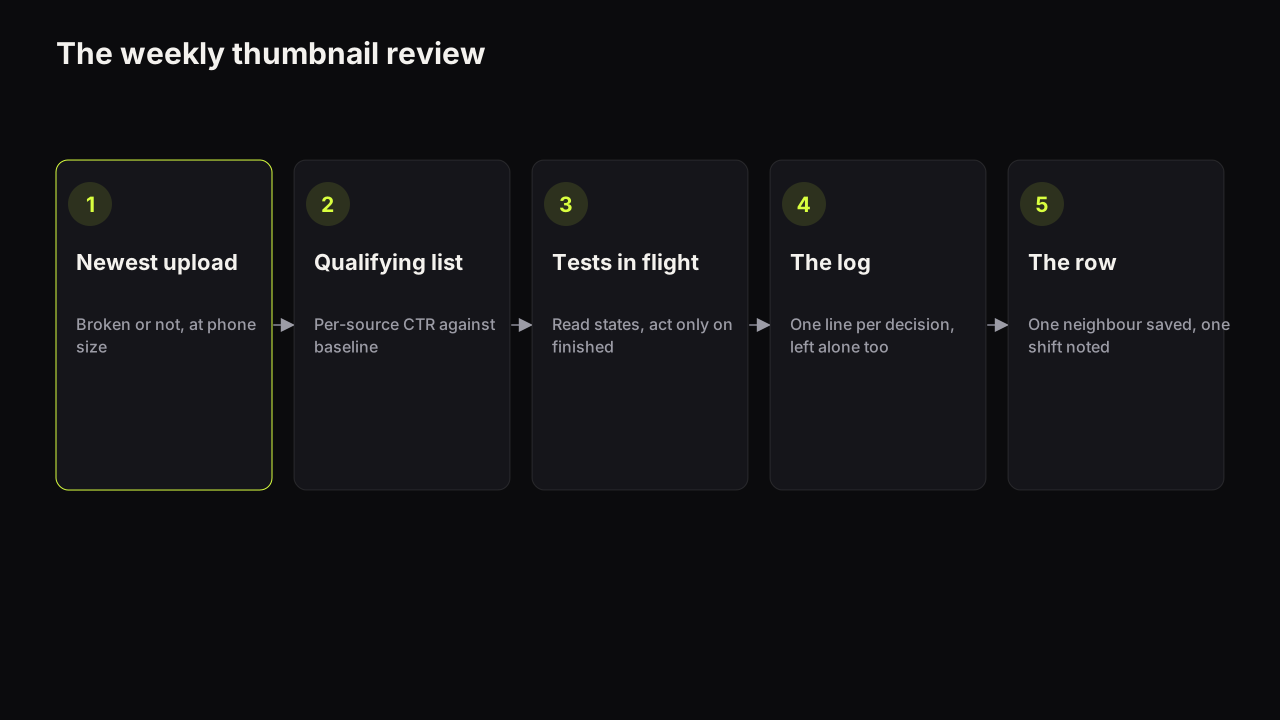
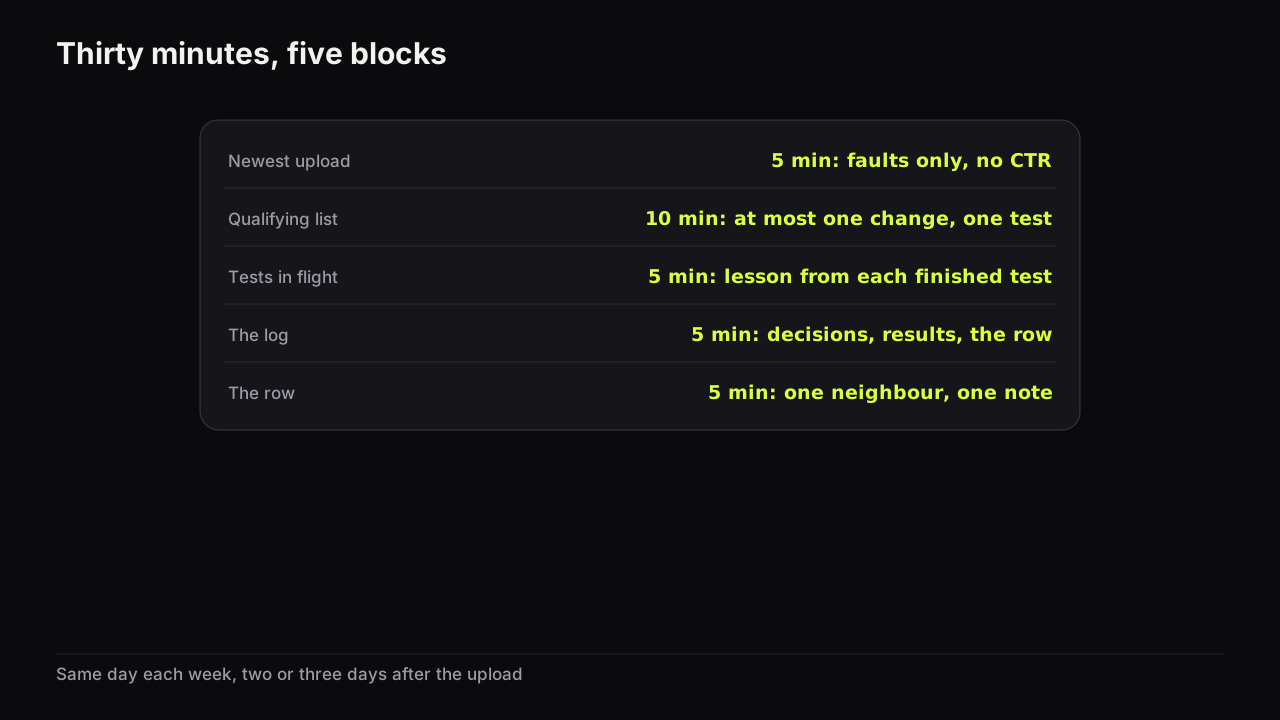
A weekly thumbnail review is a fixed 30-minute slot, on the same day each week, in which you check the newest upload for faults, pick the videos whose covers qualify for a change, read any tests that have finished, write the week's lessons down, and pull one neighbour from the row your covers sit in. Five blocks, each with a time. The ritual exists to replace the mid-week panic swap with a decision that came from a rule, and to make sure the lesson from each decision is written somewhere it will be read.
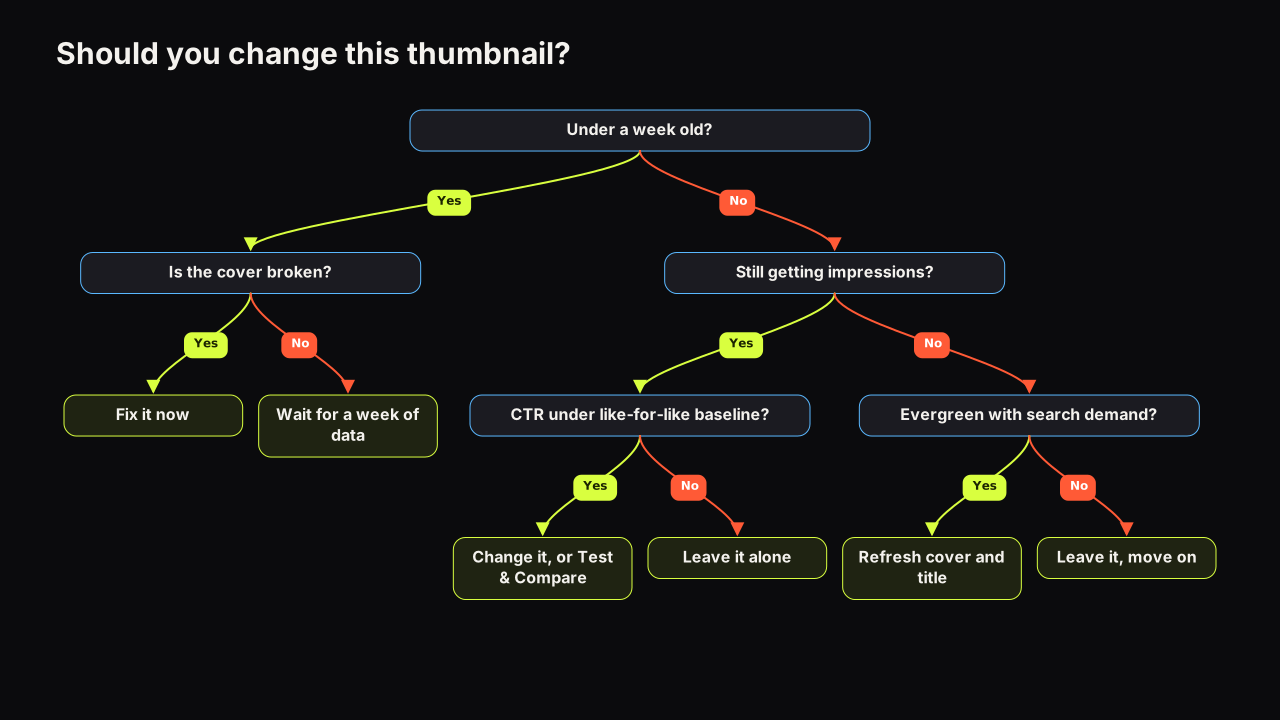
The rule itself is the decision tree for changing a thumbnail on a video that is already live; this article is the calendar around it. The per-video production process, from brief to test, is the five-step thumbnail workflow; the review is what happens between uploads, when nothing is being made and everything is being judged.
The 30-minute agenda
| Block | Minutes | What you do | What comes out |
|---|---|---|---|
| 1. The newest upload | 5 | Broken-or-not check at phone size | Fix now, or hands off for a week |
| 2. The qualifying list | 10 | Per-source CTR against baseline for videos still getting impressions | At most one change and one test |
| 3. Tests in flight | 5 | Read result states on running tests | A lesson from each finished test |
| 4. The log | 5 | One line per decision, including "left alone" | The week's entries |
| 5. The row | 5 | Open the Suggested column beside your newest video | One neighbour saved with its pattern tagged |
Block 1: the newest upload
Open the video you published this week on a phone, in the app, and look at the cover in the feed rather than on the watch page. You are looking for faults, not performance: a misspelt word, the wrong person, a headline that repeats the title, words that vanish at that size. A fault gets fixed today. Anything else gets left alone, because the number under it means almost nothing yet.
YouTube's help page on impressions and click-through rate says that new videos or channels, for example those less than a week old, and videos with fewer than 100 views, can see a wider range of click-through rates than the 2% to 10% band that half of all channels and videos fall within.
A video that is a day old has an impression mix that is still moving (subscribers first, then Home and Suggested), so its CTR is a moving target and a swap made now is a reaction to who saw it rather than to what they saw. Five minutes, no analytics.
Block 2: the qualifying list
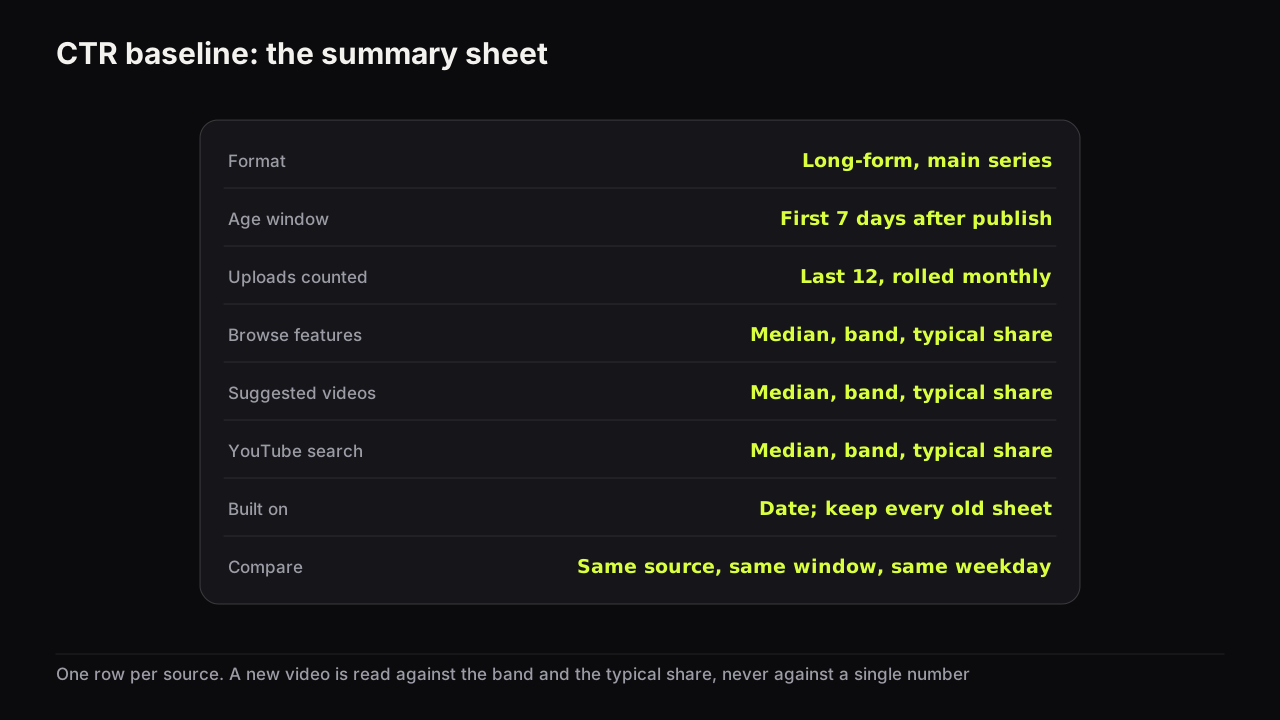
This is the block that needs the clock. In YouTube Studio, look at the last two to three months of uploads plus any older evergreen video that is still receiving impressions, and for each one compare its CTR by traffic source with your channel's like-for-like baseline. The baseline is the middle of what your comparable videos earn from the same source; the worksheet for building and updating it is a one-time job with a monthly refresh. Without it this block is guesswork against a number you read on a forum.
The rules for who qualifies are the next section. The output is short by design: at most one video to change or test this week.
Block 3: tests in flight
If a Test & Compare run is live, read its state and do nothing else. A test that has not finished is not information.
YouTube's help page on testing titles and thumbnails says a test can take a few days or up to two weeks, that it resolves faster with more different variants and more impressions, and that the result is decided by watch time share rather than clicks.
For a finished test, write the lesson, not the score: which lever won and on what kind of video. How to read each result state covers Winner, Preferred, Performed the same and Inconclusive, and what each means for the next brief.
Block 4: the log
One line per decision made this week. The entries most channels never write are the "left alone" ones, and they are the ones that stop the same video being re-examined every week. More on what a line should say below; the copyable table is in the thumbnail decision log.
Block 5: the row
Open your newest video, look at the Suggested column beside it, and save one neighbour into your swipe file with its layout, expression and dominant colour tagged. Then note one thing about the row as a whole: has its dominant colour shifted since last month? Has a layout become the uniform? That note feeds next week's brief. A swipe file that produces briefs has its own short weekly job, and this block can be the same five minutes.
Which videos qualify for a change this week
The decision tree decides each case; the weekly review is about applying it to a list and coming out with one name. The table turns the tree's branches into weekly rules.
| What you see | Qualifies this week? | Why |
|---|---|---|
| Under a week old, cover reads fine | No | The CTR range is too wide to judge; wait |
| Under a week old, cover broken | Yes, fix today | A broken cover costs most while subscribers are still seeing it |
| Still getting impressions, per-source CTR under baseline, video eligible for a test | Yes, start a test | Two covers measured at once beats two weeks compared |
| Still getting impressions, under baseline, not eligible (a Short, a Premiere not yet converted) | Yes, swap once | The only instrument available; compare per source a week later |
| Impressions flat near zero, evergreen topic | Not this week; monthly list | A new cover changes nothing until the video is shown again |
| Impressions flat, topical | No | The demand has passed |
| Blended CTR fell while Home impressions grew, per-source CTR steady | No, note it in the log | A distribution shift, not a weaker cover |
The last row is the one that saves the most working covers. The reasons a CTR can fall while a video is doing well is the diagnosis to run before any video from that row is allowed onto the list.
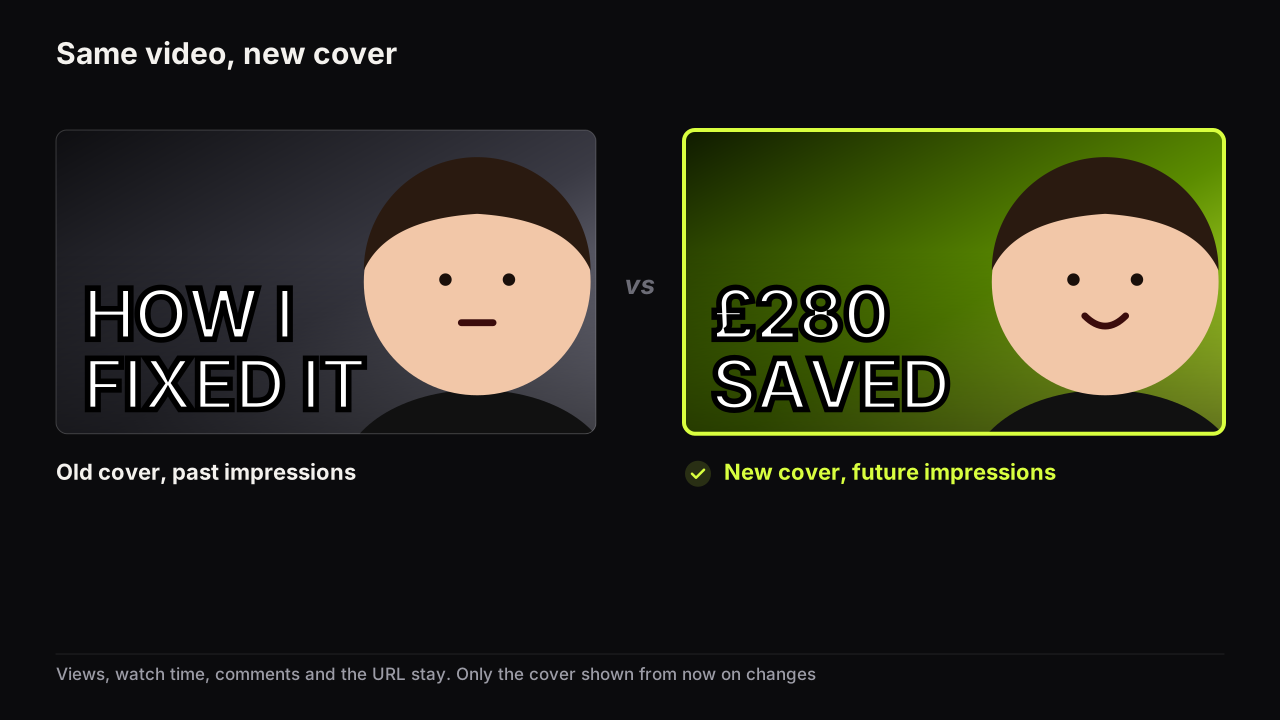
Take a three-month-old desk-setup video, say. Its cover: a monitor on the left at half the height, your face on the right with a raised eyebrow, looking at the monitor, "UNDER $500" in yellow on a dark ground. Browse still sends it impressions, its Browse CTR is under the band, the Browse share is typical, and it is long-form and public. Row three: start a test. The lever is the number, because the number is the promise, so the second variant is "$487" in the same block, the same yellow, nothing else touched. The vlog that lands on the last row the same week, blended CTR down while Home tripled, gets a log line and no place on the list, however tempting the dip looks.
We recommend a hard cap of one cover changed and one test started per week for a channel that uploads weekly. Every change needs a week of comparable impressions before it can be read, and two changes in the same week on the same channel share an audience and a row, so neither result is clean. When two videos qualify, take the one with more impressions per week, because that is the one whose result will arrive first.
One more allocation rule, ours rather than the tree's. On a week when the qualifying list runs over, we would cut block 2 short and keep block 5 whole, even though the list is where the decisions are and the row is only five minutes of looking, because the row is the one block that faces forward: it feeds next week's brief, while block 2 only ever judges what is already live.
What to write down
The log is where the review pays back, and the entries have three shapes. Keep to one line each.
A decision line names the video, what was done, and the rule that decided it: "Video 41: left alone; CTR down, Home impressions up, per-source flat." Or: "Video 38: test started; calm face against shocked, headline unchanged."
A result line records a finished test as a lesson: "Video 33: Winner, calm. Second time calm beat shock on a tutorial."
A row line records what changed around you: "Row went warm this month; our dark green still the odd one out."
In practice the log entries that change the next brief are the second-occurrence ones: the week a lesson repeats. Most channels notice a pattern only because the log put two lines with the same lever a month apart on the same page. A lesson that has repeated three times stops being tested and becomes a house rule, which is a weekly review's most valuable output and the one it cannot produce without the log.
Roles for a two-person team
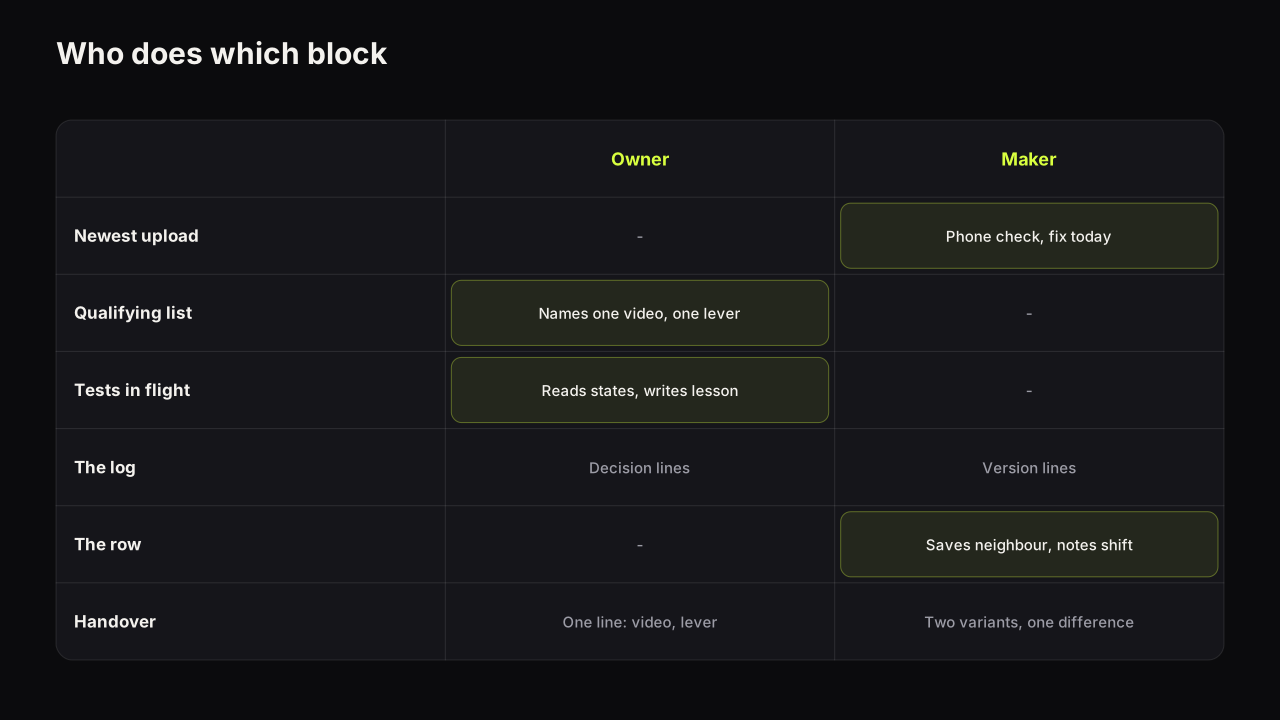
When one person reads the numbers and another makes the covers, the review splits cleanly, and the split has one rule: the person who decides does not render in the same sitting, and the person who renders does not swap a cover without a log line from the person who decided.
| Block | Owner (reads, decides) | Maker (checks, produces) |
|---|---|---|
| 1. Newest upload | Phone check; fixes a broken cover today | |
| 2. Qualifying list | Builds the list; names the one video and the one lever | |
| 3. Tests in flight | Reads states; writes the lesson | |
| 4. The log | Writes decision and result lines | Adds the version line for anything produced |
| 5. The row | Saves the neighbour; notes the row's shift | |
| Handover | "Video 38: test; calm instead of shocked; keep the headline" | Produces two variants that differ in only that |
The handover line is the whole brief for a refresh, because the video exists and the current cover is the source. On the bench the maker's job is one Tweak: the live cover's render becomes the source, the expression changes, and the scene, palette and headline stay, so the two variants differ in exactly the lever the owner named.
The monthly version
Once a month, the same slot runs for about an hour and adds four jobs to the five blocks. The pillar's monthly pass over the back catalogue is one of them; the others are housekeeping that the weekly rhythm makes cheap.
- Refresh the baseline. Add the month's videos to the like-for-like set and recompute the middle per source. A baseline that is six months old is measuring a channel that no longer exists.
- Run the back-catalogue pass. The evergreen videos parked from block 2 get ranked and the top one or two get a packaging refresh; refreshing old thumbnails in priority order is the ordering.
- Look at the last twelve covers as a row. Side by side at thumb width, your own covers next to your own covers. If you cannot tell them apart, the audience cannot either, and the four kinds of thumbnail fatigue tells you which fix applies.
- Read the whole log for repeats. Any lever that has won three times becomes a line in the house rules and leaves the test queue. Any lever that has been Inconclusive twice gets a bolder variant next time or gets dropped.
Common questions
How often should I check my thumbnail CTR?
Once a week, in a fixed slot, for decisions. Looking daily is fine for curiosity but it produces swaps made on one day's noise. YouTube's own documentation says new videos can show a wide range of CTR in their first week, so the weekly rhythm also stops you judging a cover before it has settled.
How many thumbnails should I change in a week?
One change and one new test, at most, on a channel uploading weekly. Every change needs a week of comparable impressions before you can read it, and a channel that changes three covers in one week cannot tell which change did what.
What if I upload every day?
Keep the review weekly. The newest-upload block becomes a two-minute phone check on each upload day, and in the weekly slot the week's uploads are treated as one batch for the qualifying list. The cap on changes rises with the upload count, but the rule that a change needs a week of comparable impressions does not.
What to do next
Put the slot in the calendar for the same day each week, ideally two or three days after your usual upload so block 1 has something to look at and block 2 is not tempted by a day-old number. Build the baseline before the first session. Run the five blocks with a timer the first few times; the qualifying list will try to take the whole half hour, and the point of the clock is that it does not. After four sessions the log will have a dozen lines, and one of them will already be repeating.