On this page
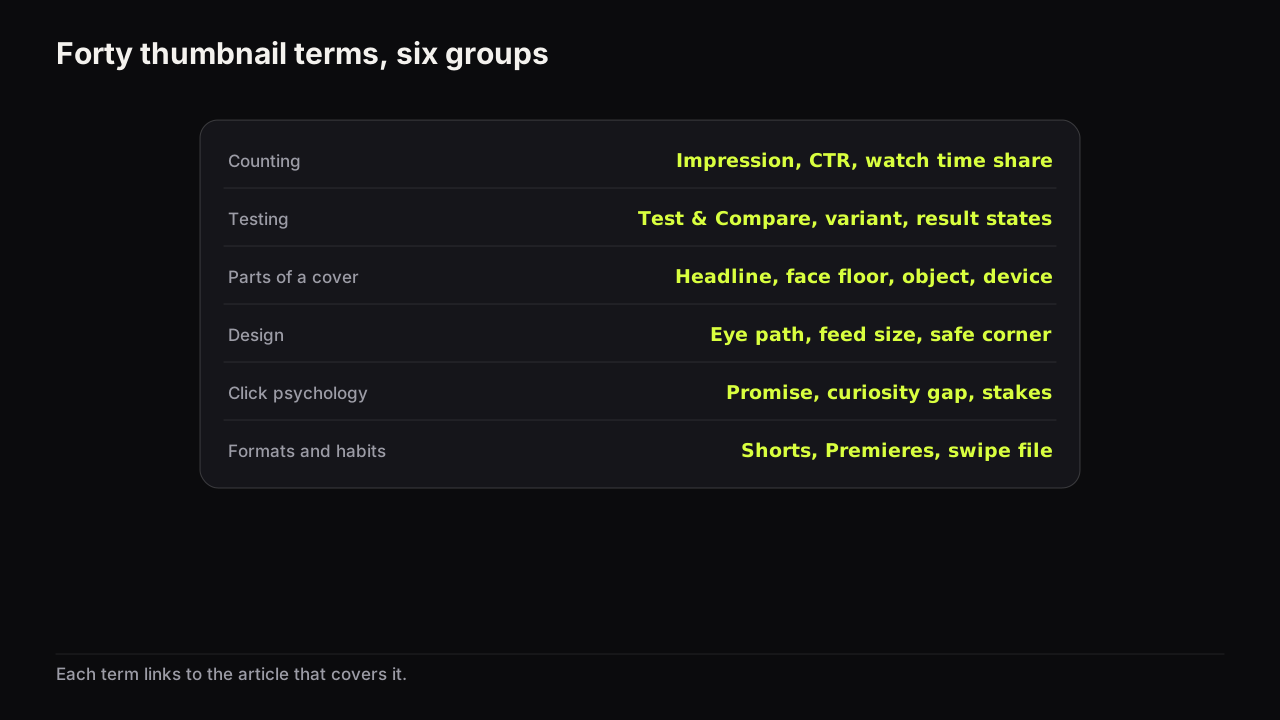
A thumbnail glossary is only useful if every term points somewhere. These 40 definitions are one or two sentences each, grouped by where the word comes from: YouTube's own counting, the testing tool, the parts of a cover, design, click psychology, and the formats and habits around them. Each one links to the article that goes deep on it. Where a definition rests on YouTube's documentation, the help page is linked in the sentence; the rest are the working definitions this library uses, and other people's usage varies.
Two words are used interchangeably throughout: thumbnail and cover. We would rather use packaging, which YouTube's documentation never does, than write "title and thumbnail together" forty times; the cost is a word some readers will not recognise, and the definitions say so where it matters. Where we give a size or a word count, it is our recommendation, not a platform rule.
Counting: impressions, clicks and watch time
Impression
An impression is one showing of your thumbnail to a viewer on YouTube. YouTube's impressions and click-through rate FAQ counts one when the thumbnail is shown for more than one second with at least half of it visible, and some showings (external sites, end screens, some embeds) are not counted at all. Impressions that never turn into views are the normal state of a feed, not a fault.
Impressions click-through rate (CTR)
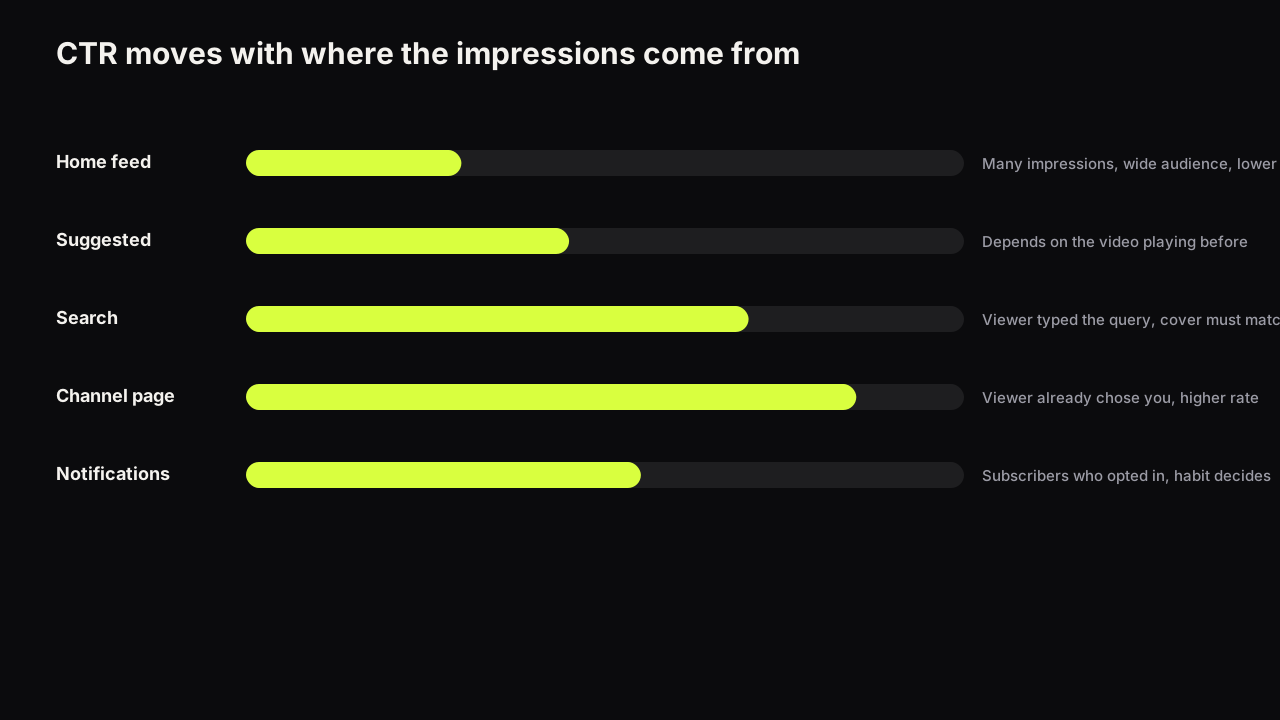
Impressions click-through rate is the share of counted impressions that became a click. The same FAQ says half of all channels and videos sit between 2% and 10% and that the figure moves with where the impressions come from, which is why what CTR measures and what a good one looks like in context is a longer question than it sounds.
Traffic source
A traffic source is the surface an impression or a view came from: Home, Suggested videos, Search, the channel page, playlists, notifications. Each one puts the viewer in a different state, so each source moves CTR in its own direction.
Watch time share
Watch time share is the fraction of a test's total watch time that each variant earned. YouTube's help page on testing titles and thumbnails says the result is decided by watch time share rather than clicks, which is why the tool can pick the thumbnail with fewer clicks.
Outlier
An outlier is a video that far exceeds its channel's usual view count. Outliers are the raw material of competitor research because they show what an audience clicked when it had the choice; how to find one and read it is its own method.
CTR baseline
A CTR baseline is your own channel's typical click-through rate, split by traffic source and video age, against which a new video is judged. Without one, every number looks like a crisis or a triumph; building one takes a worksheet and part of an afternoon.
Testing terms
Test & Compare
Test & Compare is the feature in YouTube Studio that shows different titles or thumbnails to different viewers of the same video and keeps the one with the highest watch time share. It runs on desktop only and has a list of eligibility rules that explains almost every case where it is missing.
A/B test
An A/B test is any comparison of two or more covers on the same video under conditions fair enough to trust the result. On YouTube that means Test & Compare or a manual swap, and the method for both starts with a hypothesis rather than a hunch.
Manual swap
A manual swap is the A/B test you run by hand: cover A for a window, cover B for the next, then a comparison of the two windows. It is noisier than the tool and it is the only route for small channels and ineligible videos.
Variant
A variant is one of the covers in a test. YouTube's page says tests resolve faster with more different variants, so how different is different enough is a design question with a practical answer.
Result states
The result states are the four outcomes Test & Compare reports, in YouTube's wording: Winner, Preferred, Performed the same and Inconclusive. A test can take a few days or up to two weeks, and what to do with a slow or inconclusive one is mostly a matter of patience and variant design.
Decision log
A decision log is the record of what you tested, what you expected, what happened and what you will do differently next time. Scores fade; lessons compound, which is why the log has a lesson column.
The parts of a cover
Thumbnail, cover
A thumbnail is the image shown for a video in feeds, search, suggestions and on the channel page; creators say cover for the same thing. Its job is to make one promise readable at a glance next to a dozen others, which is the whole argument of the guide.
Custom thumbnail
A custom thumbnail is an image you upload to replace the frames YouTube offers. YouTube's thumbnail and title tips page says 90% of the best-performing videos have one; what the choice actually changes is more specific than that sentence.
Auto-generated thumbnail
An auto-generated thumbnail is one of the frames YouTube pulls from the video after upload and offers as its cover. YouTube's help page on adding custom thumbnails describes the choice between those options and uploading your own; a frame you chose yourself and then upgraded sits between the two.
Headline
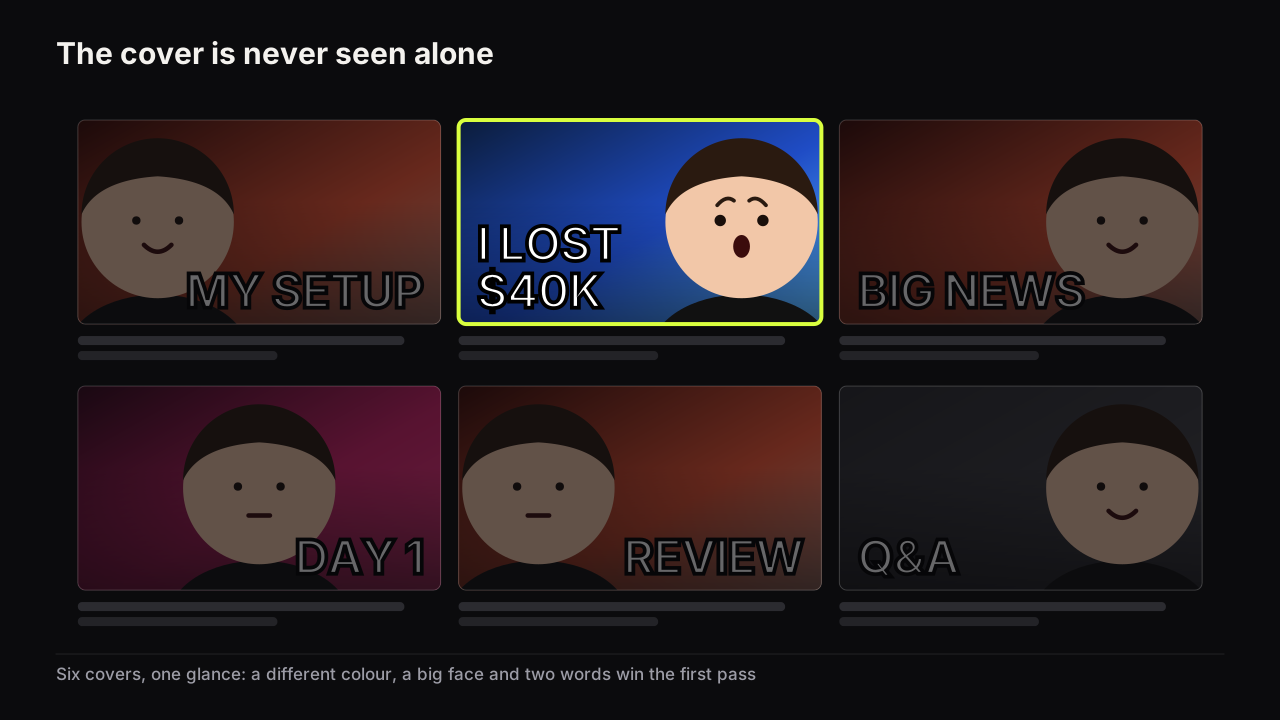
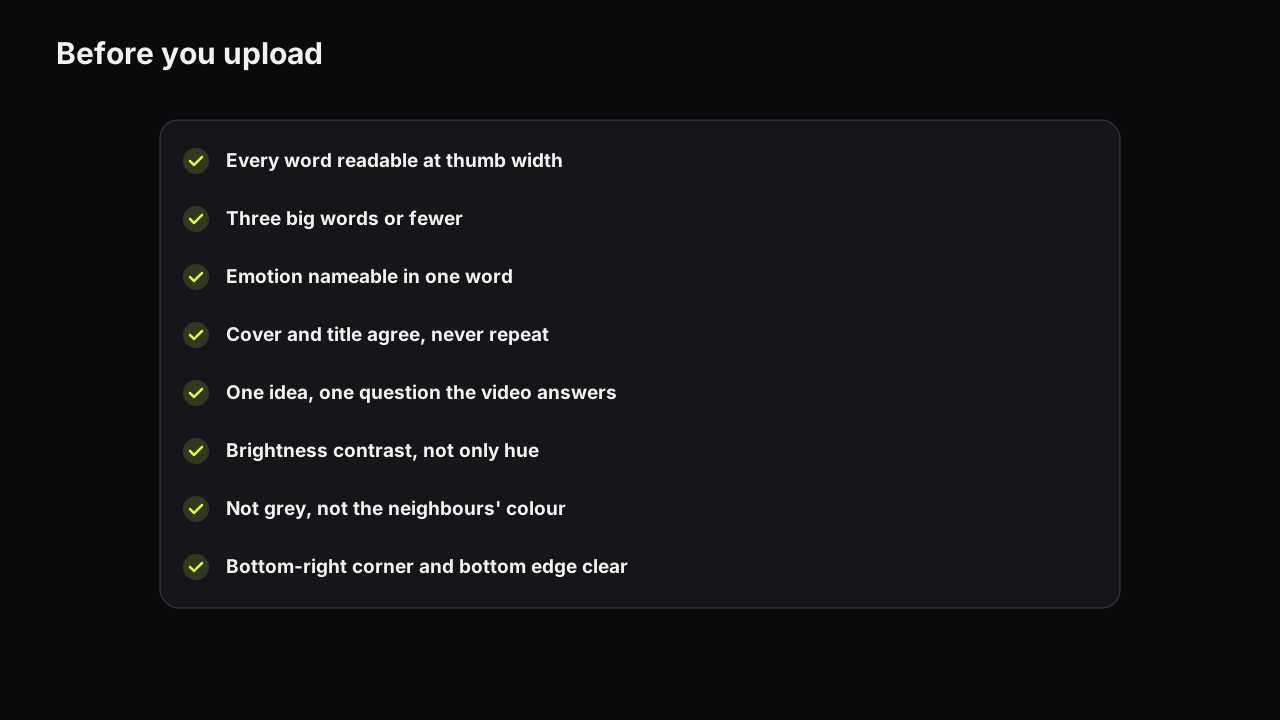
The headline is the words on the cover, as distinct from the title underneath it. It adds what the picture cannot show, and three big words is the working limit because the cover is read at thumb size.
Face-size floor
The face-size floor is the smallest a face can be before its expression stops reading at feed size; we put it at about a third of the cover's height, and half is better. Most channels sit under it without knowing, and the floor and how to crop up to it is the fix.
Expression
The expression is the one nameable emotion the face carries, and it is information rather than decoration: shock says something happened, doubt says a claim is about to be tested, calm says this is easy. Which expression fits which promise is decided by the video, not by habit.
Object
The object is the thing on the cover that is neither the face nor the words: the product, the prop, the result, the place. On faceless covers the object does the face's job of pulling the eye, and it has to be larger and better lit to manage it.
Background
The background is everything behind the face, the headline and the object; it supports and is never a fourth element. The four kinds that work and the busy room that does not covers the choice.
Device
A device is an arrow, a circle, a badge or a strip of tape added to direct, isolate or label something on the cover. Devices usually mark a layout that was unclear without them; the cases where they earn their place make a short list.
On the bench, the parts above are the fields of a render: the scene you describe, the headline in the Words on it field, a saved face, and a style that fixes the layout. The words are painted into the image by the model, so the headline field is for the two or three big words and anything that must be spelt exactly goes on a text layer afterwards.
Design words
Eye path
The eye path is the order in which a viewer's eye visits the elements of a cover: usually the words, then the face, then a stop at the object or wherever the gaze points. Take a cover, say, with "MY FAULT" in white top-left, a cracked phone at half the height on the right, and a face bottom-left wincing at the phone: the eye reads the words, drops to the face, follows the wince to the phone and stops. Turn the face to the camera and the path has no exit, so the phone is never reached. A path that closes in one sweep is the goal behind every composition rule in the design principles.
Dominant and accent colour
The dominant colour is the one colour that owns most of the cover; the accent is the one that fires against it. Two is the budget, and choosing them against the niche's neighbours matters more than choosing them in isolation.
Brightness contrast
Brightness contrast is the difference in lightness between two areas, as distinct from a difference in hue. It survives a dim phone screen when hue contrast does not, and a contrast ratio borrowed from web accessibility gives it a yardstick.
Feed size, thumb size
Feed size is the width at which most viewers see a cover on a phone, a fraction of the file you exported. We give no pixel figure because it varies by device and app version; why phone readability decides most clicks explains what shrinks first.
Phone check
The phone check is the habit of judging a cover at feed size before upload: every word readable, the emotion nameable, the cover separate from its neighbours. It opens the pre-upload checklist, and the free thumbnail tester drops a cover into a mock phone feed for exactly this.
Safe corner
The safe corner is the bottom-right of the cover, where YouTube's interface places the duration badge, together with the bottom edge, where a progress bar can run on a partly watched video. Nothing that must be read goes there, and where the words go instead follows from it.
Text layer
A text layer is real type set in a font on top of a finished image, as opposed to words painted into the picture by a camera or a model. Layers spell exactly what you typed, which is why numbers and names go on a layer on an AI cover.
Click psychology
Packaging
Packaging is the title and the thumbnail treated as one promise, with the title saying what the video is and the cover saying why it matters, or the reverse. It is creator jargon rather than a YouTube term, and packaging the video before you film it is the habit behind most consistent channels.
Promise
The promise is the sentence a stranger forms from cover and title together, and the video has to keep it early. What makes a cover clickable is a promise worth clicking; a promise the video does not contain is misleading packaging under YouTube's deceptive practices policy.
Curiosity gap, information gap
A curiosity gap is a visible distance between what the viewer knows and what they want to know, opened by the cover and closed by the video. The idea comes from Loewenstein's information-gap account of curiosity, and how to open one without clickbait is the craft.
Pattern interruption
Pattern interruption is being the odd one out in the row: a different dominant colour, a layout the niche does not use, a light cover in a dark feed. One step outside the niche's norm gets seen; too far outside reads as irrelevant.
Stakes
Stakes are what the viewer stands to gain or lose by watching, made concrete: money, time, risk, a number that means something. "$40K" is stakes and "my finances" is not, and how to show them without exaggeration is most of the finance and business playbook.
Specificity
Specificity is the lever that makes "7 days" beat "fast" and "Tokyo" beat "abroad": a specific promise is easier to picture and harder to dismiss. Specific without spoiling is the balance to strike.
Thumbnail fatigue
Thumbnail fatigue is the name creators give to a style that has stopped working, and it is four different things with four different fixes: habituation, category sameness, a shift in where impressions come from, and seasonality.
Formats, accounts and habits
Shorts thumbnail
A Shorts thumbnail is the 9:16 cover of a Short, uploaded from YouTube Studio on a computer, and it cannot be tested with Test & Compare. Where it is seen, and where it is not, decides how much effort it deserves.
Live stream and Premiere thumbnail
A live stream or Premiere thumbnail is one image that serves as the announcement while the event is upcoming and as the replay's cover for as long as the video exists. Neither can be A/B tested while scheduled, so designing for the replay and refreshing afterwards is the approach.
Verified account
A verified account is the account status YouTube requires before a custom thumbnail can be uploaded; the help page on adding custom thumbnails says so. On an unverified account the upload option is missing rather than failing, which is one of the reasons a thumbnail seems not to update. The spec the file itself has to meet is in the size and format reference.
Swipe file
A swipe file is a saved collection of covers that worked, filed by what they do (the layout, the lever, the niche) rather than by who made them. Building one is the habit; reading it for patterns rather than pictures is the skill.
House layout
A house layout is a channel's own recurring arrangement of face, words and object, kept constant while the promise changes from video to video. It is the alternative to a template, and the line between consistency and sameness runs straight through it.
What to do next
If more than a handful of these were new, read the guide first; it uses every one of them in order and shows how they fit together. If you already knew them, the useful move is to check your own vocabulary against the measurement terms: creators who say "CTR" when they mean the blended figure across all traffic sources, or "fatigue" when they mean a distribution shift, make decisions on the wrong number. Pick the term, follow its link, and fix the decision.